
Are Biometric Laptop Safes More Secure Than Keypad Safes?
Security is a top concern for anyone who owns a laptop. Laptops often carry sensitive work files, personal data, and even financial records. Losing access to this information can be costly and stressful. This is why many people use laptop safes—specialized safes made to hold and protect your device. Among the most popular types are biometric safes and keypad safes. Both claim to keep your laptop secure, but which is truly better? Is the newer biometric technology always safer, or do traditional keypads still have an edge? If you are thinking about buying a safe, understanding the real differences can help you make a smart decision.
How Biometric And Keypad Laptop Safes Work
Before comparing their security, it’s important to know how each type functions. Biometric safes use your unique physical traits, most often a fingerprint, to unlock. You simply place your finger on a sensor, and if it matches a stored print, the safe opens. Some high-end models even use facial recognition or palm prints.
Keypad safes rely on a digital code. The user sets a PIN (personal identification number), usually 4–8 digits. Entering the correct code opens the safe. Some keypad safes also include a backup key for emergencies.

Exclusive Deals
Limited-time Exclusive Deals. Check current discount on Amazon.
Check Price on Amazon As an Amazon Associate I earn from qualifying purchases.Both options aim to keep your laptop protected from theft or unauthorized access. But their methods are different, and so are their strengths and weaknesses.
Security Strengths Of Biometric Laptop Safes
Biometric safes offer a modern, high-tech way to protect your valuables. Here’s how they stand out:
Personalized Access
The main selling point of biometrics is that they use something only you have—your fingerprint or face. Unlike a PIN code, these cannot be easily guessed or shared. This means only registered users can open the safe.
Speed And Convenience
A biometric safe opens quickly. You don’t have to remember or enter a code. Just touch the sensor, and it unlocks in seconds. This is especially useful if you need to grab your laptop in a hurry.
Exclusive Deals
Limited-time Exclusive Deals. Check current discount on Amazon.
Check Price on Amazon As an Amazon Associate I earn from qualifying purchases.Difficult To Duplicate
It is very hard to copy or fake a fingerprint. While there are stories of hackers bypassing some sensors with fake prints, most modern safes use advanced scanners that check for things like blood flow or skin texture. This makes it much harder for a thief to trick the sensor.
Multiple User Support
Most biometric safes let you add several fingerprints. This is handy for shared offices or families, where more than one person needs access.
Data And Statistics
A 2023 security survey by SafeWise showed that over 60% of users felt more secure with biometric safes than with keypad models. Modern fingerprint sensors have a false acceptance rate (chance of unlocking for the wrong person) of less than 0.001%.
Exclusive Deals
Limited-time Exclusive Deals. Check current discount on Amazon.
Check Price on Amazon As an Amazon Associate I earn from qualifying purchases.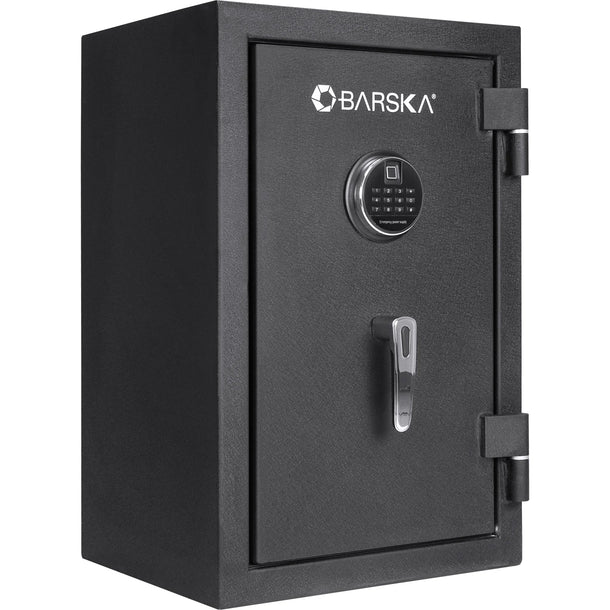
Security Strengths Of Keypad Laptop Safes
Keypad safes have been around for decades. Their design is simple, but don’t underestimate their ability to protect.
No Biometric Sensor Vulnerabilities
Keypad safes avoid some risks that come with biometric technology. For example, fingerprint sensors can sometimes fail if your finger is wet, dirty, or injured. Keypads do not have this problem.
Simple Backup Options
Most keypad safes come with a backup key. If you forget your code or the batteries die, you can still open the safe. Biometric safes often have backup options too, but keypad models tend to make this process easier.
Easy To Change Codes
You can quickly update your PIN if you think someone else knows it. It takes just a minute, and you don’t need special equipment.
Affordable And Widely Available
Keypad safes are often cheaper than biometric ones. They are available in more stores and come in more sizes and styles.
Data And Examples
According to Consumer Reports, keypad safes remain the most common type in homes, with over 70% of safe owners choosing them. The simplicity and reliability appeal to many buyers.
Weaknesses And Risks: Biometric Vs Keypad
No security system is perfect. Here’s where each type can fall short.
Biometric Safe Weaknesses
- Sensor errors: Dirt, cuts, or moisture can make fingerprint sensors fail.
- Power dependency: Most biometric safes need more power, so batteries can run out faster.
- Spoofing risks: While rare, some sensors can be fooled by fake fingerprints, especially on cheap models.
- Privacy concerns: Some people worry about storing their fingerprints in a device, although most safes keep this data locally and encrypted.
Keypad Safe Weaknesses
- Code guessing: If someone knows or guesses your PIN, they can open the safe.
- Worn-out keypads: Over time, buttons can show wear, hinting at your code.
- Key backup risk: If someone finds your backup key, the code becomes useless.
- Brute-force attacks: Some keypad safes are vulnerable if they don’t lock out after several wrong tries.
Real-world Security: Which Is Harder To Break?
To truly compare, it helps to see what happens in real-world situations.
Forced Entry
Most thieves don’t care about codes or fingerprints. They try to break open the safe using tools. Both biometric and keypad safes use similar steel bodies and locking bolts. The real security depends more on build quality than lock type.
Electronic Hacking
Keypad safes can sometimes be hacked using electronic tools to bypass the circuit. Biometric safes may also be vulnerable if their software isn’t well-designed. High-end models in both categories add features like lockout periods after failed attempts.
Social Engineering
People often share their PINs with friends or coworkers, making keypad safes less secure if the code is not kept private. Biometric safes don’t have this problem, but someone could force you to unlock the safe.
Case Example
A 2022 test by The LockPickingLawyer (a popular security YouTuber) showed that a low-cost biometric safe could be opened with a printed fingerprint on tape. However, a higher-end biometric model resisted all fake prints. The same tester found that many cheap keypad safes could be opened by entering default factory codes, which owners often forget to change.
Comparing Everyday Use: Biometric Vs Keypad
Here’s a side-by-side look at how both options perform in real life.
| Feature | Biometric Safe | Keypad Safe |
|---|---|---|
| Unlock Speed | Very fast (1-2 seconds) | Fast (3-5 seconds) |
| User Limit | Usually 10-30 fingerprints | Usually 1-2 PINs |
| Power Needs | High (more battery use) | Low (longer battery life) |
| Backup Option | Often keypad or key | Usually backup key |
| Ease of Use | Easiest for most users | Simple, but must remember code |
| Price Range | $$ to $$$ | $ to $$ |
When Is A Biometric Safe The Better Choice?
A biometric safe can be the best pick if:
- You want quick access—for example, in an emergency.
- Multiple people need entry, but you don’t want to share a code.
- You have trouble remembering PINs or often lose your keys.
- You value technology and modern features.
However, not all biometric safes are created equal. Cheap models may be less secure than a good keypad safe. Always check for live finger detection and read reviews before buying.
When Is A Keypad Safe The Better Choice?
A keypad safe may suit you if:
- You prefer simple tech that works every time.
- You worry about sensor failures (wet or dirty hands, injuries).
- You want to avoid storing biometric data on a device.
- You have a tighter budget.
Some keypad safes now add features like time delays, one-time codes, or dual-entry (two people must enter codes). These can boost security further.
Other Factors To Consider When Choosing
Build Quality Matters Most
The lock type is important, but the construction of the safe is even more critical. A poorly built safe, no matter the lock, can be pried open with a crowbar. Look for thick steel, sturdy bolts, and strong hinges.
Battery And Power
Biometric safes usually use more power. If the batteries die, you may need to use a backup key or code. Some safes add USB emergency power ports, which is a bonus.
Ease Of Installation
Both types can be bolted down or attached to heavy furniture. Make sure you install your safe somewhere hidden and hard to access.
Brand Reputation
Trusted brands like SentrySafe, Barska, and Vaultek are known for stronger security. Lesser-known brands may cut corners on hardware or software.
Real-world Usage Table
Here’s another comparison focusing on practical everyday scenarios:
| Scenario | Biometric Safe | Keypad Safe |
|---|---|---|
| Hands dirty or wet | May not read fingerprint | No problem |
| Multiple users | Easy to register more prints | Must share code |
| Night-time access | Works in the dark | Backlit keypads help |
| Forgetting credentials | Unlikely (biometric) | Possible (PIN) |
| Battery dies | May need backup method | Can use backup key |
Two Key Insights Most Beginners Miss
- Lock Quality Over Lock Type: Many people focus only on the lock (biometric or keypad), but the actual strength lies in the safe’s body, hinges, and bolts. A well-built keypad safe is often more secure than a cheap biometric safe.
- Combination Models Exist: Some safes now offer both biometric and keypad entry. These allow you to pick what works best for you, or have a backup if one method fails. This hybrid option is worth considering if you want both speed and reliability.
Common Buyer Mistakes To Avoid
- Choosing based on price alone: Cheap safes often use weak materials and can be forced open easily.
- Not changing default codes: Many keypad safes come with a factory code. Always change it right away.
- Ignoring battery needs: Biometric safes need fresh batteries more often, so set a schedule to check them.
- Over-trusting biometrics: No sensor is perfect. Always set up backup access, like a PIN or key.
- Poor installation: A safe that isn’t bolted down can be carried away by a thief, no matter how strong the lock.
Final Thoughts: Which Safe Is Truly More Secure?
So, are biometric laptop safes more secure than keypad safes? The answer isn’t simple. Biometric safes offer fast, personalized access and are harder to share or guess. But they can be vulnerable to sensor issues and, in low-end models, to spoofing. Keypad safes are time-tested and reliable, but depend on you keeping the code secret and changing it often.
For pure security, a high-quality biometric safe with live finger detection is usually superior to a basic keypad safe. But a top-grade keypad safe can outperform a cheap biometric model. Your choice should depend on your needs, your budget, and how you plan to use the safe.
If you want the best of both worlds, look for a dual-access safe (biometric plus keypad). This gives you speed, security, and a backup plan if one method fails. No matter what you choose, always focus on the safe’s build quality and install it securely.
For more details on safe technology, the Wikipedia Safe entry provides a deeper look at types, history, and modern features.

Frequently Asked Questions
Are Biometric Laptop Safes Completely Hack-proof?
No safe is truly hack-proof. Biometric safes can be very secure, but cheap models may be tricked by fake fingerprints. High-end safes use advanced sensors that are much harder to fool. Always buy from a trusted brand.
What Happens If The Biometric Sensor On My Safe Stops Working?
Most biometric safes have a backup method, like a keypad or physical key. If the sensor fails, you can use these to get inside. Always set up your backups when you first install the safe.
Do Keypad Safes Lock Out After Too Many Wrong Tries?
Many good keypad safes have a lockout feature. This means if someone enters the wrong code several times, the safe will lock for a set time. Always check for this feature when shopping.
Can Someone Lift Fingerprints From The Sensor And Use Them?
It is possible, but very hard with modern sensors. Older or cheap models are more at risk. Advanced safes use technology to sense live skin, so a lifted print usually will not work.
Is It Safe To Store My Laptop In A Biometric Or Keypad Safe For A Long Time?
Yes, but remember that laptops need airflow. Make sure the safe isn’t humid or too hot. Also, check the batteries in your safe every few months to avoid lockouts. If possible, take your laptop out and charge it regularly to protect the battery.


