
Smart locks are everywhere these days—from new apartment buildings to modern homes. Many people wonder if these digital devices are actually safer than old-style mechanical locks. Others worry that smart locks might be easy to hack or break. So, how do smart locks really compare to traditional locks when it comes to security? This article takes a close look, breaking down the facts, the myths, and the real risks. Whether you’re thinking about upgrading your door or just curious about the technology, you’ll find answers here. Let’s explore what makes a lock truly secure, compare both types, and help you decide which is right for your door.
What Is A Smart Lock?
A smart lock is a digital device that lets you lock or unlock your door using a smartphone, keypad, fingerprint, or even voice command. Unlike traditional locks, you don’t need a physical key. Some smart locks connect to Wi-Fi or Bluetooth, so you can control them from far away or give someone access without being there.
Most smart locks come with features like:

Exclusive Deals
Limited-time Exclusive Deals. Check current discount on Amazon.
Check Price on Amazon As an Amazon Associate I earn from qualifying purchases.- Remote access: Lock and unlock from your phone, even if you’re not home.
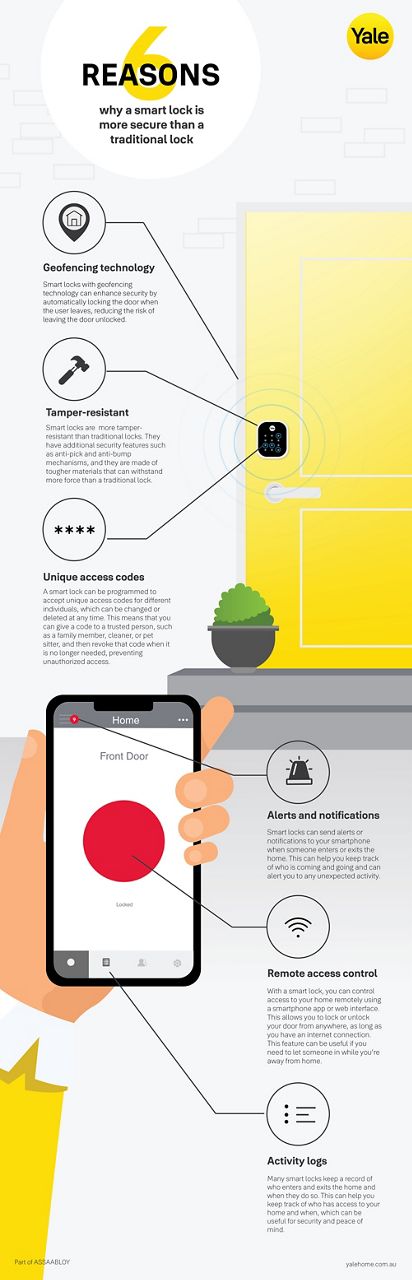
- Temporary codes: Give guests or workers a code that expires after use.
- Activity logs: See who entered and when.
- Integration: Connect with smart home devices like cameras or alarms.
Some models use biometric authentication, like fingerprints. Others work with keycards or PINs. The technology promises convenience, but does it really offer more protection?
What Is A Traditional Lock?
A traditional lock is a mechanical device, usually operated by a physical key. The most common types are:
- Pin tumbler locks: Used in most home doors, based on metal pins that align when the correct key is inserted.
- Deadbolt locks: Extra security, hard to force open.
- Mortise locks: Built into the door, stronger and often found in older buildings.
These locks don’t use batteries or software. They rely on strong materials—like steel—and physical mechanisms. For centuries, traditional locks were the standard for home security. But they have their own weaknesses, such as:
- Lock picking: Skilled thieves can manipulate pins.
- Bumping: Using a special key to quickly open the lock.
- Lost keys: Anyone who finds your key can unlock your door.
How Secure Are Smart Locks?
Smart locks offer new ways to protect your home, but also bring fresh risks. Here’s what makes them secure—and what can make them vulnerable.
Exclusive Deals
Limited-time Exclusive Deals. Check current discount on Amazon.
Check Price on Amazon As an Amazon Associate I earn from qualifying purchases.Digital Encryption
Most smart locks use encryption to protect digital signals. This means your phone’s commands are scrambled so hackers can’t easily read them. Strong encryption (like AES-128 or AES-256) is very hard to break.
Authentication Methods
Smart locks let you use multiple ways to unlock:
- Fingerprint scanners: Hard to fake, but not perfect.
- PIN codes: Easy to share, but can be guessed if too simple.
- Mobile apps: Require passwords and sometimes two-factor authentication.
Physical Strength
Smart locks still need strong materials. Many use metal bodies and reinforced bolts, like traditional deadbolts. But some cheaper models use plastic, making them easier to break.
Exclusive Deals
Limited-time Exclusive Deals. Check current discount on Amazon.
Check Price on Amazon As an Amazon Associate I earn from qualifying purchases.Remote Control
Being able to unlock your door from anywhere is convenient—but risky. If someone hacks your phone or the lock’s app, they might get access. Regular software updates help reduce this risk.
Common Vulnerabilities
- Hacking: If a smart lock’s software is weak, hackers can break in. Some older models have been hacked using Bluetooth flaws.
- Battery life: If the battery dies, you may get locked out (though most have backup keys).
- Wi-Fi attacks: If your home Wi-Fi is weak, attackers may exploit it.
How Secure Are Traditional Locks?
Traditional locks rely on mechanical strength and simplicity. Here’s what makes them secure—and where they fall short.
Physical Security
A solid deadbolt can withstand kicks and force. High-quality locks use hardened steel to resist cutting or drilling.
Key Control
If you keep your key safe, only you can open the lock. But if you lose your key or someone copies it, your home is at risk.
Pick Resistance
Some locks are designed to resist picking or bumping, using complex pin systems. But no lock is impossible to pick.
Common Weaknesses
- Lock picking: Even skilled amateurs can pick basic locks in seconds.
- Bumping: This technique works on many pin tumbler locks.
- Brute force: Weak locks can be kicked open.
- Lost or copied keys: Anyone with your key can enter.
Smart Locks Vs. Traditional Locks: Direct Comparison
Let’s look at how both types stack up on key security features. The table below compares smart and traditional locks side by side:
| Feature | Smart Locks | Traditional Locks |
|---|---|---|
| Physical Strength | Varies (metal or plastic); best models are strong | High (steel deadbolts, solid construction) |
| Digital Security | Encryption, authentication, software updates | None (mechanical only) |
| Lock Picking | Not pickable; relies on software | Possible (depends on complexity) |
| Remote Access | Yes (phone, voice, codes) | No (key only) |
| Key Loss Risk | Low (digital keys, codes) | High (lost/copies possible) |
| Hacking Risk | Possible (software flaws) | None (cannot be hacked digitally) |
| Bumping Risk | None (no pins to bump) | High (most pin locks vulnerable) |
| Battery Dependency | Yes (must stay charged) | No (works always) |
| Audit Trails | Yes (logs who enters) | No (no records) |
This comparison shows that smart locks offer digital features traditional locks cannot, but also introduce new risks.
Real-world Data: Are Smart Locks Really Safer?
According to a 2023 report by the National Crime Prevention Council, most home burglaries still involve forced entry through doors or windows. Smart locks were involved in less than 3% of reported break-ins, but this is rising as more homes adopt them.
A study by Consumer Reports tested 20 smart locks and found:
- 70% resisted physical attacks as well as high-end deadbolts.
- 40% had software vulnerabilities that could be fixed with updates.
- Only 10% failed due to battery or technical issues.
Traditional locks, especially cheap ones, failed physical tests in over 30% of cases.
These numbers show that quality matters more than lock type. A strong smart lock is as hard to break as a good deadbolt, but a weak smart lock or cheap deadbolt can both be easy targets.

Most Common Attack Methods
Burglars and hackers use different tricks depending on the lock.
Attacks On Traditional Locks
- Lock Picking: Using small tools to move pins and open the lock.
- Bumping: Using a specially cut key to “bump” pins into place.
- Brute Force: Kicking or striking the door to break the lock.
- Key Duplication: Copying a lost or stolen key.
Attacks On Smart Locks
- Hacking: Exploiting software flaws to unlock remotely.
- Bluetooth/Wi-Fi Attacks: Intercepting signals or breaking encryption.
- Physical Force: Breaking the lock body (if made of weak materials).
- Code Guessing: Trying common PINs or codes.
Burglars usually go for the easiest target. If your lock is weak—smart or traditional—it’s at risk.
Key Factors That Decide Security
No lock is perfect. Security depends on several factors:
Quality Of Materials
A lock made from hardened steel resists cutting, drilling, and force better than one made from cheap metals or plastic.
Software Updates
Smart locks must be updated regularly. New updates fix bugs and security holes. If you ignore updates, you leave your lock open to hackers.
Complexity Of Authentication
A smart lock with multi-factor authentication (like PIN plus fingerprint) is much safer than one with a simple code. For traditional locks, more complex pin systems and restricted keyways help.
Installation Quality
A lock is only as strong as the door and frame it’s attached to. Many break-ins happen because the door is weak, not because the lock fails.
User Behavior
Leaving your door unlocked, using simple codes, or sharing keys carelessly can defeat even the strongest lock.
Smart Locks: Benefits Beyond Security
Smart locks offer more than just protection. Here are some extra advantages:
- Convenience: No need for keys; unlock with your phone or code.
- Temporary Access: Let guests in without giving them a physical key.
- Audit Trails: See who came and went, useful for families or rentals.
- Integration: Connect with alarms or cameras for extra security.
Some smart locks even detect unusual activity and send alerts to your phone. For busy people or landlords, these features can be valuable.
Traditional Locks: Timeless Reliability
Traditional locks have stood the test of time. Their main strengths are:
- Simple operation: No batteries, apps, or codes.
- Durable: High-quality models last for years with minimal maintenance.
- No digital risk: Cannot be hacked remotely.
For many people, this reliability is reason enough to stick with traditional locks.
Smart Lock Myths And Realities
Many people have wrong ideas about smart locks. Let’s clear up some common myths.
Myth 1: All Smart Locks Can Be Hacked Easily
Reality: Most modern smart locks use strong encryption. Only poorly made or outdated models are at risk. Good brands release regular updates.
Myth 2: Smart Locks Don’t Work When The Battery Dies
Reality: Most smart locks have backup options, like physical keys or emergency battery packs.
Myth 3: Traditional Locks Are Always Safer
Reality: Many traditional locks can be picked or bumped in minutes. Only high-quality deadbolts offer strong protection.
Myth 4: Smart Locks Are Only For Tech Experts
Reality: Most smart locks are easy to install and use. You don’t need to be an expert.
Case Studies: Real-life Examples
Let’s look at real situations where smart locks and traditional locks were tested.
Apartment Building Upgrade
In 2022, a New York apartment building switched from traditional locks to smart locks. Residents reported fewer break-ins, mainly because the new locks logged every entry and made it harder to copy keys. However, two residents had trouble when their phone app crashed, showing the importance of backup methods.
House Break-in Attempt
A homeowner in Texas installed a smart lock with a metal deadbolt. During a break-in attempt, the burglars failed to force the door open. The lock’s activity log showed someone tried to guess the PIN multiple times, but was blocked.
This helped police investigate.
Rental Property Management
A property manager in California used smart locks with temporary codes for guests. They reported fewer lost keys and better control over who entered. The smart lock’s integration with cameras made it easier to track activity.
Comparing Costs: Smart Vs. Traditional Locks
Price matters, especially for families or businesses.
| Lock Type | Average Cost | Maintenance |
|---|---|---|
| Smart Lock | $150–$300 | Battery replacement, software updates |
| Traditional Lock | $30–$70 | Occasional lubrication, key replacement |
| High-End Deadbolt | $80–$150 | Minimal maintenance |
Smart locks cost more up front and need battery changes. Traditional locks are cheaper, but losing keys can lead to extra costs.
How To Choose The Right Lock For Your Needs
When picking a lock, think about your lifestyle, security needs, and budget.
- Assess your risk: If you live in a high-crime area, invest in a strong lock—smart or traditional.
- Consider convenience: If you often forget keys or need to give guests access, a smart lock offers flexibility.
- Check compatibility: Smart locks require stable Wi-Fi or Bluetooth. Make sure your home supports it.
- Quality first: Always buy from trusted brands. Cheap locks—smart or traditional—offer poor security.
- Backup options: Choose smart locks with physical key access or emergency power.
Many experts recommend combining both: a smart lock with a strong deadbolt gives you the best of both worlds.

Practical Insights Beginners Miss
- Smart locks are not all equal. Many beginners assume any smart lock is secure. In reality, low-quality models can be easier to break than traditional locks. Always check for certified security ratings (like ANSI Grade 1).
- Installation matters. A smart lock installed on a weak door is just as vulnerable as a traditional lock. Reinforce your door frame and use long screws for extra strength.
Are Smart Locks More Secure? The Final Answer
Smart locks can be more secure than traditional locks, but only if you choose a high-quality model, keep software updated, and use strong authentication methods. They offer features like remote control, audit trails, and temporary access that traditional locks cannot match. But they also require regular maintenance and awareness of digital risks.
Traditional locks, especially strong deadbolts, remain reliable and can be very secure if installed properly. They don’t have digital risks, but are vulnerable to picking, bumping, and key loss.
The best choice depends on your needs. For many people, a combination of both—a smart lock with a traditional deadbolt—offers the highest security.
If you want more technical details, you can read about smart lock security at Wikipedia.
Frequently Asked Questions
What Happens If My Smart Lock Battery Dies?
Most smart locks have backup options, like a hidden keyhole or an emergency battery slot. You can use a physical key or attach a portable battery to unlock.
Can Smart Locks Be Hacked?
Yes, but it’s rare with modern encryption and regular updates. Hackers target locks with weak software or outdated firmware. Always update your lock and use strong passwords.
Are Smart Locks Safe For Rental Properties?
Yes, they’re great for rentals. You can give guests temporary codes and track who enters. Just make sure to choose a lock with good security ratings and backup options.
Do Traditional Locks Still Get Picked Or Bumped Often?
Yes, especially cheap locks. High-quality deadbolts and locks with complex pin systems are harder to pick or bump, but not impossible.
Should I Use Both A Smart Lock And A Traditional Lock?
Many experts recommend it. Using a smart lock for convenience and a strong deadbolt for physical security gives you the benefits of both. It’s especially useful in high-risk areas.
Smart locks and traditional locks each have their strengths. Choose carefully, and your home will be safer—no matter which lock you use.


