
The Sonic Bomb Alarm Clock is famous for its loudness and reliability, especially among heavy sleepers and people with hearing difficulties. But one question often comes up: is this alarm clock battery powered? Knowing how the Sonic Bomb works, and whether you can use it without plugging in, is important if you want flexibility or need an alarm during power outages. This article dives deep into the battery features, compares them with other alarm clocks, and helps you decide if the Sonic Bomb fits your needs.
What Is The Sonic Bomb Alarm Clock?
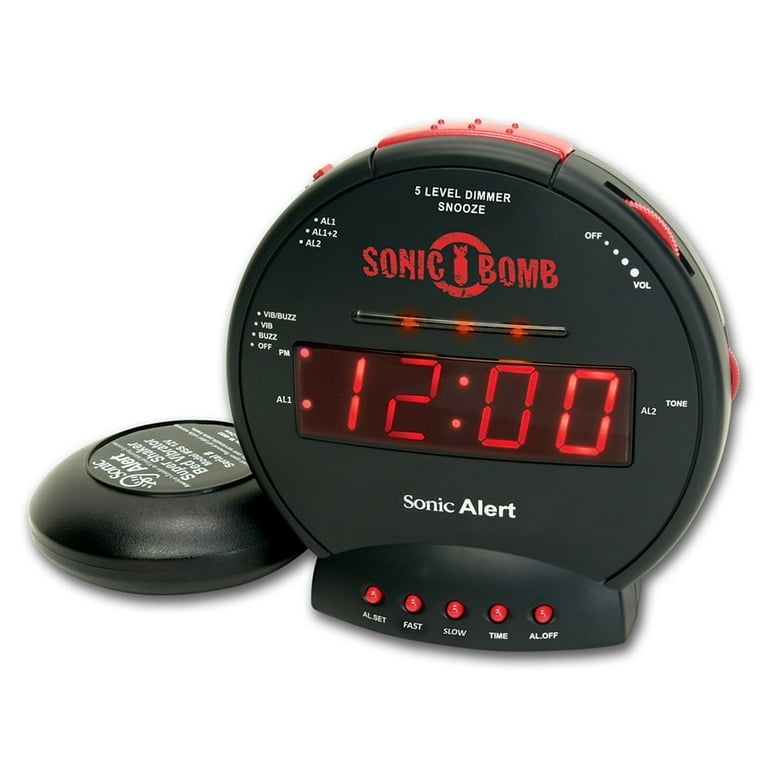
The Sonic Bomb Alarm Clock is not your average bedside clock. It’s built for people who need a strong wake-up signal. The clock delivers a loud alarm (up to 113 decibels) and includes a vibrating bed shaker. This makes it useful for anyone who struggles to wake up with normal alarms, or for those who are hard of hearing.
Sonic Bomb clocks are popular with:

Exclusive Deals
Limited-time Exclusive Deals. Check current discount on Amazon.
Check Price on Amazon As an Amazon Associate I earn from qualifying purchases.- Heavy sleepers who ignore regular alarms
- Deaf or hard-of-hearing users
- College students in noisy dorms
- Shift workers needing reliable wake-ups
Most Sonic Bomb models are larger than basic digital alarms and come with clear, easy-to-read displays. They also feature snooze, adjustable volume, and tone controls.
Battery Power: Does The Sonic Bomb Run On Batteries?
Main Power Source
The Sonic Bomb Alarm Clock is mainly powered by AC electricity. You plug it into a wall outlet, and it gets most of its power from there. This is necessary for its loud buzzer and strong bed shaker. The high decibel alarm and powerful vibration need more energy than simple battery clocks can provide.
Battery Backup Function
Most Sonic Bomb models do include a battery backup feature. This means you can insert batteries (usually 9V or AAA, depending on the model) to keep the clock running during a power outage. However, the battery backup is limited:
- The battery only keeps the time and alarm settings.
- The main alarm and bed shaker do not work on battery power alone.
- If there’s a power failure, the Sonic Bomb will remember your settings, but won’t wake you up unless power returns.
This is very different from fully battery-powered alarm clocks, which can run all functions on batteries.
Exclusive Deals
Limited-time Exclusive Deals. Check current discount on Amazon.
Check Price on Amazon As an Amazon Associate I earn from qualifying purchases.Typical Battery Specs
Most Sonic Bomb clocks use a single 9V battery for backup. Some newer models may use AAA batteries. Always check your model’s manual for the correct type.
- Battery life: Usually several months (for backup only)
- Battery needed: 9V or AAA (for settings retention)
- Battery cannot power alarm or shaker
Why Not Fully Battery Powered?
The Sonic Bomb’s loud alarm and strong vibration need more power than small batteries can supply. Running these features on battery alone would drain the battery quickly and reduce performance. That’s why Sonic Bomb designers chose AC power for main functions, with battery backup only for settings.
Exclusive Deals
Limited-time Exclusive Deals. Check current discount on Amazon.
Check Price on Amazon As an Amazon Associate I earn from qualifying purchases.Comparing Sonic Bomb Battery Features To Other Alarm Clocks
To understand the Sonic Bomb’s battery capabilities better, let’s compare it with other alarm clocks.
| Alarm Clock Model | Main Power Source | Battery Backup | Full Battery Powered? |
|---|---|---|---|
| Sonic Bomb | AC (wall outlet) | Yes (settings only) | No |
| Basic Digital Alarm | AC | Yes (settings only) | Some models |
| Portable Travel Alarm | Battery | N/A | Yes |
| Smartphone Alarm | Battery (phone) | N/A | Yes |
| Wind-Up Mechanical Alarm | Mechanical | N/A | Yes |
As shown, the Sonic Bomb stands out for its powerful features but does not fully operate on battery power.
Sonic Bomb Models And Battery Details
Different models of the Sonic Bomb Alarm Clock have slight variations in battery handling. Here’s a quick look at the most popular models:
| Model Name | Battery Type | Backup Function | Alarm/Vibration on Battery? |
|---|---|---|---|
| Sonic Bomb Classic (SBB500SS) | 9V | Keeps time/settings | No |
| Sonic Bomb Junior (SBJ525) | AAA | Keeps time/settings | No |
| Sonic Bomb Bluetooth (SBP100) | AAA | Keeps time/settings | No |
If you own a Sonic Bomb, check the battery compartment at the back or bottom. Most models have a clear label showing the battery type.
How To Use Battery Backup In Sonic Bomb
To use the battery backup feature, follow these simple steps:
- Locate the battery compartment (usually on the bottom or back of the clock).
- Insert the correct battery type (9V or AAA, as specified).
- Make sure the battery is secure and the compartment is closed.
The battery will keep your time and alarm settings if the power goes out. When power returns, your alarm settings will still be there. However, if you rely on the alarm to wake you during a power outage, it will not work unless electricity is restored.
Non-obvious Insight: Battery Quality Matters
Many people use cheap batteries for backup, thinking it doesn’t matter. But poor-quality batteries can leak, corrode, or fail to keep settings for long. Always use good-quality batteries for backup. Check the battery every few months and replace if needed.
Non-obvious Insight: Battery Backup Can Prevent Oversleeping
If you live in an area with frequent power outages, battery backup is crucial. Without it, your alarm settings might be lost during a power cut, causing you to oversleep. Even though the alarm won’t sound, you won’t have to reset everything when power returns.
Sonic Bomb Alarm Clock Vs Fully Battery-powered Alarms
If you need an alarm that works during power outages, it’s important to understand the difference between Sonic Bomb and fully battery-powered alarms.
Sonic Bomb Strengths
- Very loud alarm (up to 113 dB)
- Powerful vibration
- Reliable backup for settings
- Easy to use and adjust
Sonic Bomb Weaknesses
- Alarm and shaker won’t work without AC power
- Not portable
- Limited backup function
Fully Battery-powered Alarm Strengths
- Works anywhere, even without power
- Portable for travel
- No need for wall outlets
Fully Battery-powered Alarm Weaknesses
- Usually less loud
- Limited vibration
- Shorter battery life
If you want the best of both worlds, use a Sonic Bomb for daily wake-ups and keep a small battery-powered alarm as a backup during power outages.
Common Mistakes When Using Sonic Bomb Battery Backup
- Thinking the alarm works on battery: Many users believe the Sonic Bomb will sound during outages if there’s a battery installed. This is not true—the battery only keeps settings.
- Forgetting to replace backup batteries: Old batteries can leak or lose charge. Always check and replace them regularly.
- Using the wrong battery type: Make sure you use the correct battery as listed in your model’s manual.
- Assuming the bed shaker works on battery: The vibration feature is powerful and needs AC power. It won’t run on battery backup.
- Ignoring manual instructions: Each Sonic Bomb model can be slightly different. Always read the manual for battery details.
Who Should Choose The Sonic Bomb?
The Sonic Bomb Alarm Clock is best for:
- People who need extreme loudness or vibration to wake up
- Those with hearing difficulties
- People with unreliable power but who want settings backup
If you often travel, or need an alarm to work fully during power outages, consider a portable battery-powered alarm instead.
Practical Tips For Using Sonic Bomb Alarm Clock
- Place the bed shaker under your pillow or mattress for best results.
- Use the battery backup to save settings during outages.
- Adjust the alarm tone and volume to suit your needs.
- Check the battery every few months, even if you don’t have frequent power cuts.
- If you need a backup alarm, use your smartphone or a portable battery alarm alongside the Sonic Bomb.
Real-world Example: Sonic Bomb In Dorm Rooms
College students often use the Sonic Bomb in dorm rooms. Dorms can be noisy, and fire alarms or construction noise might drown out normal alarms. The Sonic Bomb’s loudness cuts through, and the bed shaker can wake you without disturbing roommates.
Some students install battery backup to keep settings, but also use their phone alarm as a backup during outages.
External Resource For Further Reading
If you want more technical details, visit the official Sonic Alert website: Sonic Alert Official.
Frequently Asked Questions
Does The Sonic Bomb Alarm Clock Work On Batteries Alone?
No. The Sonic Bomb uses batteries only as backup for settings. The main alarm and vibration need AC power.
What Happens During A Power Outage With The Sonic Bomb?
If there’s a power cut, the battery keeps the time and alarm settings. But the alarm sound and bed shaker will not work until power returns.
Which Batteries Does The Sonic Bomb Use?
Most models use a 9V battery or AAA batteries for backup. Always check your model’s manual to confirm.
Can The Sonic Bomb Alarm Wake Me If The Electricity Goes Out?
No. The alarm and shaker only work when plugged into a wall outlet. The battery keeps your settings, but won’t sound the alarm.
Is There A Fully Battery-powered Version Of The Sonic Bomb?
As of now, there is no fully battery-powered Sonic Bomb. All models need AC power for the alarm and vibration. If you need a portable alarm, look for other brands that offer battery-only options.
The Sonic Bomb Alarm Clock is a powerful tool for anyone who struggles to wake up with regular alarms. While it doesn’t run the alarm or shaker on batteries, the backup feature is useful for keeping settings safe during outages.
Understanding these battery details helps you use the Sonic Bomb effectively and avoid common mistakes. Choose the right alarm for your needs, and always check the manual for battery guidance.


