
Smart door locks are changing how people secure their homes and offices. These locks use codes, fingerprints, or smartphones instead of traditional keys. Many people enjoy the convenience and modern style. But smart door locks are not perfect. They have several disadvantages that you should know about before deciding to install one.

Exclusive Deals
Limited-time Exclusive Deals. Check current discount on Amazon.
Check Price on Amazon As an Amazon Associate I earn from qualifying purchases.This article will help you understand the key downsides of smart door locks. You will learn about security risks, reliability issues, costs, privacy concerns, and other factors that may affect your choice. By the end, you will have a clearer picture of whether a smart lock is right for you—or if sticking to a regular lock makes more sense.
Security Risks
Smart door locks promise safety and easy access, but their digital nature brings new risks.
Vulnerability To Hacking
Unlike traditional locks, smart locks depend on software and wireless connections. Hackers can sometimes exploit these systems:
- Wi-Fi and Bluetooth weaknesses: Many smart locks connect to your home network or phone using Wi-Fi or Bluetooth. If your network is not secure, attackers may break in remotely.
- Common hacking tools: Tools like “lockpicking malware” and “brute force” software can target some smart locks. For example, in 2022, researchers showed that certain Bluetooth locks could be unlocked in minutes using specialized apps.
Example: Real-world Breach
In 2019, security experts tested several popular smart locks. They found that almost 75% of them could be broken into using simple hacking tricks or by intercepting wireless signals.
Exclusive Deals
Limited-time Exclusive Deals. Check current discount on Amazon.
Check Price on Amazon As an Amazon Associate I earn from qualifying purchases.Physical Security Concerns
Smart locks usually have electronic parts and batteries. Some models use plastic components instead of metal. This can make them easier to break or remove from the door. A burglar might bypass the digital system and simply smash the lock.
Data Theft
Smart locks often collect data about when you enter or leave. If a hacker gets access, they can learn your daily routine. This information could help them plan a break-in when you are not home.
Reliability Problems
Smart door locks are advanced, but they are not always reliable.
Battery Life And Power Issues
Most smart locks run on batteries. If the battery dies and you don’t have a backup, you could be locked out. Some models alert you when the battery is low, but if you miss the warning, the lock may stop working.
Typical Battery Lifespan
- Average: 6–12 months per set
- High-use homes: May need replacement every 3–6 months
Connectivity Failures
Smart locks rely on wireless signals or apps. These connections can fail:
Exclusive Deals
Limited-time Exclusive Deals. Check current discount on Amazon.
Check Price on Amazon As an Amazon Associate I earn from qualifying purchases.- Weak Wi-Fi: If your home’s Wi-Fi is unstable, the lock may not respond.
- App glitches: Sometimes, the app crashes or does not sync with the lock.
- Cloud outages: Some locks depend on external servers. If the company’s cloud system goes down, your lock may become unresponsive.
Mechanical Malfunctions
Smart locks have more moving parts than traditional locks. Electronic components can fail due to moisture, dust, or temperature changes. When a smart lock fails, fixing it is usually harder—and more expensive—than fixing a standard lock.
Comparison: Reliability Of Lock Types
| Feature | Smart Lock | Traditional Lock |
|---|---|---|
| Battery Dependent | Yes | No |
| Can Fail Due to Connectivity | Yes | No |
| Mechanical Failure Risk | Moderate to High | Low |
| Easy to Repair | No | Yes |
Cost Considerations
Smart door locks cost more than regular locks in several ways.
Higher Purchase Price
A basic smart lock can cost anywhere from $100 to $300, while a good-quality traditional lock is usually $20 to $50. Premium smart locks with extra features may cost over $500.
Installation Costs
Smart locks often require professional installation. This can cost $50 to $150. Some locks need special doors or wiring, which can add to the price.
Maintenance And Repairs
When a smart lock fails, repairs are often expensive. Replacement parts may be hard to find, and service technicians charge higher rates for smart lock repairs.
Comparison: Cost Breakdown
| Expense Type | Smart Lock | Traditional Lock |
|---|---|---|
| Initial Purchase | $100–$500 | $20–$50 |
| Installation | $50–$150 | $0–$30 |
| Annual Maintenance | $30–$100 | $0–$10 |
| Repair Cost | $100–$300 | $20–$50 |
Subscription Fees
Some smart locks require a monthly subscription for advanced features like remote access, video integration, or cloud storage. These fees range from $5 to $15 per month.
Unexpected Costs
If you move or change your phone, you may need to reprogram your lock. Sometimes, this means buying new hardware or paying for technical support.
Privacy Concerns
Smart door locks are part of the “Internet of Things. ” They collect and store personal data.
Tracking And Monitoring
Smart locks often record:
- When you unlock or lock the door
- Who entered (if using codes or fingerprints)
- How long people stay inside
This data is stored on the lock, your phone, or in the cloud. If the company managing your lock is careless, your information could be exposed.
Data Sharing
Some smart lock companies sell data to third parties. This could include your home access patterns or even location information.
Risk Of Unauthorized Access
If someone gets your phone or login details, they can access your lock history and control the lock. This can be especially dangerous if you use the same password for many devices.
Example: Privacy Breach
In 2020, a popular smart lock provider was found sharing user access logs with marketing partners. Many users did not know about this until the issue became public.
Dependence On Technology
Smart locks depend on many pieces of technology. If one fails, the whole system may stop working.
Smartphone Dependency
Many smart locks require a smartphone to unlock the door. If your phone’s battery dies or you lose your phone, you may be locked out.
Software Updates
Manufacturers regularly update the software in smart locks to fix bugs or add features. If you don’t update, the lock may become vulnerable to hacking. If an update fails or is buggy, the lock may stop working.
Company Support
Smart lock makers may stop supporting old models. If the company goes out of business, you may lose access to important features or updates. This can make your lock unsafe or unusable.
Example: Discontinued Products
In 2021, a smart lock company shut down its servers. All users lost remote access, and some locks became completely unusable.
Compatibility Issues
Smart locks must fit your door and work with your home systems.
Door Type Limitations
Not all smart locks fit every door. If your door is an unusual size or shape, you may need a custom lock, which is costly and hard to find.
Integration With Other Devices
Smart locks often need to connect with other smart devices like security cameras, alarms, or smart home hubs. Compatibility problems can stop your lock from working as planned.
Firmware And App Issues
Different smart locks use different apps and firmware. If you switch brands or upgrade other devices, your lock may not work well with the new system.
User Experience Problems
Smart locks can be confusing, especially for beginners or older people.
Complicated Setup
Setting up a smart lock can take hours. You must read instructions, connect devices, and set up codes or fingerprints. If you make a mistake, the lock may not work.
Learning Curve
People must learn to use the app, change settings, and manage users. For some, this is stressful or confusing.
Lockout Risks
If you forget your code, lose your phone, or the lock malfunctions, you may be locked out. Some smart locks have backup keys, but others do not.
False Alarms
Smart locks sometimes send false alerts about attempted break-ins or low batteries. These alerts can cause stress or confusion.
Durability Concerns
Smart locks are not always as tough as traditional locks.
Weather Resistance
Smart locks have electronic parts that can fail in extreme temperatures, heavy rain, or humidity. Some locks are only rated for indoor use.
Wear And Tear
Touchscreens and buttons can wear out quickly, especially in busy homes or businesses. When parts wear out, repairs are costly.
Shorter Lifespan
Smart locks usually last 3–5 years, while traditional locks often last 10–20 years. You may need to replace your smart lock much more often.
Emergency Access Limitations
In emergencies, smart locks may slow down access for you or first responders.
Power Outages
If your smart lock depends on electricity or Wi-Fi, a power outage can make it unusable. Some locks have backup keys, but not all.
Fire Or Medical Emergencies
First responders may not know how to operate your smart lock. They may need to break down the door, causing damage.
Example: Emergency Delay
In 2022, a homeowner reported that firefighters could not open the front door because of a malfunctioning smart lock. The delay caused extra damage and stress.
Limited Backup Options
Smart locks often lack simple backup options.
No Physical Key
Some models do not include a physical key. If the electronics fail, you may be locked out completely.
Backup Access Complexity
Even when backup access exists, it can be hard to use. You may need to log in to a website, remember a special code, or call customer service.

Risk Of Obsolescence
Technology moves fast. Smart locks can become outdated quickly.
Changing Standards
New wireless standards like Wi-Fi 6 or Bluetooth 5 may not work with older locks. You may have to buy a new lock to stay compatible.
Discontinued Support
Manufacturers may stop making parts or offering updates. Your lock could lose features or become insecure.
Legal And Insurance Issues
Smart locks can create legal or insurance problems.
Insurance Coverage
Some insurers do not cover homes with smart locks. They may consider them less secure than traditional locks.
Legal Compliance
In some states or countries, smart locks are not allowed on certain doors (like fire exits or rental properties). You may need to check local laws before installing.
Accessibility Challenges
Smart locks can be hard for people with disabilities.
Physical Accessibility
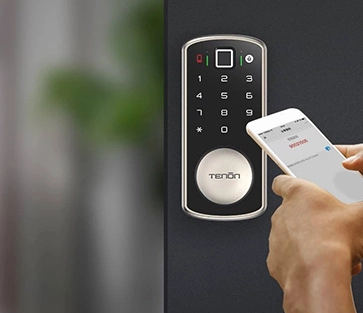
Touchscreens or tiny buttons may be hard to use for people with limited hand movement or poor eyesight.
Digital Accessibility
Apps and software may not offer features like voice commands or screen readers. This makes smart locks difficult for some users.
Environmental Impact
Smart locks create extra electronic waste.
Battery Disposal
Smart locks use batteries that must be replaced and disposed of. Improper disposal can harm the environment.
Short Product Life
Because smart locks wear out faster, more electronic waste is produced. This is worse if the lock cannot be repaired or recycled.
Common Mistakes When Choosing Smart Door Locks
Many buyers make errors when picking a smart lock. Avoid these pitfalls:
- Ignoring compatibility: Not all locks fit every door or home system.
- Overlooking backup access: Some locks lack a physical key or easy backup.
- Underestimating maintenance: Smart locks need regular battery changes and software updates.
- Assuming perfect security: No lock is foolproof. Smart locks can be hacked or physically broken.
- Failing to check legal rules: Some areas restrict smart locks on certain doors.
Non-obvious Insights
- Hidden costs: Many people forget about subscription fees and repair costs. Over five years, these can equal or exceed the price of the lock itself.
- Privacy trade-offs: Smart lock data can reveal your habits to companies or hackers. Even if you trust the lock maker, your information may be shared or exposed by accident.
Real-world Case Study
To see the impact of smart lock disadvantages, consider this story:
A family in Texas installed a high-end smart lock. They paid $350 for the lock and $100 for installation. Six months later, the lock stopped working after a software update. The manufacturer could not fix the problem remotely. The family had to pay $200 for a technician to repair the lock.
Meanwhile, their access logs were exposed due to a data breach at the lock company, revealing their daily routines. In total, the family spent over $650 in one year and lost confidence in the system.
How Smart Locks Compare To Traditional Locks
Here’s a quick summary of key differences:
| Aspect | Smart Locks | Traditional Locks |
|---|---|---|
| Security Risks | Hacking, physical breakage | Physical picking, brute force |
| Reliability | Batteries, software, connectivity | Mechanical only |
| Cost | High initial and recurring | Low |
| Privacy | Data collection | None |
| Backup Options | Often limited | Always available |
| Lifespan | 3–5 years | 10–20 years |
Frequently Asked Questions
What Happens If My Smart Lock Battery Dies?
If your smart lock’s battery is dead, you may be unable to unlock the door. Some models have backup keys or emergency power options, but others do not. Always check the battery regularly and keep spare batteries nearby.
Can Smart Locks Be Hacked Easily?
Smart locks are vulnerable to hacking if their software or network is not secure. Strong passwords and regular updates help reduce the risk, but no smart lock is completely safe from hackers.
Are Smart Locks More Expensive Than Regular Locks?
Yes, smart locks cost more to buy, install, and maintain. You may also pay monthly fees for extra features. Over time, the total cost can be much higher than a traditional lock.
Do Smart Locks Collect Personal Data?
Most smart locks collect data about when you unlock the door, who enters, and how often. This data may be stored in the cloud or shared with third parties. Read the privacy policy before buying.
What Should I Do If My Smart Lock Stops Working?
Try troubleshooting with the app or manufacturer’s instructions. If that fails, you may need professional repair. If your lock has a backup key, use it. If not, you may need to call a locksmith or customer support.
Smart door locks bring modern convenience, but they also introduce new risks and challenges. From hacking threats to reliability issues, high costs, and privacy concerns, it’s important to weigh the disadvantages carefully. If you value simple, reliable security, a traditional lock may be the better choice. But if you’re comfortable managing technology, and you want advanced features, a smart lock can be useful—just be aware of the potential downsides. For more detailed information on smart lock security, visit Wirecutter. Make your decision with confidence, knowing all the facts.


