
Smart locks are changing the way people think about home security. With a tap on your smartphone, you can lock or unlock your door, even if you are far from home. But can smart locks truly be unlocked remotely? How does this work, and is it safe?

Exclusive Deals
Limited-time Exclusive Deals. Check current discount on Amazon.
Check Price on Amazon As an Amazon Associate I earn from qualifying purchases.Let’s dive deep into the world of smart locks, explore their remote capabilities, and see what you need to know before trusting them with your home.
How Smart Locks Work
A smart lock is an electronic lock that replaces or enhances a traditional door lock. Unlike regular locks that use a physical key, smart locks use wireless connections. Most smart locks connect to your smartphone or home Wi-Fi, letting you control your door from anywhere.
Inside a smart lock, there is a small motor that moves the locking mechanism. This motor is controlled by a small computer chip. When you send a command—by tapping your phone or using a voice assistant—the chip tells the motor to lock or unlock.
Smart locks use several types of connections:
Exclusive Deals
Limited-time Exclusive Deals. Check current discount on Amazon.
Check Price on Amazon As an Amazon Associate I earn from qualifying purchases.- Bluetooth: Connects directly to your phone if you are close to the door.
- Wi-Fi: Lets you control the lock from anywhere with internet access.
- Z-Wave or Zigbee: Used in smart home systems, connecting the lock to other devices.
Some smart locks also keep a keypad or a traditional keyhole as a backup.
Remote Unlocking: What Does It Mean?
Remote unlocking means you can unlock your door even if you are not near it. For example, you could let a friend into your house while you are at work. Or you might unlock the door for a delivery when you are on vacation.
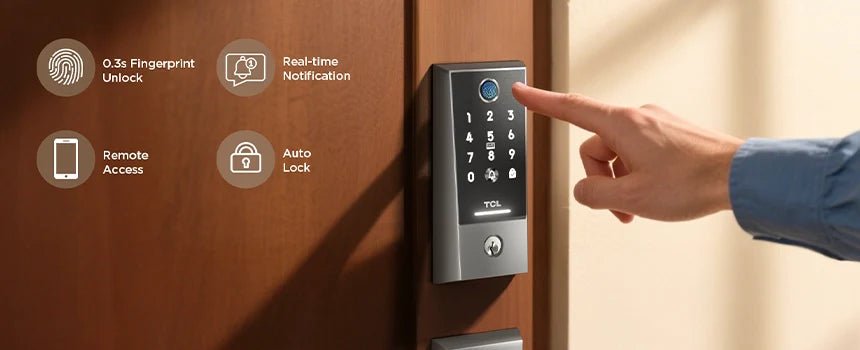
How does this happen? Most smart locks that offer remote unlocking use Wi-Fi. The lock connects to your home’s Wi-Fi network, and you use a mobile app to send commands over the internet. Some locks require a small extra device called a Wi-Fi bridge to connect to your router.
Here’s a simple example:
- You open your smart lock’s app on your phone.
- You tap “unlock.”
- The app sends your command through the internet to your home.
- The lock receives the command and unlocks the door.
If you have a Bluetooth-only smart lock, you must be close to the door—usually within 30 feet. These locks can’t be unlocked remotely unless paired with a Wi-Fi bridge.
Exclusive Deals
Limited-time Exclusive Deals. Check current discount on Amazon.
Check Price on Amazon As an Amazon Associate I earn from qualifying purchases.Types Of Smart Locks And Their Remote Capabilities
There are many smart lock brands, and not all offer the same features. Below is a comparison of popular smart locks and whether they support remote unlocking.
| Brand/Model | Remote Unlocking | Connection Type | Backup Access |
|---|---|---|---|
| August Smart Lock Pro | Yes (with Wi-Fi Bridge) | Bluetooth, Z-Wave, Wi-Fi (Bridge) | Physical Key |
| Schlage Encode | Yes (built-in Wi-Fi) | Wi-Fi, Bluetooth | Keypad, Physical Key |
| Yale Assure Lock SL | Yes (with Wi-Fi Module) | Bluetooth, Wi-Fi (Module) | Keypad |
| Ultraloq U-Bolt Pro | Yes (with Wi-Fi Bridge) | Bluetooth, Wi-Fi (Bridge) | Keypad, Fingerprint, Physical Key |
| Kwikset Halo | Yes (built-in Wi-Fi) | Wi-Fi | Keypad, Physical Key |
Notice that many locks require an extra device for Wi-Fi remote control. Always check if you need to buy a Wi-Fi bridge or module separately.
Practical Scenarios For Remote Unlocking
Smart locks with remote features offer many useful scenarios:
- Letting in guests: If a friend arrives while you’re away, you can unlock the door from your phone.
- Managing rentals: Airbnb hosts can unlock for guests without meeting them in person.
- Deliveries: Some services drop packages inside your door when you unlock it remotely.
- Emergency access: If a family member is locked out, you can help instantly.
- Monitoring access: You can see when someone unlocks your door, even from another country.
Some locks also let you send digital keys (temporary codes or app access) to others. This way, you do not need to unlock the door each time—just set up access for trusted people.
Security Risks: Is Remote Unlocking Safe?
Whenever you add remote access to your home, security becomes a concern. Can someone hack your smart lock? What if your phone is stolen?
Common Security Features
Modern smart locks use strong security methods:
- Encryption: All data sent between your phone and the lock is usually encrypted, making it hard to read if intercepted.
- Two-factor authentication: Some apps require a password and a code sent to your phone.
- Activity logs: You can see who unlocked your door and when.
Most smart locks use the same type of encryption as banks—AES 128-bit or 256-bit. This is considered very safe.
Potential Vulnerabilities
However, no system is perfect. Smart locks can be at risk from:
- Weak Wi-Fi passwords: If your home Wi-Fi is easy to hack, your lock could be at risk.
- Phishing: If someone tricks you into sharing your app login, they might control your lock.
- Outdated firmware: If you don’t update your lock’s software, hackers may find a way in.
One non-obvious risk is voice assistant hacking. If your smart speaker (like Alexa) is linked to the lock and not password-protected, someone could shout “unlock the door” through a window.
Tips To Stay Safe
- Always use a strong, unique Wi-Fi password.
- Enable two-factor authentication in your lock’s app.
- Update your lock’s firmware regularly.
- Set voice assistants to require a PIN for unlocking.
- Only share digital keys with people you trust.
Pros And Cons Of Remote Unlocking
Like any technology, remote unlocking has advantages and disadvantages. Here’s a side-by-side look:
| Pros | Cons |
|---|---|
|
|
One often-missed insight: Internet outages can temporarily disable remote unlocking. Choose a lock with a physical key or keypad as backup.

Real-world Examples And Data
According to a 2023 report by Statista, around 14 million US households used smart locks. Of these, more than 75% had models with remote unlocking. Users often choose these locks for vacation homes, rentals, and busy families.
A survey by Consumer Reports found that 67% of smart lock owners used remote unlocking at least once a week. The most common reason was letting in guests or service people.
In 2021, researchers at the University of Michigan found that most smart lock hacks involved weak Wi-Fi passwords, not the locks themselves. This shows that the main risk comes from poor home network security, not from the locks’ technology.
What Happens If The Internet Goes Down?
Remote unlocking depends on an internet connection. If your Wi-Fi or power goes out, you won’t be able to unlock the door from your phone if you’re not at home. However, most smart locks still work with Bluetooth, a keypad, or a physical key.
Some locks are better prepared for outages:
- August Smart Lock Pro: Can use Bluetooth if you’re close to the door.
- Schlage Encode: Keypad works even if Wi-Fi is down.
- Kwikset Halo: Still opens with a physical key.
Before buying, check if your lock has a backup method for emergencies.
How To Choose The Right Smart Lock For Remote Unlocking
If remote access is important to you, here’s what to look for:
- Wi-Fi Connectivity: Look for locks with built-in Wi-Fi or a reliable Wi-Fi bridge.
- Backup Access: Make sure the lock has a keypad or physical key.
- App Quality: Read app reviews—some are buggy or slow.
- Security Features: Check for encryption, two-factor authentication, and regular updates.
- Integration: If you use smart home devices (like Google Home or Alexa), check if the lock is compatible.
Here’s a quick comparison of key features:
| Feature | Why It Matters |
|---|---|
| Built-in Wi-Fi | No extra device needed for remote control |
| Keypad/Physical Key | Emergency access during outages |
| Strong App Security | Prevents hacking and unauthorized access |
| Good Battery Life | Reduces lockouts and maintenance |
| Access Logs | See who entered and when |
One thing many beginners overlook: battery life. If your smart lock’s batteries die, remote unlocking won’t work until you replace them. Choose a lock with low-battery alerts.
Common Mistakes When Using Remote Smart Locks
- Forgetting to update the app: Outdated apps may have security holes.
- Ignoring battery warnings: Dead batteries mean no remote access.
- Sharing access too widely: Only give digital keys to trusted people.
- Relying only on remote features: Always have a backup way to enter.
- Using weak passwords: Simple passwords are easy to guess.
Remote unlocking is powerful, but only if used carefully.
The Future Of Remote Unlocking
Smart lock technology is advancing quickly. Soon, you may see locks that:
- Use fingerprint or face recognition for remote access.
- Link to AI assistants that learn your habits and suggest when to lock or unlock.
- Integrate with security cameras for visual verification before unlocking.
Already, some locks can unlock automatically when your phone is nearby, using geofencing. Others let you set schedules for when the door should lock or unlock.
New standards like Matter are making smart locks more compatible with different devices, making remote unlocking even easier.
Privacy Concerns
Some users worry about privacy. When you unlock your door remotely, data is sent through the internet. This can include your location, access times, and people you trust.
Most smart lock companies promise not to sell your data. However, check their privacy policies. Choose brands with transparent privacy rules and the option to delete your data if needed.
A non-obvious tip: Use smart locks from well-known companies. They are more likely to fix security bugs and respect privacy rules.
Who Should (and Shouldn’t) Use Remote Smart Locks?
Remote unlocking is great for:
- People who travel often
- Airbnb or rental property owners
- Families with kids who lose keys
- People who get frequent deliveries
However, if you have poor internet, do not use smartphones, or worry about technology, a smart lock may not be the best choice. In these cases, a traditional lock or a keypad lock (without remote features) could be safer.
How To Set Up Remote Unlocking
If you decide to use a smart lock, setup is usually simple:
- Install the lock: Follow the instructions to replace your old lock.
- Download the app: Make sure it’s the official app for your lock.
- Connect to Wi-Fi: Set up the lock on your home network.
- Test remote unlocking: Try unlocking the door from your phone (from another location).
- Set up backups: Add trusted people, set up a keypad code or keep your old key.
If possible, update the lock’s firmware before using it. This fixes early bugs and improves security.
For more details about smart lock standards and security, you can visit the Wikipedia Smart Lock page.

Frequently Asked Questions
Can All Smart Locks Be Unlocked Remotely?
No, not all smart locks support remote unlocking. Only models with built-in Wi-Fi or a Wi-Fi bridge can be controlled from anywhere. Bluetooth-only locks require you to be close to the door.
What Happens If My Phone Is Lost Or Stolen?
If your phone is lost, log in to your smart lock account from another device and change your password immediately. Most apps let you remove old devices and set up new ones for security.
Are Smart Locks With Remote Unlocking Legal?
Yes, smart locks are legal in most countries. However, if you rent, check with your landlord before installing one. Some properties have rules about changing locks.
Can Smart Locks Be Hacked?
Smart locks can be hacked, but most attacks happen because of weak passwords or old software. Use strong passwords and keep your app updated to stay safe.
Do Smart Locks Need An Internet Connection All The Time?
For remote unlocking, yes, you need an internet connection. However, most smart locks also work with Bluetooth, a keypad, or a physical key as backup if the internet goes down.
Smart locks offer great convenience, especially with remote unlocking. They make it easier to let in guests, manage rentals, and keep track of who enters your home. But always balance convenience with security—use strong passwords, keep software updated, and have a backup plan.
With the right setup, smart locks can add both peace of mind and modern comfort to your daily life.


