Smart home technology has changed how we secure and manage our homes. Smart locks, once seen as futuristic, are now common in many households. They promise keyless entry, remote access, and better control over who can come and go. But with more people adopting voice assistants like Alexa and Google Home, a key question comes up: Do smart locks work with Alexa and Google Home? This is not just a technical question, but one that affects daily convenience, security, and even peace of mind. If you’re thinking about making your home smarter, or if you already have a smart lock and a voice assistant, understanding their compatibility is essential. Let’s explore how smart locks interact with Alexa and Google Home, what you need to know, and how this integration can shape your smart home experience.

Exclusive Deals
Limited-time Exclusive Deals. Check current discount on Amazon.
Check Price on Amazon As an Amazon Associate I earn from qualifying purchases.What Are Smart Locks?
Smart locks are electronic door locks that you can control using a smartphone, tablet, or voice assistant. Unlike traditional locks, smart locks often let you:
- Unlock or lock your door remotely
- Create temporary access codes for guests
- Track who enters and exits
- Receive notifications about lock activity
Some smart locks use Wi-Fi, others use Bluetooth, Zigbee, or Z-Wave. The key attraction is convenience—no more lost keys or hiding spares under the mat.
How Alexa And Google Home Work With Smart Locks
Alexa and Google Home are powerful voice assistants that help automate tasks. When connected to a smart lock, these platforms let you:
- Lock or unlock your door using your voice
- Check if your door is locked
- Integrate your lock into routines (e.g., locking the door when you say “Goodnight”)
However, integration is not automatic. The smart lock must support Alexa or Google Home, and sometimes you need a bridge or hub to connect them.
Exclusive Deals
Limited-time Exclusive Deals. Check current discount on Amazon.
Check Price on Amazon As an Amazon Associate I earn from qualifying purchases.Voice Commands In Action
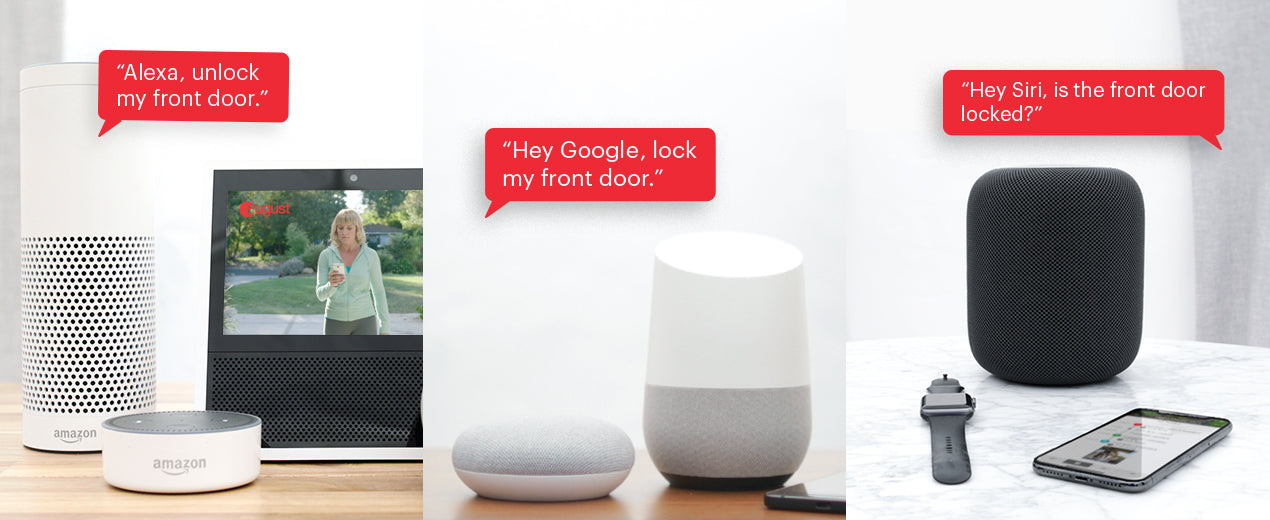
Imagine coming home with your hands full of groceries. Instead of fumbling for keys, you say, “Alexa, unlock the front door,” and your door opens. Or, before going to bed, you ask, “Hey Google, is the front door locked?” and get an instant answer.
Types Of Smart Locks Compatible With Alexa And Google Home
Not all smart locks work with both Alexa and Google Home. Some support only one, while others work with both. Here are some popular models and their compatibility:
| Smart Lock | Alexa | Google Home | Requires Bridge/Hub? |
|---|---|---|---|
| August Wi-Fi Smart Lock | Yes | Yes | No |
| Schlage Encode | Yes | Yes | No |
| Yale Assure Lock SL | Yes | Yes | Yes (for Google) |
| Ultraloq U-Bolt Pro | Yes | Yes | Yes |
| Kwikset Halo | Yes | No | No |
As you can see, some locks require a bridge or hub for full compatibility, especially with Google Home.
Setting Up A Smart Lock With Alexa Or Google Home
Connecting your smart lock to Alexa or Google Home is usually straightforward, but the steps can vary:
- Install the Smart Lock: Follow the manufacturer’s instructions for physical installation and initial setup.
- Connect to Wi-Fi or Hub: Some locks connect directly to Wi-Fi, while others need a bridge or smart home hub.
- Link to the App: Download the lock’s official app and connect your lock.
- Enable the Skill or Service:
- For Alexa: Enable the lock’s Alexa Skill in the Alexa app.
- For Google Home: Add the device through the Google Home app and link the manufacturer’s service.
- Authorize Access: You may need to log in to your lock’s account and grant permission for Alexa or Google Home.
- Test Voice Commands: Try basic commands like, “Alexa, lock the front door” or “Hey Google, is the back door locked?”
Common Setup Issues
- Network problems: Some smart locks only support 2.4 GHz Wi-Fi, so make sure your router is compatible.
- App confusion: Always use the latest version of your smart lock’s app.
- Account linking errors: Double-check login credentials and permissions.
What You Can (and Can’t) Do With Voice Assistants And Smart Locks
Locking And Unlocking
Most smart locks let you lock the door with a simple voice command. Unlocking, however, is often restricted for safety. For example, Alexa requires you to set up a PIN code for unlocking, while Google Home may only allow locking, not unlocking, depending on the lock and region.
Exclusive Deals
Limited-time Exclusive Deals. Check current discount on Amazon.
Check Price on Amazon As an Amazon Associate I earn from qualifying purchases.Status Checks
You can ask, “Is my door locked?” and get a real-time answer. This is helpful when you’re unsure if you locked up before bed or left for work.
Automations And Routines
Voice assistants let you include smart locks in routines. For example, you could say, “Goodnight” and have Alexa lock all doors, turn off lights, and lower the thermostat.
Limitations
- Some locks only support locking, not unlocking, through voice.
- Integration can be limited by region or device model.
- Delays can happen if your Wi-Fi is slow or unstable.
Security Concerns With Voice-controlled Smart Locks
Giving a voice assistant control over your door can feel risky. Here are key security concerns and how manufacturers address them:
- PIN Protection: Unlocking by voice often requires a PIN. Without the correct code, Alexa or Google Home won’t unlock your door.
- Device Authentication: Only devices on your home Wi-Fi can control the lock—strangers outside your network can’t unlock your door remotely.
- Voice Recognition: Some assistants can recognize your voice and refuse commands from unknown users, but this is not foolproof.
- Account Security: Your smart lock and voice assistant accounts should use strong, unique passwords and two-factor authentication (if available).
Real-world Example
In 2018, a family’s smart home was hacked because their voice assistant had a weak password. The hacker could control lights and the thermostat, but not the smart lock—because unlocking required a PIN and was restricted to recognized voices. This shows the extra layers manufacturers add for security.
Benefits Of Integrating Smart Locks With Alexa And Google Home
Convenience
- Hands-free access: Unlock the door while carrying bags or children.
- Remote control: Lock or check the door from anywhere, using only your voice or phone.
- Guest access: Create codes for friends, cleaners, or deliveries, and control access with simple commands.
Peace Of Mind
- Instant status updates: Never wonder if you left the door unlocked.
- Activity tracking: Get alerts when someone locks or unlocks the door.
Automation
Smart locks can work with other devices in your smart home ecosystem. For example, locking the door could also arm your security system and turn off all lights.
Drawbacks And Limitations
While the benefits are clear, there are also downsides to consider:
- Reliance on Wi-Fi: If your internet goes down, you may lose remote access.
- Voice command risks: If someone else can hear you, they might try to unlock your door. PIN codes help, but are not perfect.
- Complex setup: Some smart locks require multiple apps and extra hardware.
- Cost: Smart locks and compatible hubs can be expensive compared to traditional locks.
Comparing Alexa Vs Google Home Integration
How do Alexa and Google Home compare when controlling smart locks? Here’s a head-to-head look:
| Feature | Alexa | Google Home |
|---|---|---|
| Locking by Voice | Yes | Yes |
| Unlocking by Voice | Yes (with PIN) | Limited (depends on lock and region) |
| Status Checks | Yes | Yes |
| Routine Integration | Excellent | Very Good |
| Setup Simplicity | Easy with Alexa Skill | May need extra steps/hub |
Alexa tends to offer more flexible integration and unlocking features, while Google Home can be more restrictive for security reasons.
Popular Smart Locks That Work With Alexa And Google Home
Several smart locks are well-known for their strong integration with voice assistants. Here are some standout models, with brief details:
- August Wi-Fi Smart Lock: Installs over most deadbolts, works with both Alexa and Google Home, and doesn’t need a bridge.
- Schlage Encode: Built-in Wi-Fi, supports both platforms, and offers a robust keypad.
- Yale Assure Lock SL: Sleek touchscreen, works with Alexa and Google Home (may require a hub for Google).
- Ultraloq U-Bolt Pro: Versatile access (fingerprint, code, app), works with both assistants but needs a bridge.
- Kwikset Halo: Alexa compatible out of the box, but not Google Home.
- Nest x Yale Lock: Best for Google Home users, but lacks Alexa support.
These locks have strong security features and are popular choices for smart home enthusiasts.
Real-life Use Cases
To see the true value of integrating smart locks with voice assistants, consider these scenarios:
Family With Children
Parents can check if the door is locked without leaving the couch, or remotely unlock the door when kids forget their keys.
Airbnb Hosts
Hosts can generate temporary access codes and use Alexa or Google Home to lock up after guests leave, without being on-site.
People With Disabilities
Voice commands make it easier for those with mobility issues to control their front door, improving independence.
Smart Home Ecosystem: Beyond Just The Lock
Integrating a smart lock with Alexa or Google Home often leads people to expand their smart home. Here’s how a connected lock fits into a bigger ecosystem:
- Video Doorbells: See who’s at the door and unlock it, all from your voice or phone.
- Security Systems: Arm or disarm alarms automatically when you lock or unlock the door.
- Lighting: Trigger lights to turn on when you unlock the door at night.
This level of automation goes beyond convenience; it can also improve safety and save energy.
What To Consider Before Buying A Smart Lock For Alexa Or Google Home
When choosing a smart lock, pay attention to these factors:
- Compatibility: Not every smart lock works with both Alexa and Google Home. Check the manufacturer’s details.
- Connectivity: Some locks use Wi-Fi, others need a bridge (like Zigbee, Z-Wave, or the August Connect).
- Security: Look for locks with strong encryption, two-factor authentication, and regular updates.
- Ease of Installation: Some locks fit over existing deadbolts, others require new holes or hardware.
- Power Source: Most smart locks run on batteries. Know the battery life and alerts for low battery.
- Guest Access Features: If you want to give access codes to others, ensure the lock supports this.
- App Experience: A good app makes setup and daily use much easier.
Hidden Insights Beginners Often Miss
1. Bridge Devices Add Cost And Complexity
Some locks claim “Alexa/Google Home compatible” but require a separate bridge or hub. This device connects your lock to the internet, often adding $50–$100 to the cost and an extra step during setup.
2. Voice Unlocking Is Restricted For A Reason
Unlocking doors by voice is a top concern for security. That’s why assistants require a PIN or may block this feature entirely. If you want voice unlocking, plan to set up a secure PIN and teach your family about its use.
3. Battery Life Is Shorter With Voice Integration
When smart locks are connected to Wi-Fi or used with voice assistants, their batteries can drain faster. This is because they need to stay online more often for real-time commands. Always check battery status regularly.

Smart Lock Integration Trends And Future Updates
The smart lock market is evolving quickly. Recent trends include:
- Matter protocol: This new smart home standard aims to make devices more compatible across platforms, including Alexa and Google Home.
- Better voice recognition: Both Amazon and Google are working to make voice assistants distinguish users more accurately.
- More direct Wi-Fi locks: Fewer locks now require bridges, making setup easier.
The future promises even deeper integration, simpler setup, and smarter automations.
Frequently Asked Questions
Can All Smart Locks Work With Alexa And Google Home?
No, not every smart lock is compatible with both platforms. Always check the lock’s specifications. Some only support one assistant, and some need a bridge or hub.
Is Voice Unlocking Safe?
Voice unlocking is protected by a PIN and device authentication. It’s safer than you might think, but not risk-free. Always use a strong PIN and don’t share it widely.
Do I Need Wi-fi For My Smart Lock To Work With Alexa Or Google Home?
Most smart locks require Wi-Fi or a bridge connected to Wi-Fi for remote access and voice control. Some Bluetooth-only locks won’t work with these assistants unless you add a compatible bridge.
What Happens If The Power Or Internet Goes Out?
Most smart locks have a key backup or can be unlocked manually if power fails. Without internet, you lose remote and voice control, but local unlocking usually still works.
Where Can I Find More Information On Smart Home Security?
For more in-depth research, see Wikipedia’s Smart Lock page for technical details and security best practices.
Smart locks offer a powerful mix of convenience and security, especially when integrated with Alexa or Google Home. By understanding compatibility, setup, and potential risks, you can choose the right system for your home and enjoy a smarter, safer lifestyle.
As technology advances, these integrations will only become more seamless—making life simpler, one voice command at a time.