
Modern homes are getting smarter every year. One of the most popular upgrades is the smart lock—a digital door lock you can control with your phone, voice, or even a fingerprint. But smart locks need power, and most of them run on batteries. If you’re thinking about buying a smart lock or already own one, you probably wonder: How long do smart lock batteries last? The answer is not simple, but understanding the factors can help you avoid surprises and keep your home secure.

Exclusive Deals
Limited-time Exclusive Deals. Check current discount on Amazon.
Check Price on Amazon As an Amazon Associate I earn from qualifying purchases.Let’s explore what affects smart lock battery life, what to expect from different models, how to get the most out of your batteries, and how to avoid common mistakes. You’ll learn practical tips to make sure your smart lock never leaves you locked out.
What Determines Smart Lock Battery Life?
Several factors decide how long the batteries in your smart lock will last. Each lock, home, and user is different, so battery life can vary a lot. Here are the most important things that make a difference:
Battery Type And Quality
Most smart locks use AA alkaline batteries, but some use lithium batteries, CR123A, or even rechargeable packs. Alkaline batteries are cheap and easy to find, but they don’t last as long as lithium batteries. Lithium batteries are more expensive but work better in cold weather and have a longer life.
Quality matters, too. Cheap batteries may run out faster or leak, damaging the lock. Always use good brands.
Exclusive Deals
Limited-time Exclusive Deals. Check current discount on Amazon.
Check Price on Amazon As an Amazon Associate I earn from qualifying purchases.Lock Model And Design
Some smart locks are designed to save energy. Others use more power because they have extra features, like Wi-Fi, touchscreens, or cameras. For example, locks with built-in Wi-Fi use more energy than locks that connect using Bluetooth or Z-Wave. If the lock has a motorized deadbolt, it also needs more power to move the bolt in and out.
Usage Frequency
How often you use the lock changes battery life. A lock on a busy front door may unlock and lock 10–20 times a day. One on a rarely used back door may move just once a day. Each use drains the battery a little.
Smart Features And Connectivity
Features like auto-lock, remote access, and voice control need the lock to stay alert. If your smart lock checks for updates or stays connected to Wi-Fi all day, it uses more energy. Locks that only “wake up” when you’re nearby or press a button use much less.
Installation And Door Alignment
A little-known factor is whether your door is properly aligned. If the bolt or latch rubs or sticks, the lock’s motor works harder and drains more battery. A smooth, easy-to-turn lock will use less energy.
Weather Conditions
Cold weather can slow down batteries, especially alkalines. If your smart lock is on an outside door that gets cold, expect shorter battery life in winter.
Exclusive Deals
Limited-time Exclusive Deals. Check current discount on Amazon.
Check Price on Amazon As an Amazon Associate I earn from qualifying purchases.Firmware And App Updates
Surprisingly, some software updates can improve battery life. Others, if not well tested, might cause the lock to use more energy than before. Always check reviews before updating.
Average Battery Life By Smart Lock Type
There is no single answer for how long smart lock batteries last. But you can get a good idea by looking at the main types and brands.
Here’s a comparison of average battery life for popular smart lock brands and types:
| Smart Lock Model | Battery Type | Average Battery Life | Connectivity |
|---|---|---|---|
| August Wi-Fi Smart Lock | AA Alkaline (4x) | 3–6 months | Wi-Fi |
| Schlage Encode | AA Alkaline (4x) | 6–12 months | Wi-Fi |
| Yale Assure SL | AA Alkaline (4x) | 8–12 months | Z-Wave/Bluetooth |
| Ultraloq U-Bolt Pro | AA Alkaline (4x) | 8–12 months | Bluetooh/Wi-Fi (bridge) |
| Kwikset Halo | AA Alkaline (4x) | 6–10 months | Wi-Fi |
| Samsung SHP-DP609 | AA Alkaline (8x) | 10–12 months | Bluetooth/Wi-Fi |
As you can see, most smart locks last 6–12 months on one set of batteries. But Wi-Fi models often have a shorter life, sometimes as little as 3 months if used a lot.
Why Wi-fi Drains Batteries Faster
Wi-Fi is always on and needs more power than Bluetooth or Z-Wave. This is why some brands use a separate Wi-Fi bridge you plug into a wall outlet. The lock itself then connects by Bluetooth, saving battery life.
Real-world Example
A family of four using an August Wi-Fi lock on their front door with 10–15 lock/unlock cycles per day reported needing to change batteries every 3–4 months. In contrast, a similar lock on a less-used side door lasted nearly a year.
How To Know When Your Smart Lock Battery Is Low
Smart locks are built to warn you before the batteries run out. Here’s how they usually let you know:
- App notifications: Most locks send a warning to your phone.
- Flashing lights or beeps: The lock itself may flash or beep.
- Voice alerts: Some models have a speaker for spoken warnings.
- Manual override: Most smart locks have a keyhole or a way to use a physical key if the battery dies.
If you ignore the first warning, you may get a second, more urgent alert. Some brands say you have about 2–4 weeks after the first warning to change the batteries.
Tips To Extend Smart Lock Battery Life
Getting the most from your batteries is not just about buying better batteries. Here are proven tips to make your smart lock last longer between changes:
- Use high-quality batteries: Choose major brands and, when possible, use lithium batteries for longer life and better cold weather performance.
- Disable unused features: Turn off auto-lock, remote access, or voice control if you don’t need them.
- Check door alignment: Make sure the lock’s bolt moves smoothly. Fix any sticking or rubbing.
- Limit unnecessary remote checks: Some apps let you check the lock status anytime. But “pinging” the lock often wakes it up, draining the battery.
- Update firmware carefully: Read update notes and user feedback before installing new software.
- Keep your lock clean and dry: Moisture or dust can cause problems and make the lock work harder.
- Install in moderate temperatures: If possible, avoid putting a smart lock on doors exposed to extreme cold or heat.
Comparing Battery Types
Some users wonder if it’s worth switching from alkaline to lithium or even rechargeable batteries. Here’s a quick comparison:
| Battery Type | Average Life | Works in Cold? | Rechargeable? | Cost |
|---|---|---|---|---|
| Alkaline | 6–12 months | No | No | Low |
| Lithium | 12–24 months | Yes | No | Medium |
| Rechargeable NiMH | 3–6 months | No | Yes | High (up front) |
Lithium batteries last the longest and are best for cold weather. Rechargeable batteries can save money but usually don’t last as long on a single charge.
Common Mistakes That Kill Smart Lock Batteries Faster
Many users make simple mistakes that reduce battery life without knowing it. Avoid these pitfalls to get the best performance:
Using Cheap Or Old Batteries
Old or off-brand batteries may not deliver enough power, or they might leak and damage the electronics.
Installing On A Misaligned Door
If the lock has to push hard to move the deadbolt, the motor uses more energy each time. Always check alignment.
Overusing Remote Features
Constantly checking the lock status or using remote unlock/lock commands drains the battery faster than just using the physical keypad or app when nearby.
Ignoring Low-battery Warnings
Waiting too long to change batteries risks getting locked out. Some smart locks use extra power trying to complete the last few lock/unlock cycles on a dying battery.
Using The Wrong Battery Type
Some users try rechargeable batteries, but not all smart locks are designed for them. NiMH batteries have lower voltage than alkalines, which may confuse the lock or cause early low-battery warnings.
Smart Lock Battery Life: Brand Examples And Real User Reports
Learning from real-world experiences can help set your expectations and avoid surprises. Here’s a look at how some popular brands and models perform based on user reviews and manufacturer claims.
August Smart Locks
August’s Wi-Fi Smart Lock is known for easy installation, but battery life is a common complaint. Most users report 3–6 months of battery life with average use, but heavy users see even less. The lock uses four AA batteries, and frequent Wi-Fi connections are the main reason for shorter life.
Schlage Encode
Schlage’s Encode lock gets 6–12 months of battery life, even with constant Wi-Fi. Its energy-saving design helps. Users praise the clear low-battery warnings and quick battery changes.
Yale Assure
Yale Assure models using Z-Wave or Bluetooth can last up to a full year on one set of batteries. Z-Wave uses less energy than Wi-Fi, making these models a good choice for longer battery life.
Kwikset Halo
Kwikset Halo locks last about 6–10 months on four AA batteries, depending on usage and features. Users in cold climates often see shorter life in winter.
Samsung And Other International Brands
Some Samsung smart locks use eight AA batteries and can last up to 12 months. These models often have extra features like fingerprint readers, which can also drain batteries if used often.
How Often Should You Replace Smart Lock Batteries?
If you wait until you get a low-battery warning, you might get caught at a bad time. Most experts recommend changing batteries at least once a year—for example, every New Year’s Day or at the start of daylight saving time.
For Wi-Fi locks or locks on busy doors, every 4–6 months is safer. If you rent out your home or use the lock for Airbnb, check batteries even more often.
What Happens If The Battery Dies?
It’s a common fear: what if your smart lock battery dies and you’re locked out? Most smart locks have a backup plan:
- Physical key: Many smart locks still have a hidden keyhole.
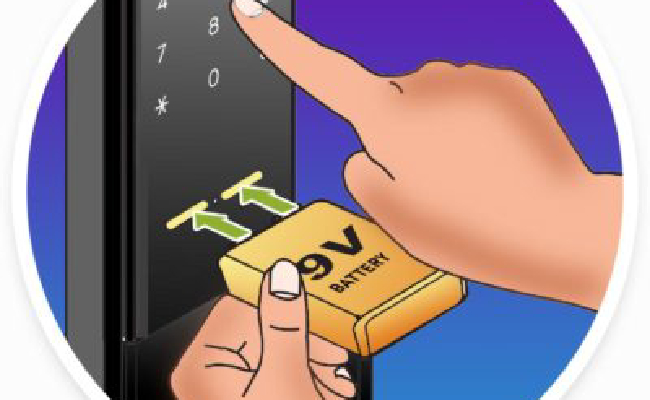
- 9V battery terminals: Some brands let you touch a 9V battery to contacts on the lock to power it up just long enough to unlock.
- App notifications: You’ll get several warnings before the battery is completely dead.
It’s smart to keep a spare key outside your home (in a lockbox) or with a trusted neighbor, just in case.

How To Change Smart Lock Batteries Safely
Swapping batteries seems easy, but a few tips can help you avoid problems:
- Check the manual: Each lock is different; follow the steps for your model.
- Use fresh batteries: Don’t mix old and new, or different brands.
- Insert correctly: Watch the + and – signs.
- Test before closing: After installing, test the lock with the app and keypad.
- Dispose of batteries properly: Recycle old batteries if possible.
Some locks “forget” settings if you change batteries too slowly. Try to swap batteries quickly, or check if your lock keeps memory during a battery change.
Do Rechargeable Batteries Work Well In Smart Locks?
This is a common question. Most smart locks are designed for alkaline batteries, not rechargeables. Rechargeable NiMH batteries have lower voltage and may not last as long. Some models might show low-battery warnings too early, or even act strangely.
However, a few brands and models now support rechargeable battery packs, especially newer high-end locks. Check your manual before switching to rechargeables.
Smart Lock Battery Life: Myths And Truths
There are many myths about smart lock batteries. Let’s clear up a few:
- Myth: “Smart locks eat batteries fast.”
Most last 6–12 months per set with normal use.
- Myth: “All smart locks use Wi-Fi.”
Many use Bluetooth or Z-Wave, which use less power.
- Myth: “Cold weather kills all batteries.”
Lithium batteries work well in the cold; alkalines don’t.
- Myth: “You’ll get locked out without warning.”
Most locks give clear, early warnings before batteries die.
Choosing A Smart Lock For The Best Battery Life
If battery life is your main concern, here’s what to look for:
- Choose Bluetooth or Z-Wave over Wi-Fi if possible.
- Pick a model with energy-saving features or “low power mode.”
- Look for locks that use lithium batteries or support them.
- Read reviews for real-world battery reports.
- Avoid models with always-on cameras or screens (unless you need them).
Future Trends: Will Smart Lock Battery Life Get Better?
Smart lock technology is improving. Newer models use more efficient chips, and some even harvest energy from the motion of opening the door. Expect longer battery life and smarter warnings in the next few years.
For those interested in technical details, you can read more about battery types and their uses in electronics on the Wikipedia Battery Page.
Frequently Asked Questions
How Do I Know Which Batteries My Smart Lock Uses?
Most smart locks use AA alkaline batteries, but some use CR123A, lithium, or even special rechargeable packs. Check your lock’s manual or look inside the battery compartment for details.
Can I Use Rechargeable Batteries In My Smart Lock?
Sometimes, but not always. Rechargeable batteries have lower voltage than regular alkalines, which may cause early low-battery warnings. Some new locks support special rechargeable packs, but always check the manufacturer’s advice first.
How Will My Lock Warn Me When The Battery Is Low?
Most smart locks send a notification to your phone, flash a light, beep, or even speak a warning. You’ll usually have 2–4 weeks to change batteries after the first warning.
Will Extreme Cold Or Heat Affect My Smart Lock Batteries?
Yes. Cold weather shortens the life of alkaline batteries. Lithium batteries work better in cold. Heat can also reduce battery life, but it’s less common.
What Should I Do If My Smart Lock Battery Dies Completely?
Most locks have a physical key backup or a way to power the lock with a 9V battery. Check your lock’s manual for emergency steps, and keep a spare key handy just in case.
Smart locks make life easier, but keeping an eye on battery life is the key to enjoying them without stress. With a little planning and regular care, you’ll always have secure, reliable access to your home.


