
Motion sensor lights make homes and businesses safer, more convenient, and energy efficient. But sometimes, these lights turn on too often—or not enough. Adjusting the sensitivity of your motion sensor lights can fix these issues. If you’ve ever wondered why your outdoor light flashes with every passing car, or why your hallway light misses you at night, this guide will help you take control.

Exclusive Deals
Limited-time Exclusive Deals. Check current discount on Amazon.
Check Price on Amazon As an Amazon Associate I earn from qualifying purchases.Motion sensor lights use infrared, microwave, or ultrasonic technology to detect movement. Sensitivity adjustment is the key to making sure your lights respond only to what you want. Whether you’re a homeowner, a renter, or someone managing a commercial space, understanding sensitivity settings will help you get the most from your lighting system.
Let’s break down how sensitivity works, the steps to adjust it, and the common mistakes people make. We’ll also compare different sensor types, show you practical examples, and answer the questions people ask most about motion sensor lights.
Understanding Motion Sensor Light Sensitivity
Sensitivity is how easily a motion sensor light reacts to movement. If sensitivity is too high, it may trigger with small or distant movements—like leaves blowing or cars passing by. If it’s too low, the sensor might miss real activity, leaving areas dark when you need light.
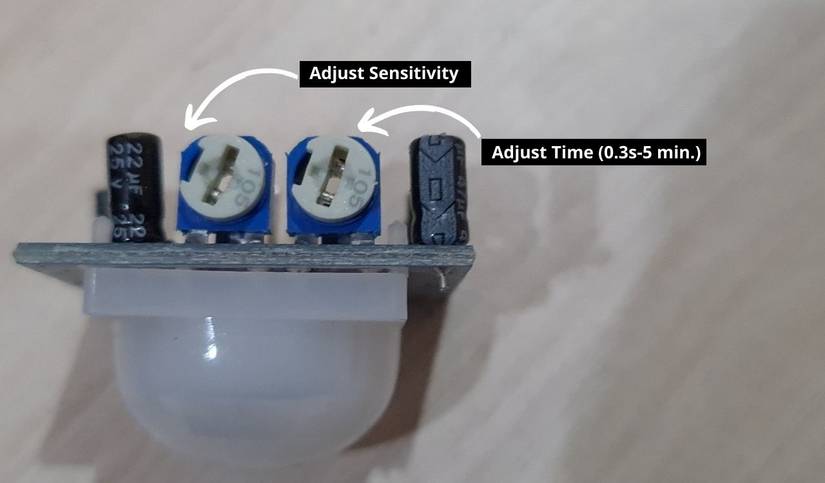
Most sensor lights have a sensitivity dial or switch. This setting changes how much movement is needed to turn the light on. Some advanced models even allow you to adjust detection range and ignore certain directions.
Exclusive Deals
Limited-time Exclusive Deals. Check current discount on Amazon.
Check Price on Amazon As an Amazon Associate I earn from qualifying purchases.Types Of Motion Sensors
Different sensor types have unique sensitivity behaviors. Here’s how they compare:
| Sensor Type | Main Detection Method | Typical Use | Sensitivity Issues |
|---|---|---|---|
| PIR (Passive Infrared) | Heat from bodies | Home, outdoor | Can miss slow movement; triggered by pets |
| Microwave | Electromagnetic waves | Industrial, large rooms | Can penetrate walls; might trigger falsely |
| Ultrasonic | Sound waves | Office, indoor | Can be too sensitive to noise |
PIR sensors are the most common for homes. They detect body heat, so adjusting sensitivity is about balancing between catching real people and ignoring pets or small animals.
Why Sensitivity Matters
If your sensor is too sensitive, you waste energy and annoy neighbors. If it’s not sensitive enough, you lose the safety and convenience motion lights offer. Finding the right level is important for:
- Security: Detecting intruders without false alarms.
- Energy savings: Lights only turn on when needed.
- Convenience: No frustration from lights missing you.
A key insight: Most beginners set sensitivity to maximum, thinking it will “work better.” In reality, this often leads to constant triggering and reduces the effectiveness of the light.
How To Adjust Motion Sensor Light Sensitivity
Adjusting sensitivity is usually simple, but each sensor and light model is a bit different. Here’s a practical step-by-step guide:
Exclusive Deals
Limited-time Exclusive Deals. Check current discount on Amazon.
Check Price on Amazon As an Amazon Associate I earn from qualifying purchases.- Locate the Sensor Settings
- Most motion sensor lights have a panel or compartment where you find dials or switches.
- Look for labels like “SENS,” “Sensitivity,” or “Range.”
- Read the Manufacturer’s Manual
- Manuals show where settings are and how to adjust them safely.
- If you lost the manual, search online for your model.
- Test the Current Sensitivity
- Walk past the sensor to see how it reacts.
- Note whether it triggers too easily or not enough.
- Adjust the Sensitivity Dial
- Turn the dial or switch slightly—usually clockwise for more sensitivity, counter-clockwise for less.
- Make small changes. Extreme adjustments can make the problem worse.
- Check the Detection Range
- Some models let you set how far the sensor “looks.” Adjusting range can help limit unnecessary triggers.
- Test Again
- After each change, walk past the sensor from different angles and distances.
- Try at different times of day; some sensors work differently in sunlight or darkness.
- Fine-Tune for Environment
- If pets or cars trigger the light, reduce sensitivity or narrow the detection angle.
- For busy areas, consider lowering sensitivity and adding shields to block unwanted movement.
- Secure the Sensor Position
- Make sure the sensor is pointed at the area you want to monitor.
- Tilt or rotate the sensor for best coverage.
Example: Adjusting Outdoor Pir Light
Imagine you have a PIR sensor light above your garage. It keeps turning on when the wind blows leaves. Here’s what you do:
- Find the sensitivity dial inside the sensor housing.
- Turn it slightly down.
- Walk past the garage to see if the light triggers at your movement, but not at leaves.
- Repeat until the light reacts only to people.
Common Adjustment Mistakes
- Changing sensitivity too quickly: Always make small adjustments and test.
- Ignoring sensor direction: The angle matters as much as the dial.
- Missing environmental factors: Wind, sunlight, and pets can affect detection.
- Not checking at night: Some sensors behave differently after dark.
Comparing Sensitivity Settings: Typical Home Vs Commercial Sensors
Let’s compare how sensitivity settings affect performance in different spaces:
| Space | Sensor Type | Recommended Sensitivity | Common Problems | Adjustment Tips |
|---|---|---|---|---|
| Home Entryway | PIR | Medium | Misses slow movement | Test walking slowly; adjust angle |
| Large Office | Ultrasonic | High | Triggered by noise | Lower sensitivity; block vents |
| Parking Lot | Microwave | Medium-High | False alarms from passing cars | Adjust range; shield sensor |
Non-obvious insight: In larger spaces, combining sensor types (like PIR and microwave) can reduce false alarms. Many commercial systems use hybrid sensors for this reason.
Advanced Sensitivity Features
Some modern motion sensor lights offer more than just a basic dial. Here are features to look for:
- Digital controls: Adjust sensitivity from a smartphone app.
- Zone masking: Block detection in certain areas with tape or built-in settings.
- Time delay adjustment: Set how long the light stays on after movement.
- Ambient light detection: Prevents the sensor from triggering when it’s already bright.
These features help you customize your sensor for your space. For example, zone masking is useful if you want to ignore a driveway but cover a sidewalk.
Smart Motion Sensor Lights
Smart lights offer more control. You can adjust sensitivity, detection zones, and even set schedules. Some models use AI to learn which movements matter most.
Example: A smart outdoor light can ignore tree branches but react to humans. Over time, it adapts to your environment. This reduces false alarms and saves energy.

Practical Tips For Sensitivity Adjustment
Getting the right sensitivity takes trial and error. Here are practical tips:
- Adjust in daylight and darkness: Sensors often perform differently based on lighting.
- Watch for environmental changes: Moving furniture or growing plants can affect detection.
- Use shields or covers: If nearby movement triggers your sensor, physical barriers can help.
- Check after installation: Re-test sensitivity every few months, especially after weather changes.
- Document your settings: Write down what works, so you can return if needed.
Another insight: Many people forget about “dead zones”—areas the sensor can’t reach. Adjusting the angle or adding a second sensor can solve this.
Troubleshooting Sensitivity Problems
If your motion sensor light isn’t working as expected, try these steps:
- Reset the Sensor
- Turn off power for 30 seconds, then turn back on.
- Sometimes, sensors need a reset to clear errors.
- Clean the Sensor Lens
- Dust or spider webs can block detection.
- Use a soft cloth to wipe the lens gently.
- Check for Obstructions
- Plants, decorations, or furniture can block movement.
- Test at Different Times
- Some sensors are more sensitive in cold or hot weather.
- Replace the Batteries
- Low power can make sensors miss movement.
- Upgrade the Sensor
- If your sensor is old or basic, newer models offer better sensitivity controls.
If problems continue, consult the manual or contact the manufacturer. For deeper technical info, visit Wikipedia.
How Weather And Environment Affect Sensitivity
Weather and the environment can change how well your motion sensor light works. For example:
- Rain or humidity: Water droplets can cause false triggers.
- Cold temperatures: PIR sensors work better in cold, since body heat stands out.
- Bright sunlight: Sunlight can reduce sensitivity or cause false alarms.
- Wind: Moving leaves and branches often trigger sensors.
Tip: If you live in an area with extreme weather, consider using sensors with weather-resistant housings and advanced settings.
Adjusting Sensitivity For Different Needs
Not every space needs the same sensitivity. Here’s how to set up lights for various locations:
Outdoor Security Lights
- Set sensitivity high enough to catch people, but low enough to ignore animals.
- Adjust the detection angle to cover entrances, not streets.
Indoor Hallway Lights
- Medium sensitivity works best. You want lights to turn on as you walk, but not with every small movement.
- If kids or pets trigger the light too often, lower sensitivity.
Garage Or Workshop Lights
- Set sensitivity to trigger when entering but not when working inside for long periods.
- Use time delay settings so the light stays on while you’re inside.
Office Or Commercial Spaces
- Use higher sensitivity for safety, but block zones like vents or machinery.
- Combine sensor types for best coverage.
Insight: For homes with pets, consider sensors with “pet immunity” features. These ignore movement from animals under a certain weight.
Data: Energy Savings From Proper Sensitivity Adjustment
Motion sensor lights save energy, but only if sensitivity is set correctly. Here’s a comparison of energy usage:
| Setting | Average Daily On-Time | Monthly Energy Use (kWh) | Estimated Cost ($) |
|---|---|---|---|
| Too Sensitive | 8 hours | 24 | 3.60 |
| Properly Adjusted | 2 hours | 6 | 0.90 |
| Not Sensitive Enough | 1 hour | 3 | 0.45 |
These numbers show that adjusting sensitivity can cut your lighting costs by up to 75%. It also helps your bulbs last longer.
Safety Considerations When Adjusting Sensitivity
It’s important to stay safe while adjusting your sensor lights:
- Always turn off power before opening sensor housings.
- Use insulated tools for electrical work.
- Avoid adjusting sensors in wet conditions.
- If you are unsure, call a qualified electrician.
For battery-powered or plug-in sensors, just unplug before adjusting.
When To Replace Or Upgrade Your Motion Sensor Light
Sometimes, adjusting sensitivity isn’t enough. Here’s when to consider upgrading:
- Your sensor doesn’t respond to adjustment.
- You get frequent false alarms, even after changes.
- The sensor is more than 10 years old.
- You want smart features, like phone control or zone masking.
Modern models are often more reliable and have better sensitivity controls. Upgrading can save you time and energy.
Frequently Asked Questions
How Do I Know If My Motion Sensor Light Is Too Sensitive?
If your light turns on with every small movement, like leaves blowing or passing cars, it’s probably too sensitive. Try lowering sensitivity and testing again.
Why Does My Sensor Light Miss Me Sometimes?
Sensors can miss slow movement, movement outside their detection range, or if the sensitivity is set too low. Adjust the dial and check the sensor’s angle.
Can I Adjust Sensitivity On All Motion Sensor Lights?
Most lights have a sensitivity control, but some basic models do not. Check your manual or look for a dial labeled “SENS” or “Range.”
Will Adjusting Sensitivity Save Energy?
Yes. Proper sensitivity means your light only turns on when needed, cutting energy use. You can save up to 75% in lighting costs by setting sensitivity correctly.
What If My Sensor Light Still Doesn’t Work After Adjustment?
Try cleaning the sensor lens, checking for obstructions, and resetting the sensor. If problems continue, you may need to replace or upgrade your light.
Motion sensor lights are powerful tools for safety and energy savings, but only if sensitivity is set right. Take your time to adjust, test, and fine-tune. With a few careful steps, you can make your lights work exactly the way you want.
If you need more technical details, always check your manufacturer’s manual or consult experts for help. Proper sensitivity adjustment makes your space safer, smarter, and more comfortable.


