
CCTV uses analog video with local recording; IP cameras send digital video over networks for greater flexibility.

Exclusive Deals
Limited-time Exclusive Deals. Check current discount on Amazon.
Check Price on Amazon As an Amazon Associate I earn from qualifying purchases.As a security professional with years of hands-on installation and system design, I’ve compared CCTV vs IP Camera systems in homes, shops, and large facilities. This article explains how each system works, the real differences that matter, and how to choose one based on cost, performance, and future needs. I’ll share practical tips, common mistakes I’ve seen, and a clear checklist so you can make a confident choice.

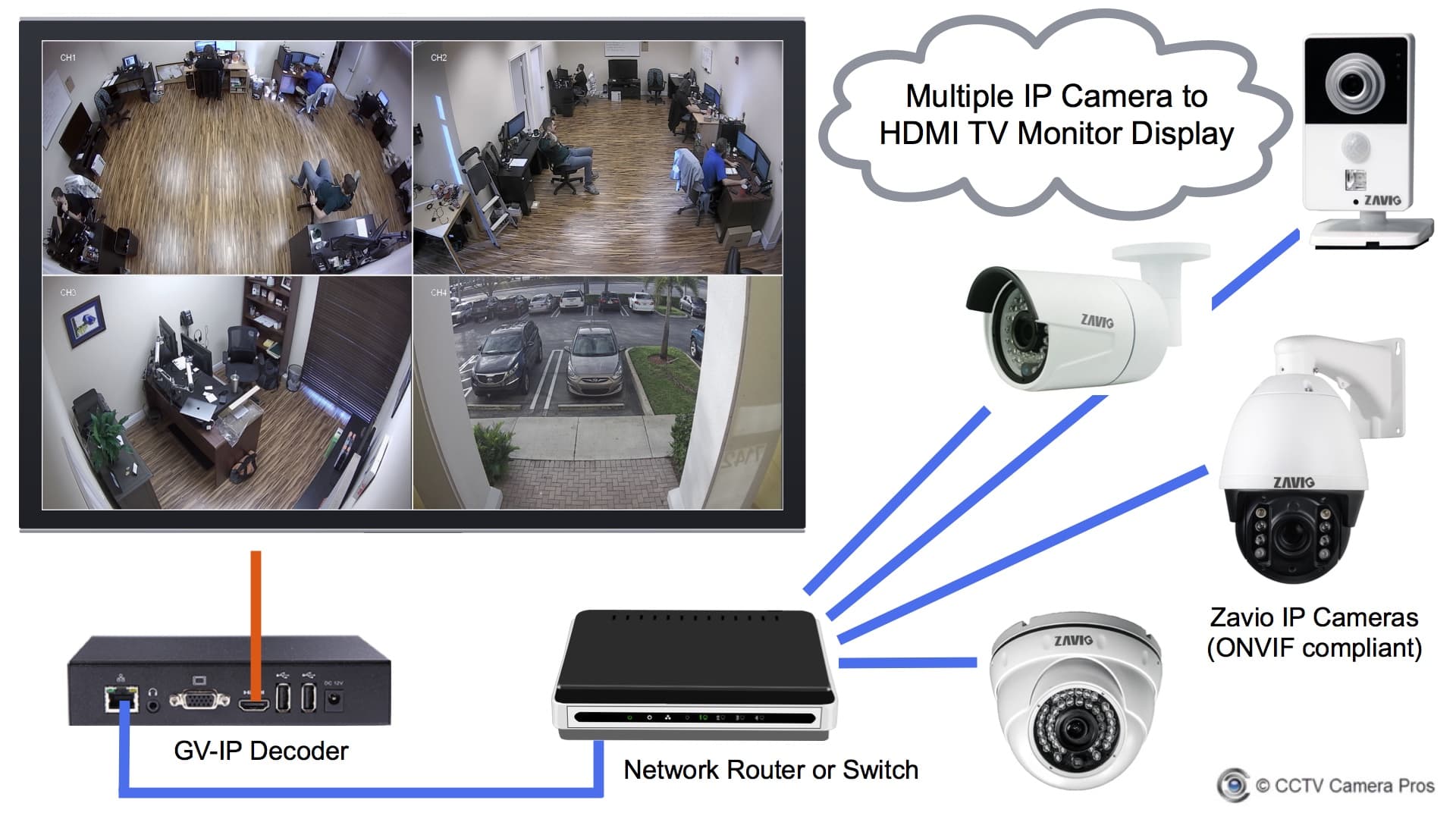
How CCTV and IP Cameras Work
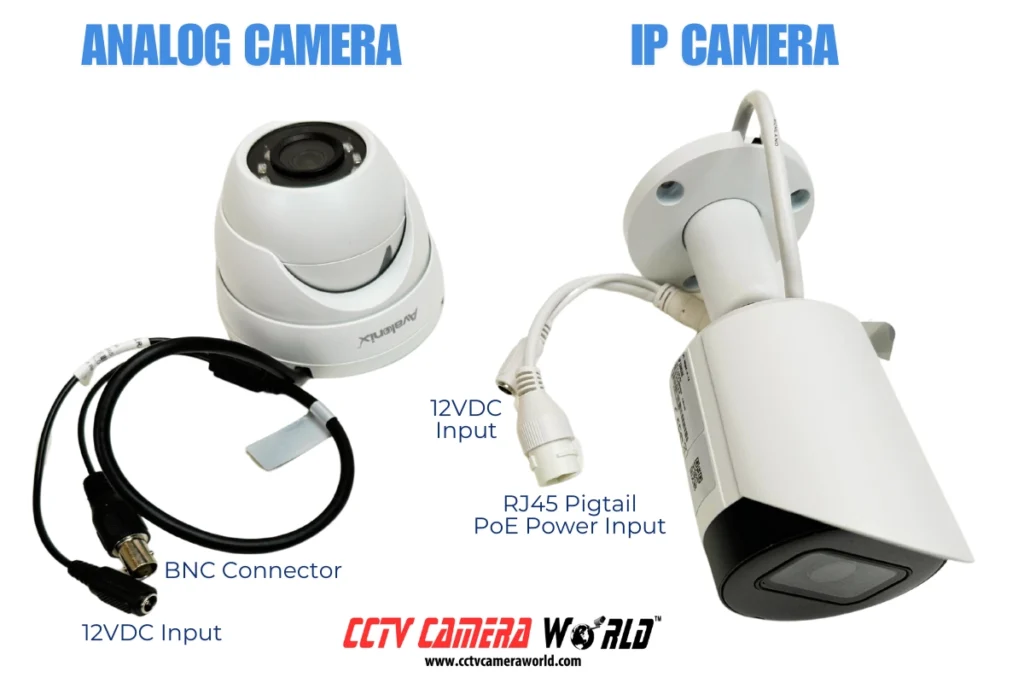
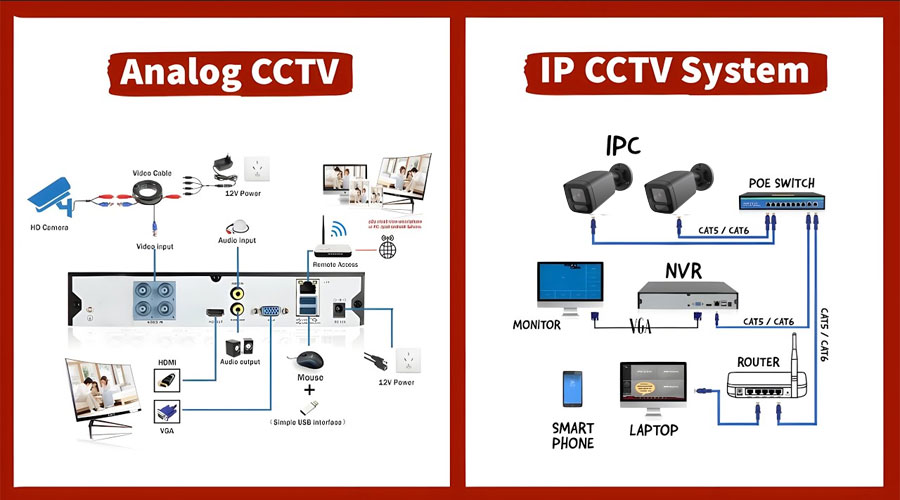
CCTV traditionally means closed-circuit television. Cameras send analog video to a local recorder. That recorder stores footage on a DVR. The system is simple and reliable. It usually uses coax cables and fixed camera addresses.
IP cameras are network devices. Each camera has an IP address. Video is compressed and sent over Ethernet or Wi‑Fi. Storage can be on an NVR, on-prem servers, or cloud services. IP systems support higher resolutions and advanced analytics.
Exclusive Deals
Limited-time Exclusive Deals. Check current discount on Amazon.
Check Price on Amazon As an Amazon Associate I earn from qualifying purchases.Key technical differences include signal type, cabling, and storage method. CCTV uses analog signal paths. IP uses packet-based networks. That affects latency, scalability, and feature support.

Key Differences: CCTV vs IP Camera
Resolution and image quality
- CCTV often uses standard-definition or lower HD. Image detail is limited.
- IP cameras commonly support 1080p, 4K, and variable bitrates. They capture more detail.
Cabling and installation
- CCTV usually relies on coaxial cable and a central DVR. Installation is straightforward.
- IP cameras use Ethernet or Wi‑Fi. Power over Ethernet (PoE) simplifies wiring.
Scalability and flexibility
Exclusive Deals
Limited-time Exclusive Deals. Check current discount on Amazon.
Check Price on Amazon As an Amazon Associate I earn from qualifying purchases.- CCTV systems are harder to scale. Adding cameras may require extra cabling and DVR channels.
- IP systems scale easily. Add cameras to the network and allocate storage.
Features and analytics
- CCTV provides basic recording and playback.
- IP cameras offer motion analytics, object detection, smart alerts, and integration with other systems.
Latency and bandwidth
- CCTV has low latency with direct analog feeds.
- IP cameras need network bandwidth. High-resolution streams can strain networks without proper planning.
Costs and total ownership
- CCTV gear can be cheaper upfront.
- IP systems may cost more initially but lower operating costs through centralized management and cloud features.
Maintenance and reliability
- CCTV has fewer software dependencies and can be robust for basic needs.
- IP systems require network management, updates, and cybersecurity measures.
PAA-style questions (short, common search queries)
- What is better for image clarity: CCTV or IP camera? IP cameras generally provide better image clarity thanks to higher resolutions and digital compression.
- Can IP cameras replace CCTV completely? Yes, IP cameras can replace CCTV in most cases, offering more features and easier scaling.
- Do IP cameras use more power than CCTV? IP cameras can use more power, but PoE consolidates power delivery and simplifies installs.
Pros and Cons of Each System
Pros of CCTV
- Lower initial hardware cost for basic setups.
- Simple architecture with fewer network dependencies.
- Reliable in low-tech environments.
Cons of CCTV
- Limited resolution and fewer analytics.
- Harder to expand and integrate with modern systems.
- Coax cabling can be bulky and less flexible.
Pros of IP camera systems
- High resolution and advanced analytics.
- Easy scalability and remote access.
- Integrates with modern security and building systems.
Cons of IP camera systems
- Requires network planning and cybersecurity measures.
- Potentially higher upfront cost.
- Firmware and software updates are necessary.
My experience: I installed CCTV for a small storefront that needed low cost and simple playback. Later, upgrading to IP cameras for a larger retail chain enabled loss prevention analytics and remote monitoring. That switch paid off in reduced shrinkage and staff time.
Installation, Cost, and Scalability
Planning matters for both CCTV and IP camera projects. Consider these steps:
- Assess coverage and resolution needs.
- Map cable runs and power sources.
- Decide on local vs cloud storage.
- Budget for accessories like lenses, mounts, and backup power.
Cost breakdown
- Camera price: CCTV cameras are often cheaper per unit. IP cameras have wider price ranges.
- Recorder: DVR for CCTV; NVR or server for IP.
- Cabling and labor: Coax vs Ethernet; PoE can reduce electrician time.
- Ongoing: Cloud storage fees, software licenses, and support.
Scalability tips
- For future growth, choose IP if you expect to add many cameras or use analytics.
- If budget is tight and needs are stable, CCTV can be a low-cost choice.
- Hybrid systems can migrate existing CCTV into IP networks using encoders.
Practical mistake to avoid: underestimating bandwidth. I once configured multiple 4K IP cameras on a single switch without proper uplink capacity. The system stuttered until we upgraded the network and added VLANs.

Use Cases and Best Practices
Best for small, simple installs
- CCTV fits small shops, garages, or basic outdoor monitoring where high detail isn’t required.
Best for modern security needs
- IP cameras work well for retail chains, campuses, warehouses, and smart buildings that need analytics, remote access, and integrations.
Hybrid setups
- You can keep existing CCTV cameras and add IP cameras for critical areas. Use encoders to bring analog into network recorders.
Best practices
- Test camera placement with real lighting conditions.
- Choose the right lens and resolution for distance.
- Secure networked cameras with strong passwords and segmented VLANs.
- Implement backup power for outdoor and critical cameras.
From my installs: place cameras slightly above eye level and avoid pointing directly at reflective surfaces. This simple tip reduced glare and improved recognition.
Security, Privacy, and Legal Considerations
Network security essentials for IP cameras
- Change default credentials immediately.
- Keep firmware up to date.
- Use strong encryption for remote access.
- Segment camera traffic from general user networks.
Privacy and compliance
- Know local laws about recording audio and private spaces.
- Use signage where required.
- Implement retention policies to limit how long footage is stored.
Data storage and retention
- On-prem storage gives more control, but requires physical security.
- Cloud storage offers redundancy and remote retrieval, at an ongoing cost.
- Balance retention time with legal requirements and storage costs.
Limitations and risks
- IP systems are vulnerable to network attacks without proper hardening.
- CCTV systems may miss digital forensics capabilities needed in complex investigations.

Choosing the Right System: Decision Checklist
Quick checklist to decide between CCTV vs IP Camera
- Coverage needs: How much detail do you need?
- Budget: What is the upfront and ongoing budget?
- Scalability: Will you add cameras later?
- Analytics: Do you need motion detection, face recognition, or license plate reading?
- Network readiness: Is your LAN ready for high-bandwidth video?
- Compliance: Do privacy laws or industry rules affect storage and access?
Step-by-step decision path
- Define objectives. Write down what you want to monitor and why.
- Measure site conditions. Check light, distances, and mounting points.
- Choose core features. Prioritize resolution, analytics, and remote access.
- Evaluate costs. Include installation, storage, and maintenance.
- Pilot a small area. Test cameras and workflows before full rollout.
Personal tip: run a short pilot for 2–4 weeks. It reveals real-world lighting and bandwidth needs you can't predict from specs.

Frequently Asked Questions of CCTV vs IP Camera
What is the main difference between CCTV and IP camera?
The main difference is signal type: CCTV uses analog video and DVRs, while IP cameras use digital networks and NVRs. IP cameras offer higher resolutions and more features.
Are IP cameras more expensive than CCTV?
IP cameras can be more expensive upfront, but total cost varies with scale, required features, and storage choices. For larger, scalable systems, IP often yields better long-term value.
Can I mix CCTV and IP cameras in one system?
Yes. Hybrid solutions use encoders or mixed recorders to bring analog feeds into networked systems. This helps migrate legacy CCTV into IP environments gradually.
Do IP cameras require more maintenance than CCTV?
IP cameras require software updates and network monitoring, so they need more IT attention. CCTV typically requires less digital maintenance but may need physical upkeep.
Which system is better for remote monitoring?
IP cameras are better for remote monitoring because they stream over networks and often include secure cloud or app access. CCTV can support remote views but usually needs added hardware.
How do I secure my IP cameras from hackers?
Use strong, unique passwords, update firmware, enable encryption, use VLANs and firewalls, and restrict external access with VPNs or secure cloud services. Regular audits help catch weak spots.
Is video quality the same at night for both systems?
IP cameras usually have better low-light and IR performance due to newer sensors and processing. But good CCTV cameras with quality lenses and lighting can still perform well in low light.
Can cloud storage replace local DVR/NVR?
Cloud storage can replace local storage for many users and offers easy access and redundancy. It adds subscription costs and relies on stable internet connections.
Will switching to IP require a full network upgrade?
Not always. Small IP installs may work on existing networks, but larger or high-resolution systems often require upgraded switches, PoE support, and better uplink capacity.
How long should I keep surveillance footage?
Retention depends on purpose and law. Typical ranges are 7 to 90 days for general surveillance, longer for evidence preservation. Check local regulations and policy needs.
Conclusion
CCTV vs IP Camera comes down to needs. CCTV is simple and cost-effective for basic coverage. IP cameras offer better image quality, analytics, and scalability for modern security. Assess your site, budget, and future plans. Pilot before you commit. Protect networked systems and follow legal rules for privacy.
Take action: map your camera needs, test a small setup, and choose the system that matches your goals. If you found this helpful, leave a comment or subscribe for more practical security guides.


