
Waking up in the morning is a struggle for many people, especially if you’re not a natural early riser. Ordinary alarm clocks often fail to get you out of bed, especially when the snooze button is easy to reach. That’s where Clocky Alarm Clock stands out. This quirky and popular gadget is famous for its wheels and ability to “run away” after the alarm goes off. But one common question remains: Does Clocky Alarm Clock have snooze? And if so, how does it work compared to traditional alarm clocks? This article explores everything you need to know about Clocky’s snooze function, its unique features, and how it truly helps heavy sleepers wake up.
What Is Clocky Alarm Clock?
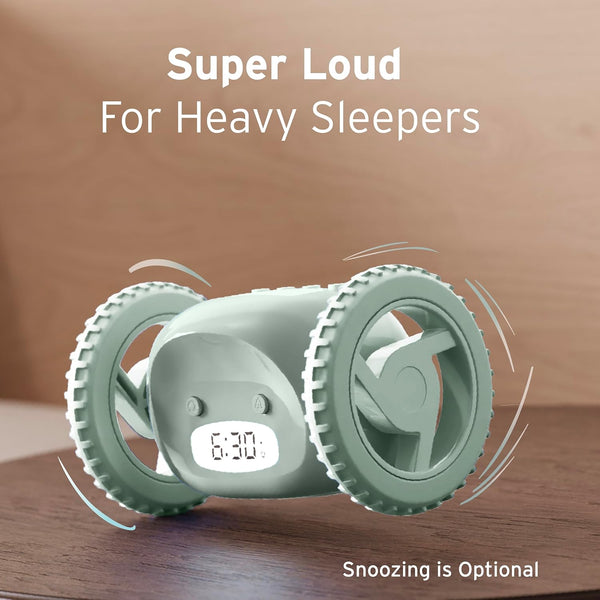
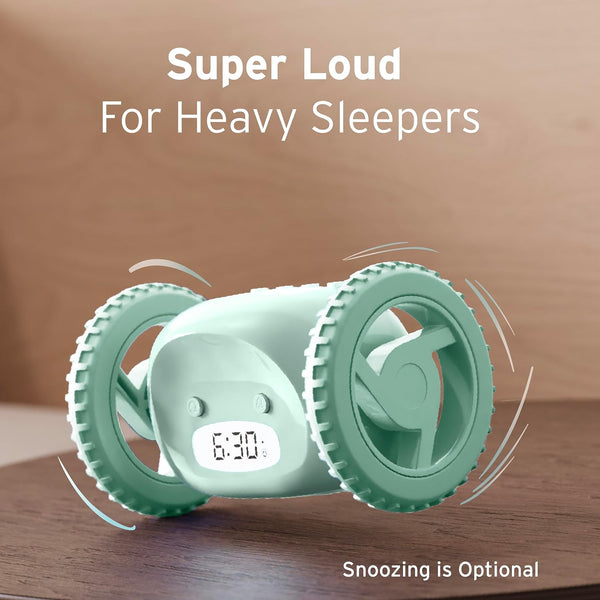
Before diving into its snooze ability, it’s important to know what makes Clocky special. Clocky is a small, digital alarm clock mounted on two wheels. When the alarm rings, Clocky can jump from your nightstand and roll around the room, forcing you to get up and chase it.
Created by Gauri Nanda while she was a student at MIT, Clocky has become a favorite for anyone who finds it hard to wake up in the morning.
This alarm clock’s main goal is to stop you from hitting snooze endlessly. With its unpredictable movements and loud alarm, Clocky is designed to make sure you actually leave your bed.
Does Clocky Alarm Clock Have A Snooze Button?
The short answer: Yes, Clocky does have a snooze button. But there’s more to the story. Clocky’s snooze function is different from standard alarm clocks, and understanding how it works is crucial for getting the most out of your Clocky experience.
How Clocky’s Snooze Works
When Clocky’s alarm rings, you can hit the snooze button to pause the alarm for a short time (usually 1 to 8 minutes, depending on your settings). However, you can only snooze Clocky once. After that, Clocky jumps off the nightstand and starts running around your room, making it much harder to ignore.
This design is very intentional. Many people overuse the snooze button, causing them to oversleep and feel groggy. Clocky’s single-snooze feature breaks this habit and makes you get up after just one snooze—if you choose to use it at all.
Snooze Settings And Customization
On most Clocky models, you can set the snooze duration between 1 and 8 minutes. This is done through the simple buttons on the back of the device. If you want to disable snooze entirely, you can set the snooze time to zero.
In this mode, Clocky will roll off your nightstand and start moving as soon as the alarm rings—no snooze allowed.
How Clocky’s Snooze Compares To Other Alarm Clocks
It’s helpful to see how Clocky’s snooze feature compares with other popular alarm clocks. Here’s a quick look at some key differences:
| Alarm Clock | Snooze Limit | Special Feature |
|---|---|---|
| Clocky | 1 snooze (customizable) | Runs away after alarm |
| Standard Digital Alarm | Unlimited snooze | Static on nightstand |
| Smartphone Alarm | Unlimited snooze (default 9 min) | Custom ringtones, app features |
| Sunrise Alarm Clock | Multiple snoozes (user-set) | Simulated sunrise light |
As you can see, Clocky’s one-snooze policy is unique and can be a game changer for those who struggle with oversleeping.
Why Do People Want To Snooze?
Hitting the snooze button feels good in the moment, but it’s not a healthy habit. Here are a few reasons why people use snooze:
- Broken sleep cycles: After the first alarm, your body starts a new sleep cycle that gets interrupted again by the next alarm, making you feel groggy.
- False sense of rest: Those extra 5-10 minutes rarely give meaningful rest. Instead, they often make waking up harder.
- Psychological comfort: People enjoy the feeling of “just a few more minutes,” even if it’s not helpful.
Clocky’s snooze feature is designed to break this cycle gently, allowing for one brief pause but then ensuring you get up.
Setting Up And Using Clocky’s Snooze
Getting the most from Clocky requires a little setup. Here’s how you can set your snooze preferences:
- Insert batteries and set the time using the hour and minute buttons.
- Set your alarm as you would on a normal digital clock.
- Choose your snooze time (1-8 minutes) or turn it off entirely if you want Clocky to run immediately.
- Place Clocky on your nightstand. Make sure it has space to jump and run.
When the alarm goes off, you can hit the snooze button once. After the snooze period, Clocky will leap off and start moving around, making noise until you get out of bed to turn it off.
Common Mistake: Forgetting To Set The Snooze Time
Some new users forget to set the snooze time and are surprised when Clocky jumps off instantly or snoozes for too long. Always check your settings before going to bed.
Does Limiting Snooze Really Help You Wake Up?
Many users wonder whether limiting snooze actually leads to better mornings. The answer is often yes—especially for heavy sleepers or people with a habit of oversleeping.
Research from the American Academy of Sleep Medicine shows that using the snooze button can lead to sleep inertia, a state where you feel extra tired after waking up. By limiting snooze to just one use, Clocky helps you avoid this problem. Plus, the physical activity of getting out of bed to chase Clocky helps you wake up faster.
User Experiences: Real Stories
Clocky has built a reputation among students, shift workers, and anyone who struggles with mornings. Here are a few typical experiences:
- A college student found that Clocky’s one-snooze rule helped them get to early classes on time, after years of missing alarms.
- A nurse working night shifts used Clocky to avoid sleeping through important appointments. The short snooze gave her just enough time to wake up without falling back asleep.
- One parent noted that their teenager, who always ignored regular alarms, now gets up after the single snooze—especially when Clocky starts rolling under the bed.
These examples show that the single-snooze feature doesn’t just wake people up—it changes morning routines for the better.
Clocky Vs. Other Rolling Alarm Clocks
Clocky isn’t the only rolling alarm clock, but it’s the best known. How does it compare with other similar products, especially when it comes to the snooze function?
| Feature | Clocky | Tocky | Ruggie |
|---|---|---|---|
| Snooze | 1 (customizable) | 1 (customizable) | No snooze |
| Movement | Wheels, jumps | Rolls smoothly | Requires standing on mat |
| Alarm Sound | Loud, robotic | Custom sounds | Loud |
While Tocky (Clocky’s “cousin”) also allows a single snooze, other options like the Ruggie force you to get up immediately by requiring you to stand on a mat. Clocky’s one-snooze design strikes a balance between comfort and discipline.

Non-obvious Tips For Using Clocky’s Snooze
Many users buy Clocky for its running feature, but overlook some smart ways to use the snooze function:
- Position Clocky carefully: If you want a gentler morning, place Clocky so it rolls toward a soft rug, not hard furniture.
- Customize for your needs: Heavy sleepers might want to set snooze to zero, while light sleepers can use the full 8 minutes.
- Combine with other routines: Use Clocky’s single snooze as a reminder to open your curtains or start a morning playlist, making the wake-up process more pleasant.
Surprisingly, some people find that after a few weeks, they don’t need to use the snooze at all. The anticipation of Clocky jumping off the nightstand can train your brain to get up right away.
Is Clocky’s Snooze Suitable For Everyone?
While Clocky’s limited snooze is great for most people, it’s not perfect for everyone. Here’s what to consider:
- Deep sleepers: Clocky is loud, but if you’re a very deep sleeper, even a moving alarm may not be enough. Pairing Clocky with another alarm can help.
- Shared bedrooms: Clocky’s noise and movement can disturb roommates or partners.
- Small spaces: If your room is crowded, Clocky might get stuck or break objects. Make sure there’s enough space for it to move safely.
Despite these challenges, most users find that Clocky’s single-snooze design is a major upgrade over regular clocks.
Frequently Asked Questions
How Long Is The Snooze Period On Clocky?
You can set Clocky’s snooze period anywhere from 1 to 8 minutes. The default is usually 1 minute, but it’s easy to customize using the buttons on the clock. If you prefer, you can also turn snooze off completely.
Does Clocky Always Run After The First Alarm?
No, Clocky only starts running after the snooze period (if you use it). You get one chance to snooze. After that, Clocky will jump off your nightstand and move around the room, making it difficult to ignore.
Can I Disable Snooze On Clocky?
Yes, you can set the snooze time to zero. In this mode, Clocky will roll away immediately as soon as the alarm goes off, with no snooze option.
Is The Snooze Button Easy To Reach?
Clocky’s snooze button is similar in size and position to those on many digital clocks. However, because the clock will eventually run away, you can’t rely on snooze for long. This helps break the habit of endless snoozing.
Where Can I Buy Clocky, And Is It Reliable?
Clocky is available from many retailers and online stores, including the official website. It’s a well-reviewed product, with thousands of positive ratings for reliability and effectiveness. For more details, visit the Wikipedia page about Clocky.
Final Thoughts
For anyone who struggles to wake up on time, the Clocky Alarm Clock’s snooze feature offers a smart solution. By allowing only one, customizable snooze, Clocky helps you avoid the trap of endless sleeping and groggy mornings. Its unique design forces you to physically get up, making it much more effective than traditional alarms. While it’s not perfect for everyone, most users find that Clocky’s approach changes their mornings for the better. If you’re tired of being late or feeling tired in the morning, Clocky’s one-snooze rule might be the wake-up call you need.

