
A Sentry Safe is designed to protect your valuables from theft, fire, and water damage, but what happens when the electronic keypad stops working or you can’t access your safe? Many owners wonder whether it’s possible to manually open a Sentry Safe without damaging it.
The answer depends on the model. Many Sentry Safe models include a manual override key that allows you to unlock the safe if the electronic keypad fails or the batteries die. However, not every Sentry Safe has this feature. Mechanical dial safes use a combination lock instead, while some high-security models require the electronic lock to function normally.
This guide explains when you can manually open a Sentry Safe, how to use the override key correctly, what to do if your safe doesn’t have one, and how to troubleshoot common problems safely.

Exclusive Deals
Limited-time Exclusive Deals. Check current discount on Amazon.
Check Price on Amazon As an Amazon Associate I earn from qualifying purchases.Can You Manually Open a Sentry Safe?
Yes, but only if your specific Sentry Safe model supports manual access.
Depending on the model, your safe may use one of these locking systems:
- Electronic keypad with an emergency override key
- Mechanical combination dial
- Electronic keypad only (no override key)
- Biometric lock with a backup key
If your safe includes an override key, you can often unlock it manually when the keypad isn’t functioning. If it doesn’t, you’ll need to restore power, enter the correct combination, or contact Sentry Safe for assistance.
The easiest way to confirm which type of lock you have is by checking your owner’s manual or locating the model number on the safe.
Exclusive Deals
Limited-time Exclusive Deals. Check current discount on Amazon.
Check Price on Amazon As an Amazon Associate I earn from qualifying purchases.When Should You Use the Manual Override Key?
The manual key is intended as a backup method of entry—not your primary way to open the safe.
You may need it if:
- The batteries are completely dead.
- The electronic keypad has stopped responding.
- The keypad buttons are damaged.
- The lock electronics have malfunctioned.
- You cannot enter your code due to a keypad issue.
Using the override key can help you regain access without forcing the door or damaging the lock.
Exclusive Deals
Limited-time Exclusive Deals. Check current discount on Amazon.
Check Price on Amazon As an Amazon Associate I earn from qualifying purchases.How to Manually Open a Sentry Safe Using the Override Key
If your safe includes a backup key, follow these steps carefully.
Step 1: Locate the Override Keyhole
On many electronic Sentry Safe models, the keyhole is hidden behind:
- The keypad
- A removable plastic cover
- A sliding panel
- A decorative logo plate
Consult your owner’s manual if you cannot find the keyhole.
Never attempt to pry off parts that aren’t designed to move.
Step 2: Insert the Correct Override Key
Use only the original override key that came with your safe.
Before inserting it:
- Check that the key is not bent.
- Remove any dust from the keyhole.
- Insert the key fully.
A partially inserted key may not engage the locking mechanism correctly.
Step 3: Turn the Key Gently
Rotate the key slowly in the direction indicated for your model.
While turning:
- Apply steady pressure.
- Avoid jerking the key.
- Do not force it if you encounter strong resistance.
If the key won’t turn, remove it and verify that you’re using the correct key.
Step 4: Turn the Handle
Once the key has unlocked the mechanism:
- Turn the safe’s handle.
- Pull the door open gently.
Some models require you to keep the key turned while rotating the handle.
If the handle feels stiff, avoid using excessive force.
Step 5: Replace the Batteries
If dead batteries caused the problem, replace them immediately after opening the safe.
Use fresh alkaline batteries from a reputable manufacturer.
Once new batteries are installed, test the electronic lock several times before closing the safe.
What If the Override Key Doesn’t Work?
If the backup key won’t unlock the safe, don’t panic.
Several issues could be preventing it from working.
The Wrong Key
Many owners accidentally try a similar-looking key.
Verify that:
- The key matches your safe.
- You’re inserting it fully.
- You’re turning it in the correct direction.
Bent or Damaged Key
Inspect the key carefully.
A bent key may:
- Fail to rotate
- Get stuck
- Turn only partially
Never force a damaged key inside the lock.
Lock Cylinder Obstruction
Dust, debris, or corrosion inside the key cylinder can prevent the key from turning smoothly.
If the lock appears dirty:
- Blow out loose debris.
- Use a graphite-based lock lubricant if recommended by the manufacturer.
Avoid oil-based lubricants because they attract dirt over time.
Door Pressure
Items packed tightly inside the safe can place pressure on the locking bolts.
Try:
- Pushing inward on the door while turning the key.
- Pulling gently on the handle.
- Slightly shifting the door as you rotate the key.
Relieving pressure often allows the bolts to retract properly.
How to Open a Sentry Safe with Dead Batteries
If your safe uses an electronic keypad, dead batteries are one of the most common causes of lockouts.
Before assuming the lock has failed:
- Replace all batteries with fresh alkaline batteries.
- Wait about 30 seconds.
- Enter your access code again.
- If necessary, use the override key if your model includes one.
Some Sentry Safe models also have external battery contacts that temporarily power the keypad without opening the battery compartment.
Refer to your owner’s manual for instructions specific to your model.
Can You Open a Sentry Safe Without a Key or Combination?
If you’ve lost both the override key and the combination, your options are limited.
Avoid attempting to:
- Drill the lock
- Pry the door open
- Strike the safe with a hammer
- Cut into the safe with power tools
These methods can:
- Permanently damage the safe
- Destroy the lock
- Void the warranty
- Compromise the safe’s fire protection
Instead, contact Sentry Safe customer support with:
- The model number
- The serial number
- Proof of ownership
They may be able to help you recover your combination or obtain a replacement key, depending on the model and ownership verification.
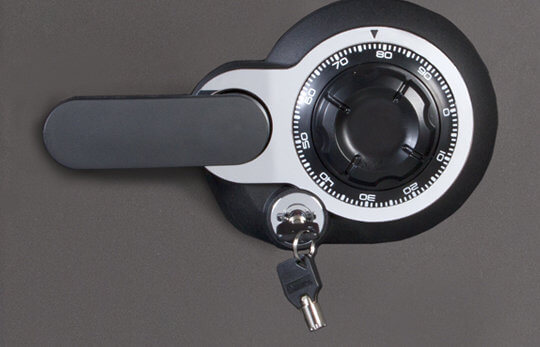
How to Open a Mechanical Sentry Safe
If your safe uses a traditional dial lock, there is no override key.
You’ll need to:
- Turn the dial several full rotations to reset it.
- Follow the correct dialing sequence for your combination.
- Stop precisely at each number.
- Turn the handle after completing the sequence.
If you make a mistake, start over from the beginning.
Mechanical locks require patience and accuracy.
Common Reasons a Sentry Safe Won’t Open
Even with the correct key or combination, several issues may prevent the safe from opening.
Dead Batteries
Weak batteries may power the keypad but not the internal unlocking mechanism.
Incorrect Combination
Entering one wrong digit or pressing buttons too quickly may cause the safe to reject the code.
Lockout Mode
Several incorrect attempts can temporarily disable the keypad for security purposes.
Jammed Locking Bolts
Overfilled safes sometimes place pressure on the bolts, preventing them from retracting.
Internal Mechanical Failure
Worn components or damaged locking mechanisms may require professional repair.
How to Prevent Future Lockouts
A few simple maintenance habits can greatly reduce the chances of getting locked out.
Replace Batteries Every Year
Don’t wait until the keypad stops responding.
Annual battery replacement is inexpensive and helps prevent unexpected failures.
Store the Override Key Separately
Never lock the only backup key inside the safe.
Instead:
- Keep it in a secure location outside the safe.
- Label it clearly.
- Ensure another trusted adult knows where it is if appropriate.
Test the Lock Regularly
Open and close the safe every few weeks.
Routine testing helps identify problems before they become serious.
Avoid Overpacking
Leave enough space around the door so items don’t press against the locking bolts.
This helps the locking mechanism operate smoothly.
Record Your Combination Securely
Store your combination:
- In a password manager
- In a secure document
- With trusted estate planning documents
Avoid writing it directly on the safe.
Frequently Asked Questions
Do all Sentry Safes have a manual override key?
No. Many electronic models include an override key, but some rely solely on the electronic keypad. Mechanical dial safes do not use override keys.
Can I manually open my Sentry Safe if the batteries are dead?
If your model has an override key, yes. Otherwise, replacing the batteries is usually the first step. Some models also support external battery power to restore keypad function temporarily.
Why won’t my override key turn?
Possible causes include using the wrong key, a bent or damaged key, dirt inside the lock cylinder, pressure on the door, or an internal mechanical problem.
Can a locksmith open a Sentry Safe?
Yes. A qualified locksmith may be able to help if you’ve exhausted other options, especially if the lock has failed mechanically. Proof of ownership is typically required.
Should I drill my Sentry Safe open?
No. Drilling should be considered only as a last resort and ideally performed by a qualified professional or under the manufacturer’s guidance. It can permanently damage the safe and may void the warranty.
Final Thoughts
Manually opening a Sentry Safe is possible only if your model includes a manual override key or another approved backup access method. For many owners, simply replacing dead batteries or using the override key restores access in minutes. Taking the time to identify your safe’s locking system and following the correct procedure can help you avoid unnecessary damage and frustration.
If the safe still won’t open after you’ve tried the recommended troubleshooting steps, resist the temptation to force it open. Contact Sentry Safe customer support or a qualified locksmith for assistance. Keeping fresh batteries installed, storing your override key in a secure location outside the safe, and testing the lock periodically are the best ways to ensure your valuables remain both protected and accessible when you need them.


