
The world around us is changing fast, and so is the way we protect our homes. Gone are the days when a simple door lock or a loud siren was enough. Today, many people want more control, better safety, and smarter options. That’s where smart home alarm systems come in. But what exactly are they? How do they work, and are they really better than old systems? Let’s explore the details so you can decide if a smart home alarm system is right for you.
What Is A Smart Home Alarm System?
A smart home alarm system is a modern security setup that uses connected devices and wireless technology. These systems are designed to keep your home safe by letting you monitor and control everything from your phone or computer. Unlike traditional alarms, which usually just make noise when someone breaks in, smart systems send alerts to your phone, allow remote control, and can connect with other smart devices.
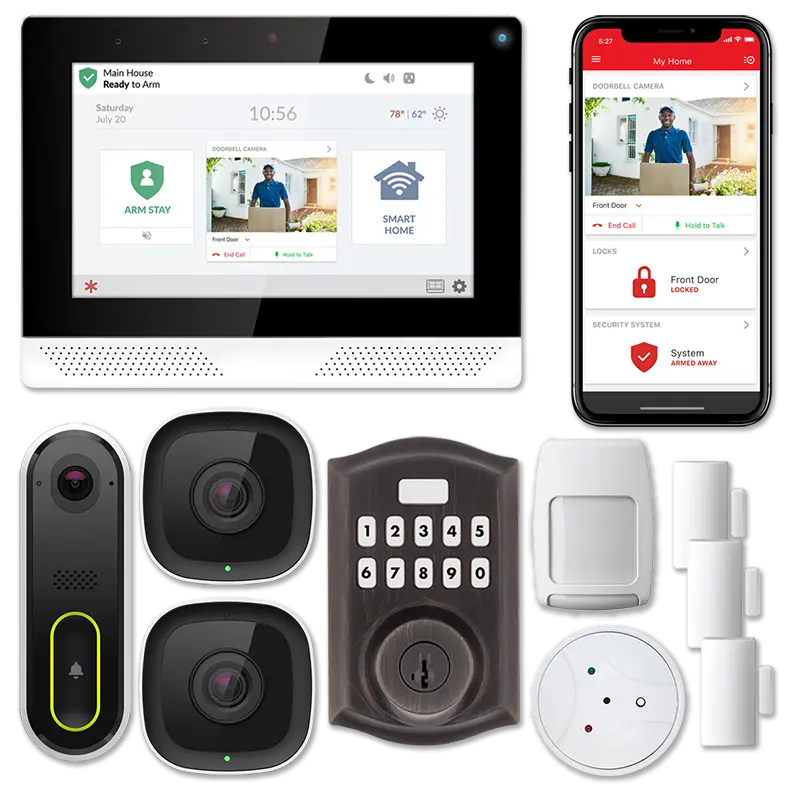
They often include sensors for doors and windows, motion detectors, cameras, and even smart locks. Some can also detect smoke, carbon monoxide, or water leaks. The main idea is to create a network of devices that talk to each other and to you, making your home safer and easier to manage.

Exclusive Deals
Limited-time Exclusive Deals. Check current discount on Amazon.
Check Price on Amazon As an Amazon Associate I earn from qualifying purchases.Key Features Of Smart Home Alarm Systems
Smart home alarm systems offer many features that make them different from older setups. Here are the main ones:
1. Wireless Connectivity
Most smart alarms use Wi-Fi, Bluetooth, or Zigbee to connect devices. This means you don’t need to drill holes or run wires everywhere.
2. Mobile Access And Control
You can check your home, arm or disarm the system, and get alerts from your smartphone, tablet, or computer—anywhere, anytime.
3. Instant Notifications
If something happens (like a door opens or motion is detected), you get a real-time alert. Some systems also send emails or text messages.
Exclusive Deals
Limited-time Exclusive Deals. Check current discount on Amazon.
Check Price on Amazon As an Amazon Associate I earn from qualifying purchases.4. Integration With Other Devices
Smart alarms can work with smart lights, thermostats, cameras, and locks. For example, your lights could turn on when motion is detected.
5. Remote Monitoring
You don’t need to be at home to see what’s going on. Live video feeds and status updates are available through apps.
6. Customizable Settings
You can set rules, schedules, and zones. For example, you might only want the alarm active at night or when you’re away.
Exclusive Deals
Limited-time Exclusive Deals. Check current discount on Amazon.
Check Price on Amazon As an Amazon Associate I earn from qualifying purchases.7. Automated Responses
Some systems can automatically call emergency services or trigger other smart devices.
8. User-friendly Interface
Most smart alarms have simple apps or dashboards that make them easy to use—even for beginners.
How Do Smart Home Alarm Systems Work?
Smart alarm systems use a mix of sensors, cameras, and control panels. These devices connect wirelessly to a central hub. Here’s how the process works:
- Sensors are placed on doors, windows, and sometimes in rooms. They detect movement or when something opens.
- Cameras record or stream video, letting you see what’s happening inside or outside.
- Control Panels let you arm/disarm the system and see alerts. Many are touch screens or can be controlled through your phone.
- The Hub acts as the brain, connecting all devices and sending data to your phone or cloud.
When a sensor detects something unusual (like movement or a door opening), it tells the hub. The hub then sends you an alert, and may also trigger other actions (like turning on lights or recording video).
Example Scenario
Imagine you’re on vacation. A smart sensor on your front door detects movement. It sends a signal to the hub, which alerts you through your phone. You check the live camera feed and see someone at your door. You can then decide to call the police or trigger a loud alarm remotely.
Types Of Smart Home Alarm Systems
Smart home alarm systems come in different shapes and sizes. Here are the most common types:
Diy Systems
You buy the devices, set them up yourself, and manage everything through an app. These are popular because they’re affordable and flexible.
Professionally Installed Systems
Experts install the devices and often offer ongoing support or monitoring. These systems are usually more expensive but may be more reliable.
Self-monitored Systems
You get alerts and handle everything yourself. There’s no monthly fee, but you’re responsible for responding.
Monitored Systems
A company watches your home 24/7. If something happens, they contact you and emergency services. This adds a monthly cost but gives extra peace of mind.
Hybrid Systems
Some systems let you switch between self-monitoring and professional monitoring. This is useful if you travel often or want backup support.
Comparison: Smart Vs Traditional Home Alarm Systems
Let’s compare smart alarm systems to older, traditional setups. This helps you see the big differences.
| Feature | Smart Alarm System | Traditional Alarm System |
|---|---|---|
| Connectivity | Wireless, app-based | Wired, control panel only |
| Notifications | Instant, mobile alerts | Local siren, sometimes phone call |
| Integration | Works with other smart devices | Standalone |
| Setup | DIY or professional | Usually professional |
| Remote Access | Yes, from anywhere | No |
| Custom Features | Highly customizable | Limited customization |
Benefits Of Smart Home Alarm Systems
Smart home alarm systems offer many advantages over traditional options. Here’s why more people are choosing them:
Improved Security
Because devices are connected and can send instant alerts, you’re more likely to catch problems early. Cameras let you see what’s happening, and automated responses can help scare away intruders.
Easy Monitoring
You don’t need to be at home to know what’s going on. Mobile apps give you full control, which is useful for busy families or people who travel.
Flexible And Expandable
You can start with a basic setup and add more devices later. This means your system grows with your needs.
Integration With Smart Home Devices
Smart alarms work with other devices like smart locks, lights, and thermostats. For example, your door can lock automatically when you leave, or lights can turn on if the alarm is triggered.
Lower Costs
DIY systems are usually cheaper. You avoid monthly fees and expensive installation costs.
User-friendly
Most systems are designed for easy use. Simple apps and clear instructions help even non-technical users.
Non-obvious Insights
1. False Alarm Reduction
Smart systems can use advanced sensors and cameras to confirm real threats, reducing false alarms. Many traditional systems trigger easily, causing unnecessary stress or police visits.
2. Data And History Tracking
Smart alarms can keep a log of events—who armed/disarmed the system, when doors were opened, or when motion was detected. This data is useful for understanding patterns or sharing with police if needed.

Common Components Of Smart Home Alarm Systems
Smart alarms include several devices. Here are the main ones you’ll find:
Sensors
- Door/window sensors
Alert you when a door or window opens.
- Motion sensors
Detect movement inside or outside the house.
Cameras
- Indoor/outdoor cameras
Give live video and record events.
- Video doorbells
Let you see and talk to visitors.
Control Panel Or Hub
- The main device that connects everything. Usually touch-screen or app-based.
Alarms And Sirens
- Loud sounds to scare away intruders.
Smart Locks
- Let you lock/unlock doors remotely.
Environmental Sensors
- Detect smoke, carbon monoxide, or water leaks.
Smart Lights
- Can turn on automatically if an alarm is triggered.
How To Choose A Smart Home Alarm System
Selecting the right system can be tricky. Here’s what matters most:
Coverage
Think about which areas need protection: doors, windows, garage, backyard, etc. Choose a system that covers all important spots.
Compatibility
Check if the system works with your existing smart devices (lights, locks, speakers). Some brands only work with their own products.
Monitoring Options
Decide if you want self-monitoring or professional monitoring. Professional monitoring adds cost but gives extra support.
Ease Of Installation
DIY systems are simple to set up. If you’re not comfortable installing devices, consider professional installation.
Price
Compare device costs, monthly fees, and installation charges. Some systems are cheap upfront but have hidden monthly fees.
Mobile App Quality
A good app makes everything easier. Look for systems with reliable, easy-to-use apps.
Customer Support
If you run into problems, good support is important. Check reviews and support options.
Security And Privacy
Make sure the system uses strong encryption and protects your personal data. Some cheaper systems can be hacked easily.
Expandability
If you might add more devices later, choose a system that supports expansion.
| Factor | Why It Matters | Common Mistake |
|---|---|---|
| Coverage | Protects all entry points | Missing garage or back doors |
| Compatibility | Works with other devices | Buying incompatible brands |
| Monitoring | Immediate help in emergencies | Choosing self-monitoring, then forgetting to check alerts |
| Price | Fits your budget | Ignoring hidden fees |
| App Quality | Makes system easy to use | Choosing a system with buggy apps |
Installation And Setup Process
Setting up a smart home alarm system is usually simple, but each brand is a bit different. Here’s a general overview:
1. Read The Instructions
Don’t skip this step. Each system has unique requirements.
2. Install Sensors
Attach door/window sensors with adhesive or screws. Place motion sensors in key spots (like hallways or near entrances).
3. Set Up Cameras
Mount cameras outside or inside. Connect them to power and Wi-Fi.
4. Connect The Hub
Plug in the hub and connect it to your network.
5. Download The App
Install the app on your phone. Follow prompts to connect devices.
6. Test Everything
Check that sensors and cameras work. Trigger alarms to see how notifications arrive.
7. Customize Settings
Set rules, arm/disarm schedules, and notification preferences.
Practical Tips
- Place motion sensors at least 6 feet above the floor for best results.
- Don’t put sensors near heating vents—they can trigger false alarms.
- Change default passwords on all devices to protect against hackers.
- Use camera privacy covers when you’re at home, if you’re concerned about privacy.
Cost Of Smart Home Alarm Systems
Prices vary a lot based on features, devices, and monitoring. Here are average costs in the US:
- DIY kits: $150–$500 (includes sensors, hub, and maybe a camera)
- Professional installation: $300–$1,000 (plus labor)
- Monthly monitoring: $10–$50 (optional)
Some brands offer bundles that include several devices for a lower price. Always check for hidden fees (like app subscriptions or extra sensors).
Example Data
According to a 2023 survey, 70% of US homeowners prefer DIY systems because of lower cost and easy setup. Professional monitoring is chosen by about 30%—often people with larger homes or higher security needs.

Smart Home Alarm System Brands
Many companies offer smart home alarms. Here are a few popular brands:
- Ring
Known for video doorbells and easy-to-use systems.
- SimpliSafe
Offers flexible DIY setups and professional monitoring.
- Nest Secure
Integrates well with Google devices.
- ADT
Traditional security company now offering smart systems.
- Abode
Good for customization and smart home integration.
Always compare reviews and features before buying.
Smart Home Alarm Systems And Privacy
Smart alarms collect a lot of data—video, sensor history, and more. You need to make sure your privacy is protected.
- Encryption:
Choose systems that use strong encryption to protect your data.
- Data Storage:
Some systems store video and alerts in the cloud; others keep it local.
- Access Controls:
Set strong passwords and limit who can access your system.
Non-obvious Insight
Even if a system uses encryption, weak passwords can let hackers in. Always use unique, strong passwords for your app and devices.
Common Mistakes When Using Smart Home Alarm Systems
1. Ignoring Software Updates
Updates fix bugs and security problems. If you skip them, your system could be vulnerable.
2. Leaving Devices Unprotected
Not changing default passwords or using weak passwords makes it easy for hackers.
3. Poor Placement Of Sensors
Sensors in the wrong spot miss threats or cause false alarms.
4. Forgetting To Arm The System
Smart alarms are only useful if you use them. Set reminders or automate arming.
5. Not Checking Compatibility
Buying devices that don’t work together leads to frustration.
Smart Home Alarm Systems And Emergency Response
Some smart systems can automatically contact emergency services if an alarm is triggered. This is useful if you’re away or unable to respond.
- Professional Monitoring:
Trained staff can call police, fire, or medical help.
- Self-Monitoring:
You get alerts and decide what to do.
Example
If smoke is detected, the system can alert you and, with professional monitoring, fire services can be contacted even if you’re not home.
Smart Home Alarm Systems In The Real World
Many people use smart alarms for different reasons. Here are a few examples:
- Families:
Set up alerts so parents know when kids arrive home.
- Travelers:
Monitor their home while away, and get instant alerts.
- Small businesses:
Protect offices and shops with smart systems.
A 2022 study showed homes with smart alarms are 60% less likely to be burgled than those with no alarm or traditional systems.
Future Trends In Smart Home Alarm Systems
Smart alarms are getting smarter every year. Here’s what to expect soon:
- Artificial Intelligence:
Systems will analyze video and sensor data to spot real threats, not just movement.
- Voice Control:
More systems will work with Alexa, Google Assistant, or Siri.
- Better Integration:
Everything in your home—from locks to lights—will work together for seamless security.
- Advanced Sensors:
Detecting not just movement, but unusual sounds, temperature changes, or even air quality.
Frequently Asked Questions
What Makes A Smart Home Alarm System “smart”?
A smart system uses connected devices, wireless communication, and mobile apps to monitor and control your home. It can send instant alerts, integrate with other smart devices, and be managed remotely.
Do I Need Professional Monitoring For My Smart Alarm System?
Professional monitoring adds extra support, as trained staff can contact emergency services. However, many people use self-monitoring to save money. It depends on your needs and comfort level.
Are Smart Home Alarm Systems Safe From Hackers?
Most systems use strong encryption and security features, but you must use strong passwords and update software regularly. Avoid systems with poor security records.
Can Smart Home Alarm Systems Work With Other Smart Devices?
Yes, many systems integrate with smart locks, lights, thermostats, and voice assistants. Always check compatibility before buying.
What If I Move To A New Home?
Most smart alarm systems are easy to uninstall and move. Just remove the devices, reset the hub, and reinstall in your new home.
Smart home alarm systems offer more than just basic protection—they give peace of mind, flexibility, and control. As technology improves, these systems will become even more powerful and easy to use. If you want to learn more about the technical details or compare brands, check out resources like Wikipedia. Whether you’re a beginner or a tech enthusiast, smart home alarms are changing the way we keep our homes safe.


