
Smart door locks are becoming more common in homes and businesses. People like them for their convenience, security, and modern look. But there is one question many buyers ask: Do smart door locks work without Wi-Fi? If you are thinking about getting a smart lock or you already have one, understanding this is important. Not every smart lock needs Wi-Fi, and not every feature depends on an internet connection. Let’s explore how these devices function, what happens when Wi-Fi is unavailable, and which locks are best for your needs.

Exclusive Deals
Limited-time Exclusive Deals. Check current discount on Amazon.
Check Price on Amazon As an Amazon Associate I earn from qualifying purchases.How Smart Door Locks Work
Smart door locks are electronic devices that let you control access to your home or office. Instead of traditional keys, you use mobile apps, keypads, fingerprints, or even voice commands. The main idea is to make locking and unlocking easier and safer.
Most smart locks have these features:
- Remote access: Control the lock from anywhere using your phone.
- Activity logs: See who entered and when.
- Temporary access: Give codes to guests or workers for a limited time.
- Integration: Work with other smart devices (like security cameras).
But the way smart locks connect to your phone or other devices can be very different. Some use Wi-Fi, while others use Bluetooth, Zigbee, Z-Wave, or even just a keypad.
Types Of Connections In Smart Door Locks
Smart locks can connect to your phone or smart home system in several ways. Understanding these helps you know which features will work without Wi-Fi.
Exclusive Deals
Limited-time Exclusive Deals. Check current discount on Amazon.
Check Price on Amazon As an Amazon Associate I earn from qualifying purchases.Bluetooth Smart Locks
Bluetooth is a wireless technology that connects devices over short distances. Many smart locks use Bluetooth to talk directly to your phone. You don’t need Wi-Fi for basic features.
- Advantages: Works even if Wi-Fi is down; battery efficient; no extra hub needed.
- Limitations: Range is limited (usually 30–50 feet); no remote access unless paired with a hub.
Wi-fi Smart Locks
Wi-Fi smart locks connect directly to your home network. This allows you to control them from anywhere with an internet connection.
- Advantages: Full remote access; integration with smart home platforms; real-time alerts.
- Limitations: Needs constant Wi-Fi; uses more battery; vulnerable to network outages.
Zigbee And Z-wave Smart Locks
These are wireless protocols designed for smart home devices. They need a hub (like Samsung SmartThings) to connect to your phone or network.
- Advantages: Reliable; good for larger homes; low battery use.
- Limitations: Needs a hub; remote features depend on Wi-Fi.
Keypad And Offline Smart Locks
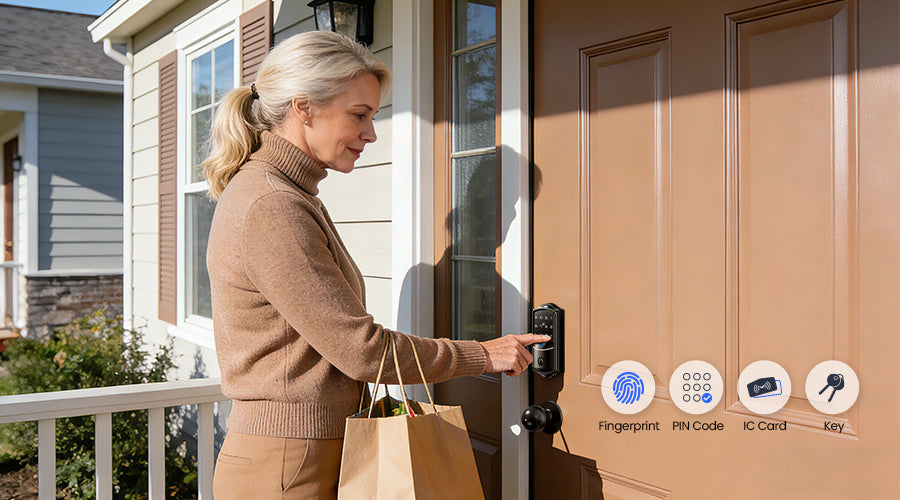
Some smart locks use a simple keypad or physical methods (like fingerprint scanners). They don’t need Wi-Fi or any network.
- Advantages: Always works; no connectivity issues.
- Limitations: No remote access; fewer smart features.
What Features Work Without Wi-fi?
Not every feature of a smart lock depends on Wi-Fi. Let’s see which functions you can rely on even when there is no internet connection.
Exclusive Deals
Limited-time Exclusive Deals. Check current discount on Amazon.
Check Price on Amazon As an Amazon Associate I earn from qualifying purchases.Basic Locking And Unlocking
Most smart locks still let you lock and unlock your door using:
- Physical keys
- Keypad codes
- Bluetooth (if you’re nearby)
- Fingerprint or card
If your smart lock uses Bluetooth or a keypad, you can still enter even if your Wi-Fi is down.
Local Access Through Bluetooth
If your lock supports Bluetooth, you can use your phone to unlock the door as long as you are within range. Remote access won’t work, but the basic unlocking is still possible.
Using Backup Methods
Smart locks often include backup access options:
- Mechanical keys: For emergencies.
- Keypads: Enter a code directly.
- RFID cards: Touch to unlock.
These methods work without Wi-Fi or even without batteries (for some models).
Features That Require Wi-fi
Some functions will not work when Wi-Fi is unavailable:
- Remote unlocking (from far away)
- Real-time alerts and notifications
- Integration with voice assistants (like Alexa or Google Home)
- Activity logs sent to your phone
If you want these features, your lock needs a working internet connection.
Smart Locks That Work Well Without Wi-fi
Many smart locks are designed to work even when Wi-Fi is down. Here are some popular models and their capabilities.
| Lock Model | Connection | Works Without Wi-Fi? | Backup Access |
|---|---|---|---|
| August Smart Lock (Bluetooth) | Bluetooth | Yes (local) | Physical key |
| Schlage Encode | Wi-Fi | Yes (keypad) | Keypad, key |
| Yale Assure Lock SL | Zigbee/Z-Wave | Yes (keypad) | Keypad, key |
| Kwikset SmartCode 888 | Z-Wave | Yes (keypad) | Keypad, key |
| Samsung SHS-3321 | Keypad | Yes (always) | Keypad, RFID |
As you can see, most modern smart locks offer at least one offline access method.
-1)
Real-life Scenarios: What Happens When Wi-fi Goes Down?
Imagine you are coming home late at night and your internet is not working. Will your smart lock leave you locked out? Usually, you can still unlock the door with a keypad or Bluetooth. But if you are trying to unlock your door remotely for a guest, you won’t be able to do it without Wi-Fi.
Another common scenario is during a power outage. Most smart locks are battery-powered, so they keep working even if the electricity is out. However, if your lock uses Wi-Fi, remote access will fail if your router loses power.
Let’s look at a practical example:
- You’re on vacation, and a friend needs to enter your home.
- If you use a Wi-Fi smart lock, you can send a code or unlock the door remotely—if your internet is working.
- If the Wi-Fi is down, your friend can only use a keypad code or physical key.
This shows the importance of having backup access options.
Smart Lock Security Without Wi-fi
People often worry that losing Wi-Fi makes their smart lock unsafe. In reality, most locks are designed to stay secure even without internet.
Encryption And Local Security
Smart locks use encryption to protect data sent over Bluetooth or other channels. Even without Wi-Fi, your lock’s local security remains strong. Hackers would need to be physically close to try to break in.
Physical Security
If your smart lock has a strong deadbolt and is made from quality materials, it is just as safe as a traditional lock. The keypad or fingerprint sensor adds another layer.
Common Security Mistakes
- Using weak codes: Choose codes that are hard to guess. Avoid birthdays or simple patterns.
- Ignoring battery levels: If your lock’s battery dies, you may lose access. Check battery status regularly.
- Not updating firmware: Even offline smart locks need software updates for security. Update through the app when possible.
Comparing Smart Lock Technologies
Different technologies offer different advantages. Here’s a quick comparison to help you decide which is best for your needs.
| Technology | Remote Access | Works Without Wi-Fi | Battery Use | Extra Hardware Needed |
|---|---|---|---|---|
| Bluetooth | No (unless with hub) | Yes (local) | Low | No |
| Wi-Fi | Yes | No | High | No |
| Zigbee/Z-Wave | Yes (with hub) | Yes (local) | Low | Hub |
| Keypad | No | Yes | Low | No |
Choose the technology that matches your lifestyle. If you travel often and need remote access, Wi-Fi is useful. If you want reliability and simple use, keypad or Bluetooth may be better.
Practical Tips For Smart Lock Owners
If you own or plan to buy a smart lock, here are some helpful tips:
- Always check for backup access. Make sure your lock has a physical key or keypad option.
- Keep batteries charged. Smart locks warn you when batteries are low. Change them before they run out.
- Test offline features. Try locking and unlocking without Wi-Fi to see what works.
- Set strong codes. Use random numbers for keypad access.
- Update software. Even offline locks need updates for security.
- Store emergency keys safely. Don’t keep them outside, but make sure you can reach them in an emergency.
Non-obvious Insights For Beginners
Many new users think that losing Wi-Fi means losing all smart lock features. In reality, most smart locks are designed to work locally. Here are two insights many beginners miss:
- Bluetooth locks can be unlocked by anyone with the registered phone, even without internet. You just need to be nearby.
- Some Wi-Fi locks keep temporary codes active even if the Wi-Fi is down. Codes already saved in the lock’s memory will still work until the connection is restored.
Smart Lock Brands That Don’t Need Wi-fi
If you want a lock that works perfectly offline, consider these brands:
- Schlage: Many models have keypads and backup keys.
- Yale: Offers keypad-only locks and models with Z-Wave connectivity.
- Kwikset: SmartCode series supports offline keypad access.
- Samsung: Digital locks with keypad and RFID.
- August: Bluetooth models work locally.
These brands focus on reliable offline access.
How To Choose A Smart Lock For Your Home
When picking a smart lock, think about your daily habits and needs:
- Do you need remote access? Choose a Wi-Fi lock.
- Is reliable access more important? Keypad or Bluetooth is better.
- Will guests or workers need entry? Look for locks with temporary codes.
- Do you have a smart home hub? Zigbee or Z-Wave locks integrate well.
Also, consider the lock’s build quality, battery life, and backup options. Read reviews and ask about offline features before buying.
Common Myths About Smart Locks And Wi-fi
Let’s clear up some misconceptions.
Myth 1: Smart Locks Stop Working When Wi-fi Is Down
Most smart locks keep basic functions even without Wi-Fi. Only remote features are affected.
Myth 2: Wi-fi Locks Are Always Less Secure
Smart locks use strong encryption and are designed for safety. The main risk comes from weak codes or poor battery maintenance.
Myth 3: You Must Have A Smart Home Hub
Many locks work without hubs. Only Zigbee or Z-Wave models need them.
Myth 4: Smart Locks Need Constant Software Updates
Offline locks don’t need as many updates, but keeping firmware current is still wise.

Smart Lock Battery Life Without Wi-fi
Wi-Fi locks use more battery because they are always connected. Bluetooth and keypad locks last longer, sometimes up to a year or more. If your Wi-Fi goes down, your lock still works as long as the battery is charged.
Here’s a quick comparison of battery life:
| Lock Type | Average Battery Life |
|---|---|
| Wi-Fi | 3–6 months |
| Bluetooth | 8–12 months |
| Keypad | 12–18 months |
| Zigbee/Z-Wave | 10–14 months |
Always check battery levels and keep spare batteries handy.
Smart Locks In Apartments And Rentals
Smart locks are popular in apartments and rental properties. If you manage rentals, you may want locks that work offline, so tenants are not locked out during outages. Keypad locks are best for this, as you can change codes easily and give access without needing Wi-Fi.
Some cities and property managers recommend smart locks for security and convenience. For more details, see this Wikipedia overview.
Frequently Asked Questions
Will My Smart Lock Still Work If My Wi-fi Goes Out?
Yes, most smart locks will still work using a keypad, Bluetooth, or physical key. Only remote access and notifications stop working.
Can I Unlock My Smart Lock From Far Away Without Wi-fi?
No. Without Wi-Fi, you cannot unlock your smart lock remotely. You must be nearby or use a backup method.
Are Bluetooth Smart Locks Safer Than Wi-fi Locks?
Both types are secure if you use strong codes and keep software updated. Bluetooth locks are less exposed to remote attacks, but Wi-Fi locks offer more features.
What Happens If My Smart Lock’s Battery Dies?
You may lose access to smart features. Most locks have a physical key or emergency power option. Always check battery status and replace batteries regularly.
Can I Give Temporary Access To Guests Without Wi-fi?
Yes, you can give guests keypad codes or physical keys. Some locks store codes locally, so they still work even if Wi-Fi is down.
Smart locks are a great step towards modern security. You don’t need Wi-Fi for basic access and safety, but having internet lets you use more advanced features. Always choose a lock that fits your lifestyle, and make sure it has reliable backup options.
By understanding how smart locks work without Wi-Fi, you can enjoy both convenience and peace of mind.


