
Smart door locks are changing the way we secure our homes. Instead of keys, you can unlock doors with your phone, fingerprint, or even voice. But if you already have a deadbolt on your door, you might wonder: Can you use a smart lock with your existing deadbolt? Or do you have to change everything? This question matters because most homes, especially in the US, use deadbolts as their main security. Upgrading to a smart lock should be easy, but there are things you must know before starting.

Exclusive Deals
Limited-time Exclusive Deals. Check current discount on Amazon.
Check Price on Amazon As an Amazon Associate I earn from qualifying purchases.This article explains if and how smart door locks can work with existing deadbolts. You’ll learn about compatibility, installation, pros and cons, security, and common mistakes. It also covers what to do if your deadbolt isn’t a perfect match. Whether you rent or own your home, this guide helps you decide the best way to upgrade your door without risking your safety or wasting money.
Understanding Deadbolts And Smart Locks
Deadbolts are popular because they offer strong protection. Unlike spring locks, a deadbolt needs a key or handle to move. Most deadbolts are single cylinder (key outside, thumb turn inside) or double cylinder (key both sides). They are made to resist force, making them harder to break in.
Smart locks use digital technology to unlock doors. Common ways to unlock include:
- Smartphone apps
- Keypads (entering a code)
- Fingerprint sensors
- Bluetooth or Wi-Fi connections
- Voice commands (using smart speakers)
Some smart locks replace the whole lock. Others are made to work with existing deadbolts. The goal is to make your door smarter without losing security.
Exclusive Deals
Limited-time Exclusive Deals. Check current discount on Amazon.
Check Price on Amazon As an Amazon Associate I earn from qualifying purchases.Types Of Smart Locks For Existing Deadbolts
There are two main types of smart locks when you want to keep your deadbolt:
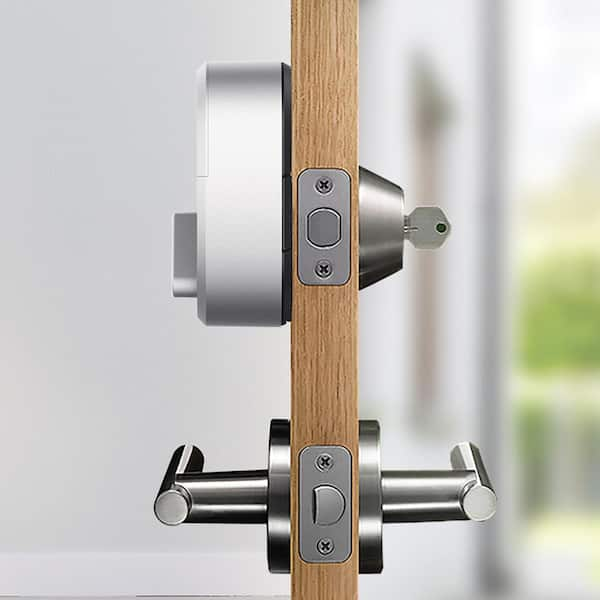
- Retrofit smart locks: These attach to the inside of your door and turn your deadbolt’s knob. You keep your original deadbolt and keys.
- Full replacement smart locks: These need you to remove your deadbolt and install a new smart lock. You lose your old keys and hardware.
Let’s compare these options:
| Type | Deadbolt Compatibility | Installation | Pros | Cons |
|---|---|---|---|---|
| Retrofit | Works with most single-cylinder deadbolts | Easy, usually tool-free | Keep old keys, quick setup, less door damage | May not fit all deadbolts, sometimes looks bulky |
| Full Replacement | Requires removing deadbolt | More complex, may need tools | Modern look, full smart features | Lose old keys, may not fit older doors |
Most people choose retrofit smart locks because they’re simple and don’t require changing door hardware. Popular brands like August, Yale, and Level offer retrofit models.

Compatibility: Will A Smart Lock Fit Your Deadbolt?
Not all deadbolts work with all smart locks. Before buying, check:
- Deadbolt shape and size: Most retrofit locks need a single-cylinder deadbolt. Double-cylinder deadbolts are less compatible.
- Backset: This is the distance from the edge of your door to the center of the lock. Standard is 2-3/8” or 2-3/4”.
- Thumb turn style: Some smart locks need a flat or round thumb turn, others need a specific shape.
- Door thickness: Most smart locks fit doors 1-3/8” to 2” thick.
Manufacturers list compatible deadbolts on their websites. For example, the August Smart Lock fits most single-cylinder deadbolts from brands like Kwikset, Schlage, and Baldwin. If your deadbolt is old or custom, check the compatibility guide before buying.
Exclusive Deals
Limited-time Exclusive Deals. Check current discount on Amazon.
Check Price on Amazon As an Amazon Associate I earn from qualifying purchases.Here’s a quick reference for common deadbolts and smart lock compatibility:
| Deadbolt Brand | Retrofit Smart Lock Compatibility | Notes |
|---|---|---|
| Kwikset | High | Fits most models |
| Schlage | High | Check thumb turn shape |
| Baldwin | Medium | Some models require adapters |
| Defiant | Medium | Check backset and turn |
| Generic | Low | May need custom fitting |
Non-obvious insight: Some older deadbolts have unique thumb turns or sizes. Even if a smart lock says it’s “universal,” always check the shape and depth of your deadbolt’s thumb turn. If your deadbolt is rare, contact the smart lock maker for guidance.
How To Install A Smart Lock With Your Existing Deadbolt
If you’ve chosen a retrofit smart lock, installation is usually quick. Most brands promise you can do it in under 15 minutes. Here’s a step-by-step guide:
- Check Compatibility: Double-check your deadbolt matches the smart lock’s requirements.
- Remove Existing Thumb Turn: Take off the thumb turn on the inside of your door. Usually, this needs a screwdriver.
- Attach Smart Lock Mounting Plate: Secure the plate to your door using the screws from the deadbolt.
- Mount the Smart Lock: Slide or snap the smart lock onto the plate.
- Connect Batteries: Insert the batteries (usually AA or CR123).
- Set Up the App: Download the smart lock’s app and follow the instructions.
- Test the Lock: Make sure the smart lock turns your deadbolt smoothly.
Example: The August Smart Lock attaches to the inside of your door. You keep your existing deadbolt and keys. The app guides you step by step, and you can still use your old key from outside.
Tip: If your deadbolt doesn’t turn smoothly by hand, fix it before installing the smart lock. A sticky deadbolt can cause the smart lock motor to jam or fail.
Non-obvious insight: Many people forget to check if the smart lock’s motor is strong enough for their deadbolt. If your deadbolt is hard to turn, the smart lock may drain batteries faster or stop working. Lubricate your deadbolt and test it before installation.
Benefits Of Using Smart Locks With Existing Deadbolts
Keeping your deadbolt and adding a smart lock offers several advantages:
- Keep your old keys: If your phone dies or the lock fails, you still have your key.
- No need to change hardware: Saves money and keeps your door looking the same.
- Easy to revert: If you move or want to remove the smart lock, just take it off.
- Flexible access: You can use both smart features and your key.
Smart locks also allow you to:
- Send virtual keys to guests or cleaners
- Track who enters and when (activity logs)
- Lock/unlock remotely (from anywhere)
- Integrate with smart home systems (like Alexa or Google Home)
Stat: According to a 2023 report by Statista, about 19% of US households use smart locks, and most prefer retrofit models for easy installation.
Security And Reliability Considerations
Security is the main reason people use deadbolts. Does adding a smart lock make it weaker? Let’s look at key factors:
Physical Security
Smart locks do not change the strength of your deadbolt. If your deadbolt is Grade 1 (the strongest rating), it stays Grade 1. Retrofit smart locks simply turn the deadbolt for you.
However, some smart locks add features like:
- Auto-lock: Automatically locks after a set time
- Tamper alerts: Sends notifications if someone tries to break in
Digital Security
Smart locks use encryption to protect your data. Look for locks with AES 128-bit or 256-bit encryption. Also, choose brands with good reputation for cybersecurity.
Common mistake: Some users forget to update the firmware. Outdated software can be hacked. Set reminders to check for updates every few months.
Battery Life
Smart locks run on batteries. If batteries die, you can still use your key (with most retrofit models). Battery life ranges from 6 months to 1 year, depending on use.
Tip: Always check battery level in the app. Most locks warn you before batteries get low.
Emergency Access
If your phone, app, or smart lock fails, your old key still works. This is a major benefit of retrofit models. Full replacement locks may not allow this.
Common Problems And How To Avoid Them
Even with good planning, some issues can happen:
- Misalignment: If your deadbolt is not aligned, the smart lock may struggle or jam.
- Weak Wi-Fi/Bluetooth: Poor signal can cause delays or failures in unlocking.
- App glitches: Sometimes apps crash or fail to connect. Reinstall or update the app for fixes.
- Battery drain: Cold weather or heavy use can drain batteries faster.
How to avoid:
- Align your deadbolt and check smooth operation before installing.
- Place a Wi-Fi extender near your door if needed.
- Update your app and firmware regularly.
- Use quality batteries and replace them as soon as you get a warning.
What To Do If Your Deadbolt Isn’t Compatible
Sometimes your deadbolt won’t fit a smart lock. Here’s what you can do:
- Try an adapter kit: Some smart locks offer adapters for unusual deadbolts.
- Replace the deadbolt: Buy a standard single-cylinder deadbolt. This usually costs $20–$50.
- Choose a full replacement smart lock: If you don’t mind losing your old key, pick a lock that replaces everything.
- Ask a locksmith: They can help you find a deadbolt that matches your door and the smart lock.
Example: If you have a double-cylinder deadbolt (key both sides), most smart locks won’t fit. Replace it with a single-cylinder deadbolt for smart lock compatibility.
Comparing Popular Smart Locks For Existing Deadbolts
Here’s a comparison of three leading retrofit smart locks:
| Brand | Works with Existing Deadbolt | Unlock Methods | Battery Life | Smart Home Integration |
|---|---|---|---|---|
| August Smart Lock | Yes | App, keypad, voice, key | 6–12 months | Alexa, Google, Apple HomeKit |
| Yale Assure SL | No (full replacement) | App, keypad, voice | 6–9 months | Alexa, Google, SmartThings |
| Level Bolt | Yes | App, key, voice | 12+ months | Apple HomeKit |
Note: Only August and Level Bolt let you keep your deadbolt and keys. Yale Assure SL needs full replacement.
Smart Lock Features That Matter
If you want to use a smart lock with your deadbolt, focus on these features:
- Easy installation: Look for tool-free setup and clear instructions.
- Battery alerts: Choose locks that warn you early about low battery.
- Remote access: Allows you to lock/unlock from anywhere.
- Integration: Works with your favorite smart home system.
- Activity logs: See who unlocked the door and when.
Stat: Over 70% of smart lock users say remote access is their top reason for upgrading.
Renting Vs. Owning: Smart Locks And Deadbolts
If you rent your home, you may not be allowed to change locks. Retrofit smart locks are perfect for renters because:
- No changes to door hardware
- Easy to remove when you move out
- Landlord can still use the original key
Tip: Always ask your landlord before installing a smart lock. Some require you to get approval in writing.
Smart Lock Security: Real Risks And Solutions
Smart locks add new risks, but also new solutions:
- Hacking: Choose locks with strong encryption and update software often.
- Physical attack: Your deadbolt’s strength stays the same. Upgrade to Grade 1 if you want maximum protection.
- Battery failure: Keep backup batteries and use your key if needed.
- Lockout: Always have your physical key handy, especially if your phone is lost or dead.
Non-obvious insight: Many people use smart locks but forget to check their door frame and strike plate. If these are weak, even a strong deadbolt can fail. Upgrade your strike plate for better protection.

Smart Lock Limitations With Existing Deadbolts
While retrofit smart locks are easy, there are limits:
- Some deadbolts are too old or unique to fit.
- You don’t get features like built-in alarms or cameras.
- Looks may be bulky on the inside of your door.
- Some locks don’t support all smart home systems.
Example: If you have a decorative deadbolt or a rare brand, you may need to change it to use a smart lock.
Real-life Success Stories
Many homeowners and renters have upgraded their doors with smart locks and kept their deadbolts.
Case 1: A family in Texas installed an August Smart Lock on their Kwikset deadbolt. They could unlock the door with their phones, but still used keys when needed. Setup took less than 10 minutes.
Case 2: A renter in New York used the Level Bolt with her Baldwin deadbolt. She got an adapter from the manufacturer and kept both smart and physical access.
Case 3: An Airbnb host in California added a smart lock to his existing deadbolt. He sent virtual keys to guests and checked activity logs, making hosting easier and safer.
These examples show that most people can upgrade without changing their deadbolts, as long as they check compatibility and follow installation steps.
Key Takeaways For Smart Lock And Deadbolt Compatibility
- Most single-cylinder deadbolts work with retrofit smart locks.
- Always check deadbolt shape, thumb turn, and door thickness.
- Retrofit models let you keep your old keys and hardware.
- If your deadbolt isn’t compatible, replace it with a standard model or ask for an adapter.
- Smart locks offer remote access, activity logs, and integration with smart home systems.
- Security stays strong if your deadbolt is high quality and your lock uses good encryption.
For more details on deadbolt ratings and compatibility, visit the American National Standards Institute.
Frequently Asked Questions
Can Smart Locks Be Used With Any Deadbolt?
Not all deadbolts are compatible. Most single-cylinder deadbolts work, but double-cylinder and unusual shapes may not. Always check the smart lock’s compatibility guide before buying.
Will I Still Be Able To Use My Old Key?
Yes, if you use a retrofit smart lock. You keep your deadbolt and keys, so if the smart lock fails or your phone dies, your key will still open the door.
Do Smart Locks Affect The Security Of My Deadbolt?
No, the physical strength of your deadbolt stays the same. Smart locks only add digital access. Make sure your deadbolt is Grade 1 for best protection.
What Happens If The Smart Lock Batteries Die?
You can use your physical key to unlock the door. Smart lock apps usually warn you when batteries are low, so you have time to replace them.
Can Renters Use Smart Locks With Existing Deadbolts?
Yes. Retrofit smart locks are great for renters because they don’t change the door hardware. Always ask your landlord for permission before installing.
Upgrading your home with a smart lock doesn’t have to be complicated. With the right information and careful planning, you can enjoy modern convenience and keep your trusted deadbolt. Always check compatibility, follow installation tips, and maintain your lock for safe, reliable access.


