
Smart home technology has changed the way we protect our homes. Among the many innovations, smart locks have become popular for their convenience and advanced security. But how do smart locks work with full home security systems? Is it just about locking and unlocking doors from your phone, or is there more to this integration? If you’re curious about making your home safer and smarter, understanding this connection is essential.
This article explores how smart locks integrate with home security systems, the technology behind them, benefits, challenges, and what to watch out for. Whether you are a homeowner, tech lover, or just starting to explore home automation, this guide will help you see the big picture and make informed choices.
What Are Smart Locks?
Smart locks are electronic locks that let you control access to your home using devices like smartphones, keypads, or even voice assistants. Unlike traditional locks, smart locks use wireless technology such as Bluetooth, Wi-Fi, or Z-Wave. You can lock or unlock your door remotely, share access codes with family or guests, and get notifications when someone enters your home.

Exclusive Deals
Limited-time Exclusive Deals. Check current discount on Amazon.
Check Price on Amazon As an Amazon Associate I earn from qualifying purchases.Some smart locks have built-in sensors that detect when the door is open or closed, while others connect with cameras or other smart devices. This means your door lock is no longer just a simple mechanical device—it’s now part of your home’s digital network.
Types Of Smart Locks
There are several types of smart locks, each with its own features:
- Keypad Smart Locks: Use a numeric code for entry.
- Bluetooth Smart Locks: Unlock when your phone is nearby.
- Wi-Fi Smart Locks: Control locks from anywhere with internet access.
- Biometric Smart Locks: Use fingerprints or facial recognition.
- Retrofit Smart Locks: Attach to existing locks for smart features.
The right type depends on your needs, your home, and how you want to interact with your security system.
What Is A Home Security System?
A home security system is a combination of devices and software designed to protect your home from intruders, fire, and other threats. Traditional systems include alarms, sensors on doors and windows, and often a central control panel. Modern systems are much smarter—they connect to the internet, let you monitor your home from your phone, and work with devices like cameras, motion sensors, and now, smart locks.
Exclusive Deals
Limited-time Exclusive Deals. Check current discount on Amazon.
Check Price on Amazon As an Amazon Associate I earn from qualifying purchases.A good security system does more than sound an alarm. It can alert you and emergency services, record video, and automate actions like turning on lights. The trend today is for all devices to work together, giving you full control and a better sense of security.
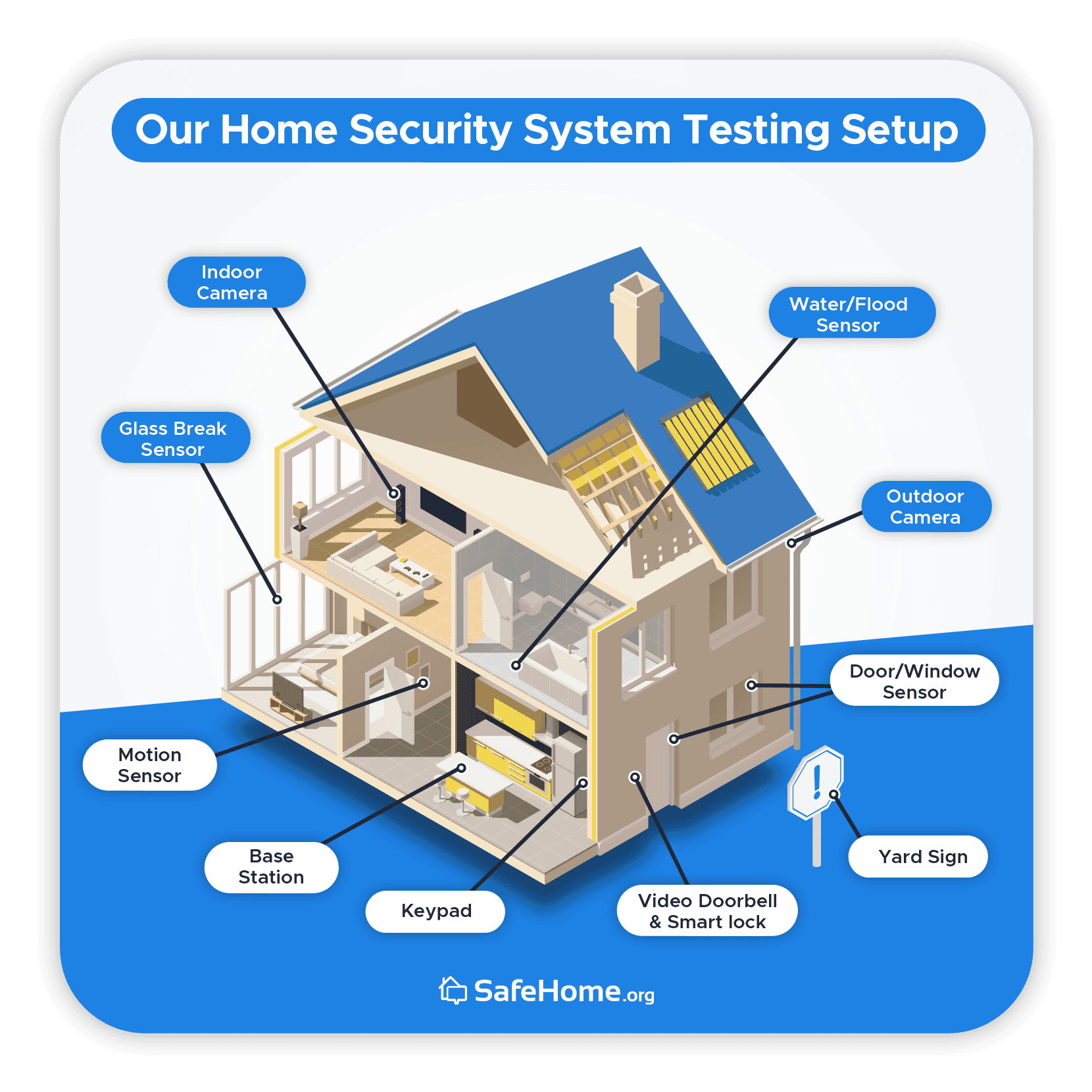
Core Components Of Modern Home Security Systems
- Control Panel: The main hub where devices connect.
- Sensors: Detect motion, door/window opening, smoke, or glass breaking.
- Cameras: Monitor key areas inside and outside.
- Alarms/Sirens: Warn of intrusions or other dangers.
- Mobile App: Control and monitor your system remotely.
- Smart Integrations: Work with locks, lights, and other smart devices.
How Smart Locks Integrate With Home Security Systems
The real value of smart locks shows when they are part of a complete home security system. Integration means smart locks and the security system “talk” to each other, sharing information and automating actions to keep your home safe.
Main Ways Smart Locks Integrate
- Centralized Control: Control both your locks and security system from one app or hub.
- Automated Security Actions: Lock doors automatically when the alarm is set or at certain times.
- Real-Time Alerts: Get instant notifications if a door is unlocked or if someone uses a code.
- Access Logs: Review who entered and when, from anywhere.
- Smart Scenes and Routines: Link locks with other devices (e.g., when you unlock the door, lights turn on, and the alarm disarms).
Let’s look closer at these key areas.
Exclusive Deals
Limited-time Exclusive Deals. Check current discount on Amazon.
Check Price on Amazon As an Amazon Associate I earn from qualifying purchases.Centralized Control
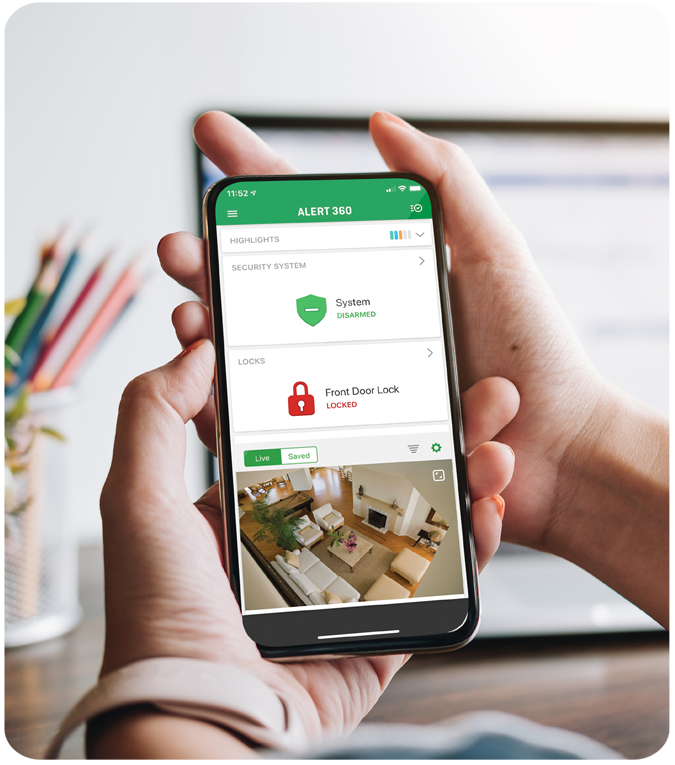
With integration, you no longer need separate apps for your smart lock and security system. Most top systems (like ADT, Vivint, or SimpliSafe) let you add compatible smart locks to their mobile apps. This means you can arm your system, check camera feeds, and lock your doors all from one place.
This central control is not just about convenience—it reduces mistakes. For example, you won’t forget to lock the door when you leave, as you can do it on the same screen where you arm your alarm.
Automated Security Actions
A big advantage is automation. For example, your security system can be set to:
- Lock all doors when you leave and arm the system.
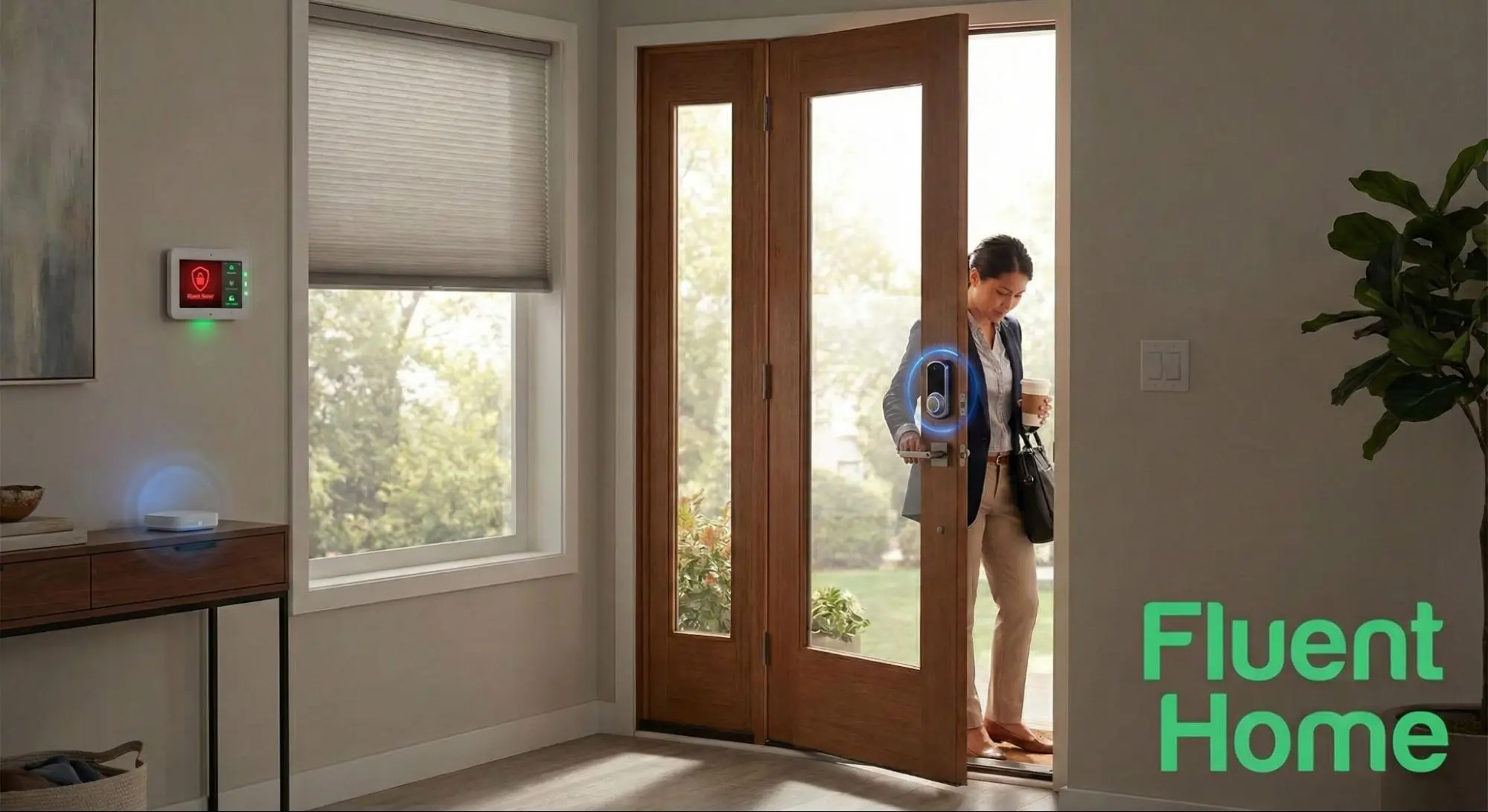
- Unlock the front door and disarm the alarm when you enter a code.
- Lock doors at night automatically.
This level of integration creates a seamless security experience and helps avoid human errors.
Real-time Alerts And Access Logs
Integration allows for real-time alerts and detailed logs. If someone enters with a code, you get a notification instantly. If a door is left unlocked, the system can alert you. The access log lets you track who came in and when—great for families or Airbnb hosts.
Smart Scenes And Routines
Many systems let you create routines or “scenes. ” For example, a “Goodnight” scene can lock all doors, turn off lights, and arm the alarm with one tap. This makes securing your home easier and more consistent.
Technologies That Make Integration Possible
How do smart locks and security systems actually talk to each other? It’s all about wireless communication protocols and smart home hubs.
Common Communication Protocols
- Wi-Fi: Most flexible, works with internet-connected devices.
- Bluetooth: Short range, often used for phone-to-lock communication.
- Z-Wave & Zigbee: Special wireless languages for smart home devices. Reliable and use less power.
- Thread: Newer protocol, fast and secure, used in some latest devices.
A smart lock with Z-Wave can connect directly to a security system hub that supports Z-Wave. This allows quick and reliable communication, even if your internet goes down.
Role Of Smart Home Hubs
A smart home hub (like Samsung SmartThings or a security panel) acts as the “brain.” It connects all devices, including smart locks, and lets them work together.
Some smart locks only integrate with certain hubs or systems. It’s important to check compatibility before buying. For example, August smart locks work with many systems but require a Wi-Fi bridge for full features.
Example Of Integration
Suppose you have a Ring Alarm security system and a compatible Schlage smart lock. Using the Ring app, you can:
- Lock/unlock the door from the app.
- Set the alarm to disarm when you unlock the door with your code.
- Get alerts when someone unlocks the door.
This tight integration gives you more control and information than using each device separately.
Comparison Of Integration Features Among Top Smart Locks
Different smart lock brands offer different levels of integration with security systems. Here’s a side-by-side look at three popular models:
| Smart Lock | Works With | Key Integration Features | Protocols |
|---|---|---|---|
| August Wi-Fi Smart Lock | Ring, SmartThings, Alexa, Google Home | Remote locking, guest access, auto-unlock, logs | Wi-Fi, Bluetooth |
| Schlage Encode | Ring, Alexa, Google Home | Built-in Wi-Fi, app control, voice control, logs | Wi-Fi |
| Yale Assure SL | SimpliSafe, SmartThings, Alexa | Code access, auto-lock, integration with alarms | Z-Wave, Zigbee, Wi-Fi (with module) |
This shows the importance of checking compatibility—not every lock works with every system.
Benefits Of Integrating Smart Locks With Home Security Systems
Combining smart locks with your home security system brings many benefits. Here are the main advantages:
1. Enhanced Security
When your locks and security system work together, it’s harder for intruders to find weak spots. For example, if someone tries to force open the door, the system can trigger an alarm or alert you immediately.
2. Convenience And Peace Of Mind
You can control your whole security system from anywhere. Forgot to lock the door? Do it from your phone. Expecting a guest? Let them in with a code or remotely unlock the door.
3. Activity Monitoring
Access logs and real-time alerts help you monitor who enters your home and when. This is especially useful for families, rental properties, or homes with cleaning or maintenance staff.
4. Automation
Set routines like locking all doors when you leave, or unlocking when you arrive. This automation saves time and reduces security risks caused by forgetfulness.
5. Flexible Access
You can create temporary access codes for guests, babysitters, or delivery people. These codes can expire after a set time, reducing the risk of unauthorized entry.
6. Insurance Benefits
Some insurance companies offer lower premiums for homes with integrated smart security systems. This can save you money over time.
Common Integration Challenges
While integration brings many benefits, there are also some challenges and issues to be aware of.
1. Compatibility Issues
Not all smart locks work with all security systems. Some require extra modules or bridges, and some only work with certain brands. Always check compatibility lists before buying.
2. Security Risks
Like all connected devices, smart locks can be targeted by hackers. It’s important to use strong passwords, keep firmware updated, and choose locks from trusted brands.
3. Power And Connectivity
Most smart locks use batteries, which need to be replaced every few months. If the batteries die, you may need a physical key. Also, Wi-Fi or hub failures can interrupt remote access.
4. Cost
Integrating smart locks with a security system often means higher upfront costs. Some systems also charge monthly fees for advanced features.
5. Complexity
More features mean a steeper learning curve. Setting up automation and integrations can be confusing for some users. Simple mistakes during setup (like creating weak access codes) can reduce security.
Practical Steps To Integrate Smart Locks With Your Home Security System
If you want to make your home smarter and safer, here’s how you can integrate smart locks with your security system:
Step 1: Choose Compatible Devices
Start with a list of the security system and smart locks you’re interested in. Check the manufacturer’s website for compatibility information. For example, Ring lists compatible smart locks on their support pages.
Step 2: Install The Smart Lock
Follow the instructions to install the smart lock on your door. Most models replace your existing deadbolt or fit over it. Make sure the lock is powered (fresh batteries) and that you keep the backup key handy during setup.
Step 3: Connect To The Security System
Use your security system’s app or control panel to add the smart lock. This may involve scanning a QR code or putting the lock in pairing mode. Some locks need an extra hub or bridge for full integration.
Step 4: Test Integration Features
Once connected, test key features:
- Can you lock/unlock from the security app?
- Do notifications and logs work as expected?
- Try automations like auto-locking or unlocking with the alarm.
Step 5: Set Up Access Codes And Automations
Create access codes for family, guests, or services. Set up routines like “Arm system and lock doors at 10 pm” or “Unlock and disarm when code is entered. ”
Step 6: Review Security Settings
Change default codes, set strong passwords, and enable two-factor authentication if available. Regularly check for firmware updates for both the lock and security system.
Step 7: Educate Family Members
Show everyone how to use the system, including physical backup keys and what to do if the lock doesn’t respond.
Real-world Example: Airbnb Host
Consider an Airbnb host who uses a Yale smart lock integrated with a SimpliSafe security system. Each guest receives a unique access code that only works during their stay. When a code is used, the system automatically disarms the alarm, and the host gets a notification. After checkout, the code is deleted, and the alarm re-arms.
This setup saves time, avoids key handovers, and improves security for both the host and guests. It also provides a full log of who entered and when—a valuable feature for property managers.
Data On Smart Lock Adoption And Security
Smart locks are growing fast in the US. According to a 2023 report by Statista, over 12% of US households use at least one smart lock, and the global smart lock market is expected to reach $6.1 billion by 2026.
But are smart locks really secure? Data shows that most break-ins still happen through unlocked doors or windows. A smart lock connected to a security system can greatly reduce this risk by sending reminders and locking doors automatically.
Here’s a quick comparison of smart lock and traditional lock security features:
| Feature | Traditional Lock | Smart Lock |
|---|---|---|
| Remote Locking | No | Yes |
| Access Codes | No | Yes |
| Integration with Security System | No | Yes |
| Physical Key Backup | Yes | Usually |
| Automatic Locking | No | Yes |
| Battery Required | No | Yes |
A non-obvious insight: Many people worry about hacking, but the most common failure with smart locks is dead batteries or poor Wi-Fi. Regular maintenance is just as important as digital security.
What To Consider Before Integrating Smart Locks
Before integrating smart locks with your home security system, think about the following:
- Home type: Renters may prefer retrofit locks that don’t require new holes or major changes.
- Internet reliability: If your Wi-Fi is unreliable, look for locks with local (Z-Wave/Zigbee) support and backup keys.
- Privacy concerns: Integrated systems collect data about when you come and go. Choose brands with strong privacy policies.
- Future-proofing: Pick locks and systems that support over-the-air updates and open standards for better long-term compatibility.
- Insurance and legal: Some local laws require physical keys. Always keep a backup key accessible.
Upcoming Trends In Smart Lock Integration
The smart lock market is moving fast. Some exciting trends to watch:
- Voice Assistant Integration: Deeper control via Alexa, Google Assistant, and Siri.
- Biometric Security: More locks with fingerprint or face recognition, reducing the risk of lost or shared codes.
- Geofencing: Systems that unlock doors as you approach and lock when you leave, using your phone’s location.
- Matter Protocol: A new smart home standard making devices more compatible across brands.
- AI Monitoring: Systems that learn your routines and alert you to unusual activity.
As smart homes become the norm, expect even tighter integration and smarter security.
For more on the latest smart home security trends, visit the Consumer Reports Smart Lock Guide.
Frequently Asked Questions
How Do Smart Locks Communicate With Home Security Systems?
Smart locks use wireless protocols like Wi-Fi, Z-Wave, or Bluetooth to connect with a security system’s hub or control panel. The hub acts as a translator, letting the devices share information and work together. For the best integration, both the lock and the security system need to support the same protocol.
Can I Still Use A Physical Key With A Smart Lock?
Most smart locks include a physical key option as a backup. This is important if the lock’s battery dies or if there’s a technical problem. Some newer models (like certain Yale or August locks) can be installed over existing deadbolts, so your old key will still work.
Are Smart Locks Safe From Hackers?
Smart locks have strong encryption and security features, but no device is 100% hack-proof. Choose locks from trusted brands, use strong passwords, and keep your devices updated. Physical attacks on doors are still more common than cyber attacks, but be aware of both risks.
What Happens If The Power Or Internet Goes Out?
Most smart locks run on batteries and can work without internet for basic locking and unlocking. However, remote features and integration with security systems may not work during an outage. Always keep a backup key, and check battery levels regularly.
Do Smart Locks Work With Rental Properties Or Airbnb?
Yes, smart locks are popular with rental properties. They make it easy to give guests temporary access codes and track entry. Integration with a security system adds extra safety, automating actions like arming/disarming the alarm as guests come and go.
Upgrading your home’s security with smart locks and a connected system is a smart investment in both safety and convenience. With careful planning and the right products, you can enjoy a home that’s not only secure but also adapts to your lifestyle.


