
Smart door locks are changing the way we secure our homes and offices. Imagine unlocking your door with a tap on your phone, or sharing access with friends and family from anywhere in the world. This technology is more than just convenience—it is reshaping security and privacy.

Exclusive Deals
Limited-time Exclusive Deals. Check current discount on Amazon.
Check Price on Amazon As an Amazon Associate I earn from qualifying purchases.If you have ever wondered how these smart locks connect to your smartphone, you are not alone. Many people find the process confusing, especially with new terms like Bluetooth, Wi-Fi, and cloud integration. In this article, you’ll learn how smart door locks actually link with your phone, the technology behind it, the practical benefits, and what to watch out for as a buyer.
Let’s break down the process in simple, clear steps and uncover useful tips that most beginners miss.
What Is A Smart Door Lock?
A smart door lock is an electronic lock that can be controlled by a smartphone, tablet, or other smart devices. Unlike traditional locks that use keys, smart locks use digital codes, biometrics, or wireless signals. Most smart locks come with an app, allowing you to lock or unlock the door remotely, monitor who enters, and even set automatic schedules.
Smart locks are popular in homes, hotels, and offices. According to a 2023 report from Statista, the global smart lock market is expected to reach $4.4 billion by 2027, growing at a rate of about 15% each year. This rapid growth shows how people trust and prefer these devices for their security needs.
Exclusive Deals
Limited-time Exclusive Deals. Check current discount on Amazon.
Check Price on Amazon As an Amazon Associate I earn from qualifying purchases.The Main Technologies Behind Smart Door Lock Connectivity
Understanding how smart locks connect to your smartphone starts with knowing the main technologies used. Smart locks use several types of wireless communication. Each one offers different features, benefits, and limitations.
Bluetooth
Bluetooth is a short-range wireless technology. Most smart locks use Bluetooth to connect directly to your phone when you are nearby. The connection is fast and secure, and it doesn’t need an internet connection.
Benefits:
- Low power consumption
- Easy setup
- Works even if Wi-Fi is down
Limitations:
- Only works when your phone is within 30–40 feet (about 10 meters)
- Cannot unlock doors remotely unless paired with another device
Wi-fi
Wi-Fi smart locks connect to your home’s wireless internet. This allows you to control the lock from anywhere, as long as you have an internet connection.
Exclusive Deals
Limited-time Exclusive Deals. Check current discount on Amazon.
Check Price on Amazon As an Amazon Associate I earn from qualifying purchases.Benefits:
- Remote access from anywhere in the world
- Receive instant notifications
- Integrate with other smart home devices
Limitations:
- Higher power consumption
- Needs a stable Wi-Fi network
Zigbee And Z-wave
Some smart locks use Zigbee or Z-Wave—special wireless protocols for smart home devices. These require a hub to connect to your phone or the internet.
Benefits:
- Reliable for smart home setups
- Can connect multiple devices
Limitations:
- Needs a compatible hub
- More complex setup
Nfc (near Field Communication)
NFC is used in some smart locks, mainly for tap-to-unlock features. You touch your phone to the lock, and it opens.
Benefits:
- Fast, secure unlock
- No need for internet or Bluetooth
Limitations:
- Very short range (a few inches)
- Not common in most models
Table: Smart Lock Connectivity Comparison
Here’s a quick comparison of the main connectivity options:
| Technology | Range | Remote Access | Setup Complexity | Power Use |
|---|---|---|---|---|
| Bluetooth | 10 meters | No | Simple | Low |
| Wi-Fi | Unlimited | Yes | Medium | High |
| Zigbee/Z-Wave | 30 meters | Yes (with hub) | Complex | Low |
| NFC | Few inches | No | Simple | Low |

How Does A Smart Door Lock Connect To Your Smartphone?
The process of connecting a smart lock to your smartphone usually involves several steps. Here is a typical scenario:
- Install the Smart Lock: Mount the smart lock on your door as per the instructions. Some models fit over existing deadbolts; others replace the whole lock.
- Download the App: Each smart lock has a companion app, available for iOS and Android.
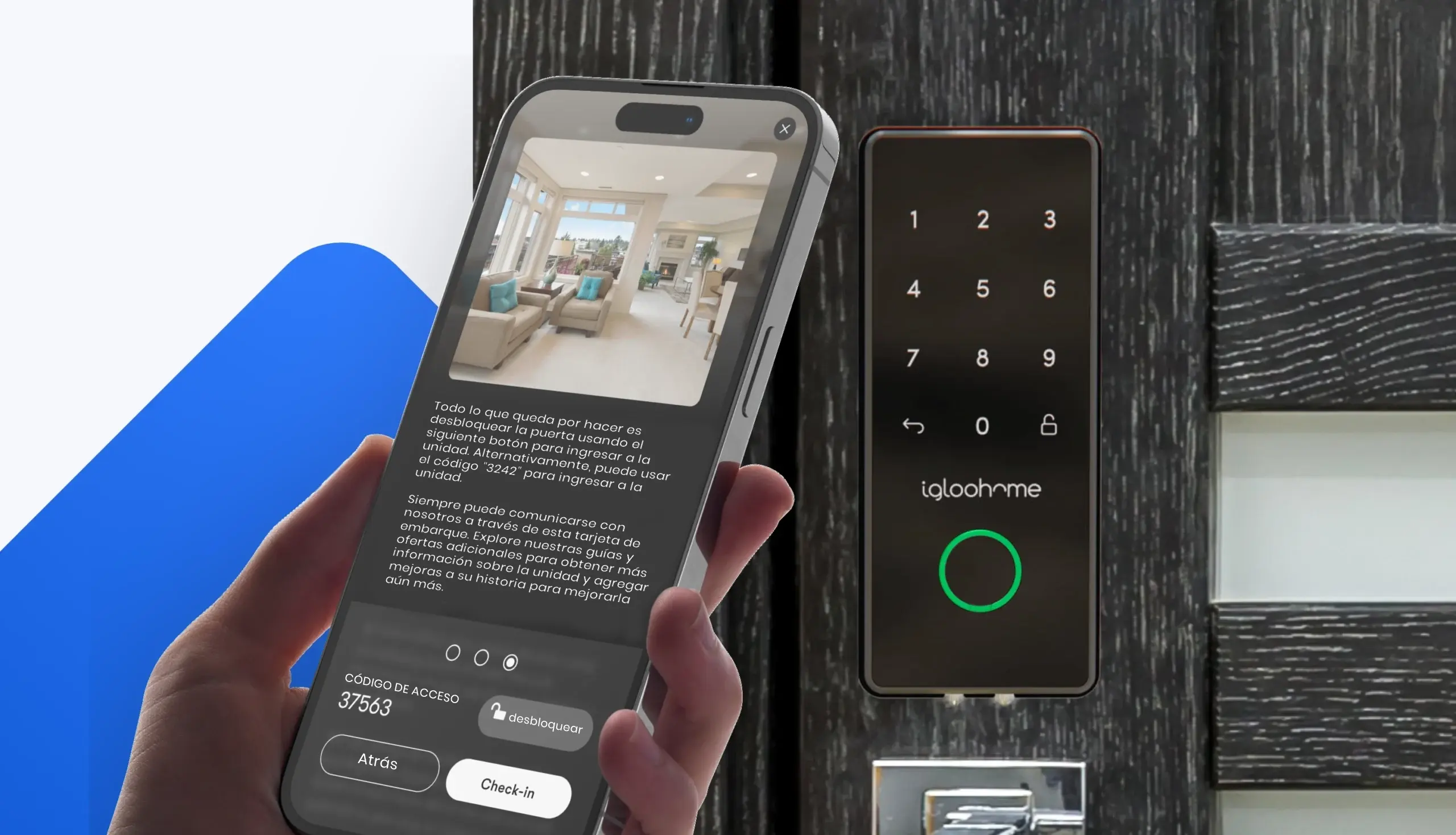
- Pair the Device: Open the app and follow instructions to pair your phone with the lock. This often involves turning on Bluetooth or Wi-Fi, scanning a QR code, or entering a code.
- Configure Settings: Set up user profiles, access codes, and preferences. You can add family members, set schedules, and choose notification settings.
- Test the Connection: Try locking and unlocking the door using your phone. Some locks let you use voice commands (like Alexa or Google Assistant).
Most smart locks use encryption to keep data secure. For example, many Bluetooth locks use 128-bit AES encryption—the same level used by banks.
Example: Setting Up A Wi-fi Smart Lock
Let’s look at a real-world example. Suppose you buy a Wi-Fi smart lock:
- You install the lock and download the app.
- The app asks for your Wi-Fi network name and password.
- You enter the information; the lock connects to your home Wi-Fi.
- Now, you can lock or unlock your door from anywhere using your phone.
If you add a smart home hub (like Samsung SmartThings), you can also integrate other devices like cameras, lights, and sensors.
Key Features Enabled By Smartphone Connectivity
Smartphone connectivity unlocks many features that traditional locks cannot offer. Here are the main benefits:
Remote Access
With remote access, you can lock or unlock your door from anywhere. This is useful if you forget to lock up, or need to let someone in while you’re away.
Real-time Notifications
Most smart lock apps send instant notifications when someone enters or leaves. You can see who unlocked the door and at what time.
Temporary Access Codes
You can create temporary codes for guests, cleaners, or delivery people. These codes expire after a set time, adding security.
Voice Commands
Many smart locks integrate with virtual assistants like Alexa, Google Assistant, or Siri. You can unlock your door with a simple voice command.
Activity Logs
Smart locks keep a log of activity. You can review who accessed the door, from which device, and when. This is helpful for families, offices, or rentals.
Table: Features Enabled By Smartphone Connection
Here is a summary of what smartphone integration adds:
| Feature | Benefit | Common Uses |
|---|---|---|
| Remote Lock/Unlock | Control from anywhere | Let guests in, check door status |
| Notifications | Instant alerts | Know who enters/leaves |
| Temporary Codes | Flexible access | Rental guests, cleaners |
| Voice Control | Hands-free operation | Smart home convenience |
| Activity Logs | Track entry history | Family, office security |
Security Aspects: Is Smartphone Connectivity Safe?
Security is a major concern when it comes to smart locks. Many people worry about hackers or privacy risks. However, modern smart locks use advanced security measures.
Encryption
Most smart locks use end-to-end encryption. Data sent between your phone and the lock is scrambled, making it unreadable to outsiders.
Two-factor Authentication
Some apps require two-factor authentication (2FA). You need both your phone and a code sent to your email or SMS.
Automatic Firmware Updates
Manufacturers often send automatic updates to fix bugs and improve security. This means your lock gets safer over time.
Common Security Mistakes
Beginners sometimes make these errors:
- Using weak passwords for the app
- Not updating the lock’s firmware
- Sharing access codes without limits
To stay safe, use strong passwords, enable 2FA, and update your lock regularly.
Common Smartphone Compatibility Issues
Not all smart locks work with every smartphone. Compatibility depends on the lock’s software and the phone’s operating system.
Operating System Support
Most smart locks support both iOS and Android. However, some features may work better on one platform.
App Updates
Smart lock apps need regular updates. If your phone’s system is old, the app may not work well.
Bluetooth And Wi-fi Problems
Bluetooth and Wi-Fi can have issues like interference, low battery, or network outages. Keep your phone updated and check signal strength.
Table: Compatibility Checklist
Here’s what to check before buying:
| Feature | Why It Matters | How to Check |
|---|---|---|
| OS Support | App must work on your phone | Check app store listing |
| Bluetooth/Wi-Fi Version | Ensures fast connection | Compare phone and lock specs |
| Voice Assistant Integration | For hands-free use | Check compatibility with Alexa/Siri/Google |
| App Updates | New features, security | Read reviews, check update history |
Buyer Guide: Choosing A Smart Lock That Works With Your Smartphone
Choosing the right smart lock can be tricky. Here’s what really matters:
- Check Connectivity Type: Decide if you need Bluetooth, Wi-Fi, or Zigbee/Z-Wave. Bluetooth is best for local use; Wi-Fi is ideal for remote access.
- App Quality: A good app is essential. Read user reviews about app reliability and ease of use.
- Smartphone Compatibility: Make sure the lock supports your phone’s OS and version.
- Battery Life: Wi-Fi locks use more power. Look for models with backup batteries or alerts for low battery.
- Security Features: Look for locks with encryption, 2FA, and regular updates.
- Integration with Other Devices: If you use smart home systems, check if the lock works with Alexa, Google, or Apple HomeKit.
- Physical Security: The lock should be strong and resistant to tampering.
Common Buyer Mistakes
Many buyers overlook these points:
- Buying a lock that doesn’t fit their door
- Ignoring app compatibility
- Skipping security features
Always check compatibility and security before buying.
Practical Tips For Using Smart Door Locks With Your Smartphone
Here are some helpful tips from real users:
- Keep Your App Updated: Updates fix bugs and add features.
- Enable Notifications: Get alerts when someone unlocks the door.
- Use Temporary Codes: Give guests limited access.
- Change Access Codes Regularly: Prevent unauthorized entry.
- Check Battery Levels: Set reminders to replace batteries.
A non-obvious insight: Many locks allow you to set up geo-fencing. This means the lock can automatically unlock when your phone is nearby, making entry seamless.
Another practical tip: If you travel often, choose a lock with cloud backup. This lets you restore settings if you lose your phone.

Real-world Examples And Use Cases
Smart door locks are used in many ways:
- Home Security: Parents can see when kids arrive home.
- Airbnb Rentals: Hosts give temporary codes to guests, reducing key exchange hassles.
- Offices: Managers track who enters and exits.
- Hotels: Some hotels use smartphone access, improving guest experience.
A 2022 survey found that 68% of smart lock users felt safer and more in control compared to traditional locks.
Troubleshooting Common Problems
Even the best smart locks can face issues. Here’s how to solve common problems:
Bluetooth Not Connecting
- Restart your phone and lock.
- Make sure Bluetooth is enabled.
- Move closer to the lock.
App Not Responding
- Update the app.
- Restart your phone.
- Reinstall the app if needed.
Wi-fi Dropping
- Check your router.
- Move the lock closer to Wi-Fi source.
- Reset network settings.
Access Codes Not Working
- Check for expired codes.
- Update the lock firmware.
- Contact support if needed.
The Future Of Smart Lock Connectivity
Smart lock technology is evolving fast. Soon, we may see:
- Biometric Integration: Unlock with fingerprints or facial recognition.
- Advanced AI: Locks learn your habits and adjust security automatically.
- Improved Battery Life: New designs use less power and last longer.
Research from Consumer Reports suggests that future smart locks will offer even stronger security, faster setup, and better integration with smart home systems.
Frequently Asked Questions
How Secure Is Smartphone-based Smart Lock Access?
Most smart locks use strong encryption, like AES-128 or AES-256. Data sent between your phone and the lock is scrambled, making it hard for hackers to intercept. Using strong passwords and two-factor authentication adds extra safety.
Can I Control My Smart Lock From Anywhere?
Yes, if your smart lock connects to Wi-Fi or uses a hub, you can control it from anywhere with internet access. Bluetooth-only locks need you to be nearby.
What Happens If My Phone Battery Dies?
Most smart locks have backup options. You can use a physical key, enter a code on the lock, or use another device. Some locks even have emergency power contacts.
Are Smart Locks Compatible With Older Smartphones?
It depends on the lock and app. Most require iOS or Android systems from the last few years. Check the app requirements before buying.
Can Smart Locks Work With More Than One Smartphone?
Yes. You can add multiple users in the app. Each user can have their own access code or permissions. This is useful for families, roommates, or offices.
Smart door locks offer more than just convenience—they provide better control, flexibility, and peace of mind. Connecting your smart lock to your smartphone is usually easy, but requires careful setup and security checks. With the right lock and app, you can enjoy safe, seamless access to your home or office.
As technology improves, these locks will become even smarter and safer. If you’re looking to upgrade your security, understanding how smart locks connect to smartphones is the first step.


