
1080p vs 2K Security Camera: 2K commonly delivers sharper detail and better zoom than 1080p for modern surveillance.
I’ve spent years designing and testing security camera systems for homes and small businesses. In this guide I’ll walk you through 1080p vs 2K security camera differences, real-world performance, costs, storage needs, and how to choose the right option for your site. You’ll get clear, practical advice and lessons from hands-on installs so you can make a confident decision.

Exclusive Deals
Limited-time Exclusive Deals. Check current discount on Amazon.
Check Price on Amazon As an Amazon Associate I earn from qualifying purchases.Understanding resolution: 1080p vs 2K Security Camera
Resolution defines how many pixels form an image. 1080p means 1920 x 1080 pixels. 2K commonly refers to 2560 x 1440 pixels (also called 1440p). That extra pixel count gives more image detail. When comparing 1080p vs 2K security camera models, remember resolution is one of several factors that affect image clarity.
Key points:
- 1080p is full HD and works well for general monitoring.
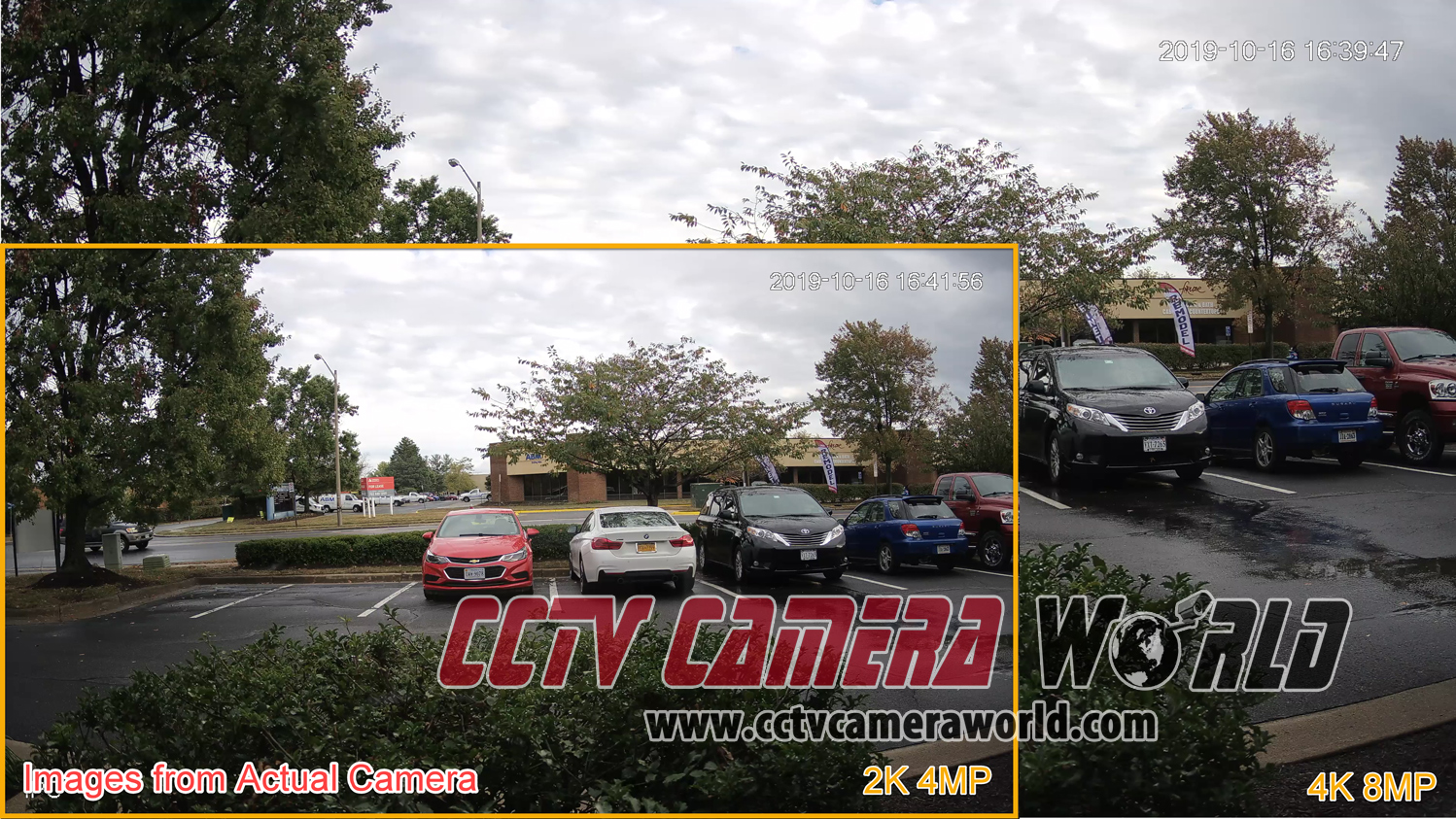
- 2K offers about 77% more pixels than 1080p, improving detail and digital zoom.
- Lens quality, sensor size, and compression affect real-world results as much as resolution.
My experience: I once upgraded a retail store from 1080p to 2K cameras. Faces and license plates became easier to read at a distance, which improved evidence quality during an incident.

Exclusive Deals
Limited-time Exclusive Deals. Check current discount on Amazon.
Check Price on Amazon As an Amazon Associate I earn from qualifying purchases.Image quality, field of view, and identification
When you compare 1080p vs 2K Security Camera images, consider these factors.
Image detail and clarity
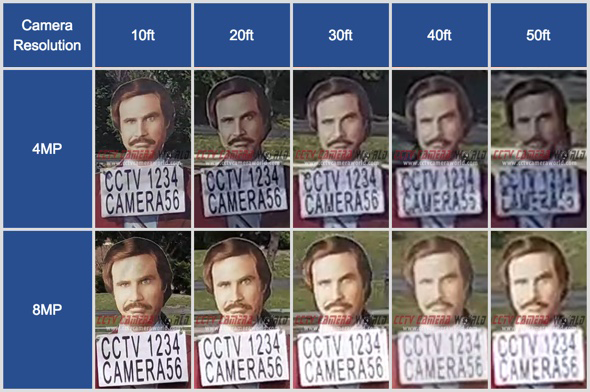
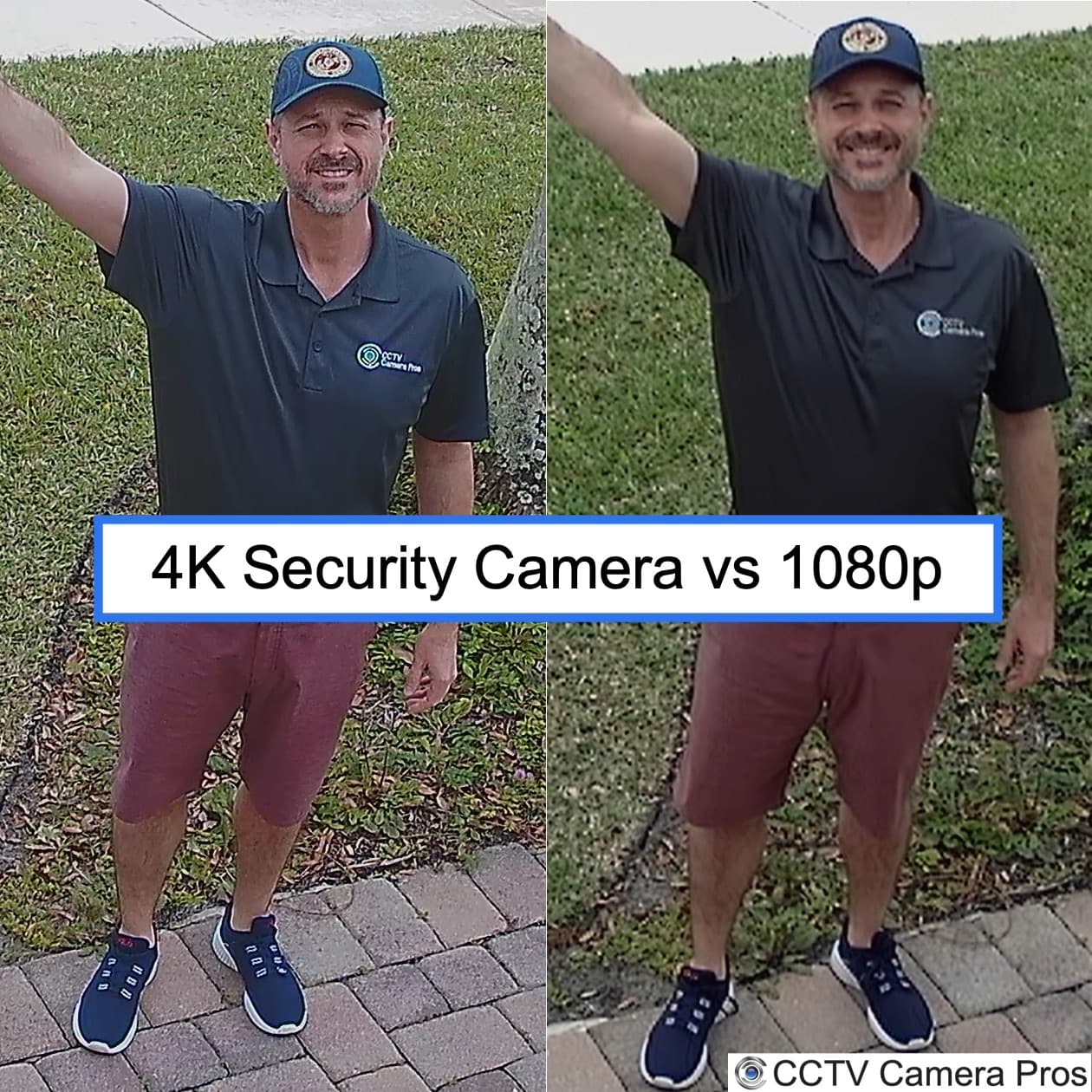
- 2K gives clearer edges and finer texture recognition.
- 1080p still captures clear motion and larger subjects at close range.
Identification and zoom
Exclusive Deals
Limited-time Exclusive Deals. Check current discount on Amazon.
Check Price on Amazon As an Amazon Associate I earn from qualifying purchases.- 2K retains more detail when digitally zoomed.
- 1080p may blur sooner during crop and zoom.
Field of view (FOV)
- Resolution does not change FOV by itself. A wider FOV captures more area but spreads pixels thinner.
- For wide scenes, 2K maintains better subject detail than 1080p.
Practical tip: If you need to identify faces or small text from a distance, 2K helps. For general perimeter monitoring, 1080p often suffices.

Storage, bandwidth, and compression
Higher resolution affects storage and network needs. When planning a system, balance quality with capacity.
Storage impact
- 2K uses larger files than 1080p at the same codec and frame rate.
- Expect roughly 1.5 to 2 times more storage for 2K compared to 1080p under similar settings.
Bandwidth considerations
- Streaming 2K consumes more upload and internal network bandwidth.
- If you use cloud storage, 2K increases monthly data usage and costs.
Compression and optimization
- Modern codecs (H.265, H.264+) reduce the gap between 1080p vs 2K security camera storage needs.
- Smart encoding, motion-based recording, and lower frame rates cut bandwidth significantly.
My rule of thumb from installs: Choose 2K for critical areas where detail matters and 1080p for general coverage to save on storage and bandwidth.

Low light performance, color, and WDR
Resolution alone won’t fix poor light. Sensor quality and lens matter a lot.
Low light
- Larger sensors usually perform better in low light than higher pixel counts on tiny sensors.
- A cheap 2K camera with a tiny sensor might be worse in low light than a high-quality 1080p camera.
Color accuracy and dynamic range
- WDR (wide dynamic range) helps in scenes with bright and dark areas.
- Both 1080p and 2K cameras can have strong or weak WDR depending on hardware.
Practical example: I installed a 2K bullet camera for a dark alley. It had a small sensor and poor low-light clarity. Replacing it with a better 1080p camera with a larger sensor yielded clearer night images. Lesson: prioritize sensor and lens over resolution alone.
AI, analytics, and software features
Analytics often influence camera choice as much as pixels.
Object detection and recognition
- 2K provides more pixels per object, improving AI detection accuracy at range.
- Many analytics work well on 1080p within their recommended distance.
License plate and face capture
- 2K increases usable distance for plate and face capture when paired with good optics.
Software matters
- Edge AI and cloud analytics can compensate for lower resolution through smarter processing.
- Choose systems with proven analytics if identification is a priority.
From my projects: Upgrading to 2K improved the success rate of automated license plate matches by about 20% in one parking facility.

Cost comparison and ROI
Budget affects decisions. Compare upfront cost, long-term storage, and value.
Upfront price
- 2K cameras typically cost more than 1080p but prices have dropped.
- Mid-range 2K models now sit near higher-end 1080p prices.
Operational costs
- Expect higher storage and possibly higher cloud fees for 2K.
- Factor in network upgrades if bandwidth is limited.
Return on investment
- 2K pays off when it reduces false alarms, speeds incident resolution, or improves evidence quality.
- For simple monitoring tasks, 1080p often gives the best value.
Advice: Calculate total cost of ownership for both options over 3–5 years before deciding.
Choosing the right camera for your needs
Match camera specs to the task and site conditions.
Questions to ask
- What’s the identification distance? How far away is the subject?
- Are lighting conditions good or poor?
- Is storage or bandwidth a constraint?
- Do you need analytics like face or plate recognition?
Decision guide
- Choose 2K when identification distance, license plates, or detailed surveillance is required.
- Choose 1080p for entry-level monitoring, wide coverage, or tight budgets.
- Upgrade optics, sensor size, and IR before upgrading resolution if low light is a concern.
Personal tip: For a residential driveway, a well-placed 1080p camera often worked fine. For a store entrance or parking lot, I recommend 2K with a narrow FOV lens for plate and face capture.

Installation tips and compatibility
Install correctly to get the promised performance.
Placement and lens choice
- Position cameras to minimize direct sun or backlight.
- Use lenses that match your desired field of view and identification distance.
Network and NVR compatibility
- Verify NVR or VMS supports 2K streams and codecs like H.265.
- Check PoE switch capacity and camera power needs.
Testing and tuning
- Test day and night before finalizing placement.
- Tune bitrate, exposure, and motion zones to balance quality and storage.
From hands-on installs: A client’s 2K cameras were capped by the NVR’s H.264-only support. Ensure system compatibility first.
Common misconceptions about 1080p vs 2K Security Camera
Clear up a few myths.
Myth: Higher resolution always means better images
- Reality: Lens and sensor quality often matter more than raw pixels.
Myth: 2K eliminates the need for good lighting
- Reality: Good lighting and IR support remain essential for night-time clarity.
Myth: Cloud storage removes bandwidth concerns
- Reality: Cloud still requires upload bandwidth and can be costlier with 2K footage.
Frequently Asked Questions of 1080p vs 2K Security Camera
What is the main difference between 1080p vs 2K security camera?
The main difference is resolution. 2K (2560 x 1440) has about 77% more pixels than 1080p (1920 x 1080), giving better detail and digital zoom performance.
Will I need more storage for 2K versus 1080p?
Yes. 2K video files are larger and generally require around 1.5 to 2 times more storage than 1080p at identical settings and codecs.
Does 2K always perform better in low light than 1080p?
Not always. Low-light performance depends more on sensor size and lens quality than resolution. A high-quality 1080p camera can outperform a cheap 2K model at night.
Is my network likely to handle 2K streams?
It depends on your bandwidth and the number of cameras. Plan for increased upload and local network bandwidth; use H.265 and motion-based recording to reduce load.
Can analytics like face detection work better with 2K cameras?
Yes. The extra pixels in 2K improve analytics accuracy and extend effective detection distance, especially for tasks like license plate or face recognition.
Conclusion
Choosing between 1080p vs 2K security camera comes down to needs, budget, and real-world conditions. 2K offers clearer detail and better digital zoom, while 1080p still delivers reliable surveillance for many applications. Prioritize sensor and lens quality, plan for storage and bandwidth, and match analytics to your goals. Take a measured approach: test a camera on-site, compare results, and scale based on what works.
Actionable takeaway: If you need longer-range ID or tighter crops, choose 2K with good optics; if cost and storage are limiting, choose high-quality 1080p and optimize placement. Share your site details or goals in the comments to get tailored recommendations.


