
Home alarm systems have changed a lot in the past ten years. Many people now ask: Can home alarm systems record video footage? This is an important question for anyone wanting to protect their home or property. Today’s alarm systems are not just sirens and sensors—they often include cameras, video storage, and ways to view recordings. If you are thinking about installing a new system or upgrading your current one, understanding video recording is essential.
Let’s explore how video recording works in modern home alarm systems, what features you should look for, and how it affects privacy and security. By the end, you’ll know what to expect, what mistakes to avoid, and how to choose the best system for your needs.
How Home Alarm Systems Use Video Recording
Most modern home alarm systems now offer video recording. This means you can see what happens inside or outside your home, even when you are not there. Cameras are usually connected to the alarm system and can start recording when motion is detected or when the alarm is triggered.

Exclusive Deals
Limited-time Exclusive Deals. Check current discount on Amazon.
Check Price on Amazon As an Amazon Associate I earn from qualifying purchases.There are two main types of video recording in home alarm systems:
- Continuous recording: Cameras record all the time, storing footage for a set number of days.
- Event-based recording: Cameras only record when something happens, like motion or a door opening.
Event-based recording is more common because it saves storage space and makes it easier to review important events. Some systems let you choose between both modes.
Why Video Recording Matters
Video footage gives you evidence if something happens. For example, if a break-in occurs, you can show police exactly what happened and who was involved. This footage can also help with insurance claims and give you peace of mind.
Components That Enable Video Recording
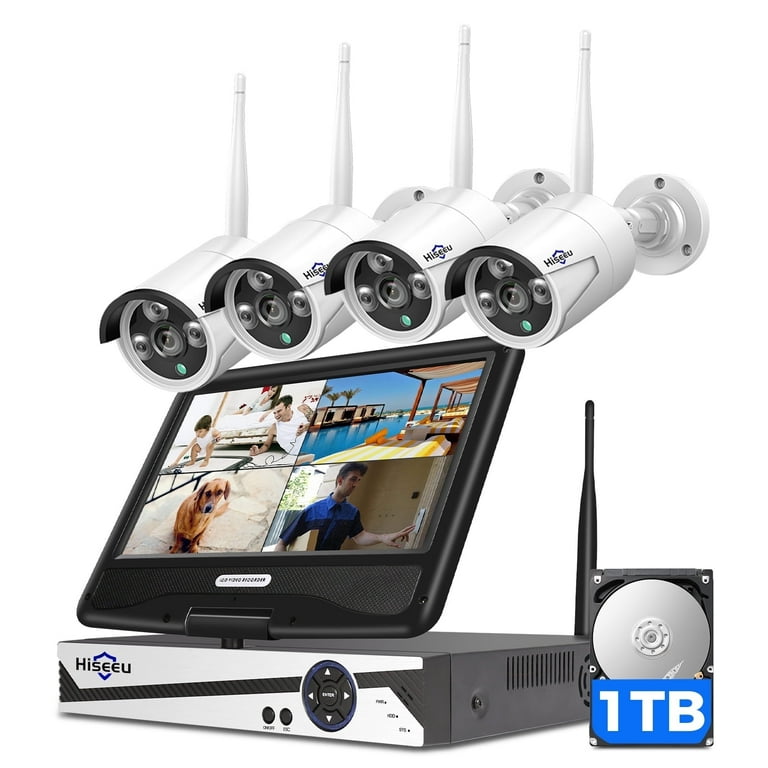
To record video, a home alarm system must include a few key parts:
Exclusive Deals
Limited-time Exclusive Deals. Check current discount on Amazon.
Check Price on Amazon As an Amazon Associate I earn from qualifying purchases.- Cameras: These can be indoor or outdoor, wired or wireless.
- Storage device: This can be a hard drive, memory card, or cloud service.
- Control panel: Allows you to manage settings and review footage.
- Network connection: Needed for remote viewing or cloud storage.
Some systems come with all these parts included. Others let you add cameras and storage as needed.
Camera Types And Features
Different camera types can affect how and when footage is recorded. Here’s a simple comparison:
| Camera Type | Indoor/Outdoor | Resolution | Night Vision | Audio |
|---|---|---|---|---|
| Standard Wired | Both | 720p – 1080p | Yes | Optional |
| Wireless IP | Both | 1080p – 4K | Yes | Built-in |
| Doorbell Camera | Outdoor | 720p – 1080p | Yes | Two-way |
Wireless IP cameras are now popular because they are easy to install and can be viewed remotely.
Exclusive Deals
Limited-time Exclusive Deals. Check current discount on Amazon.
Check Price on Amazon As an Amazon Associate I earn from qualifying purchases.Storage Options For Video Footage
Video footage needs to be stored somewhere. The main storage options are:
- Cloud storage: Footage is saved online, accessible from anywhere.
- Local storage: Footage is saved on a hard drive, DVR, or SD card.
- Hybrid storage: Combines both, offering more flexibility.
Each option has its pros and cons. Cloud storage is convenient, but you pay monthly fees and depend on the internet. Local storage can be cheaper, but footage may be lost if the device is stolen or damaged.
| Storage Type | Pros | Cons |
|---|---|---|
| Cloud | Easy access, off-site backup | Monthly cost, needs internet |
| Local | No recurring cost, private | Limited space, risk of loss |
| Hybrid | Best of both, flexible | More expensive, complex setup |
How Long Is Footage Stored?
Most systems let you choose how long footage is kept. Standard retention is 7-30 days. Some premium systems store footage for several months. Event-based recording can help keep important clips longer by deleting unimportant footage.
How Video Recording Is Triggered
Cameras can record in different ways. The most common triggers are:
- Motion detection: Starts recording when movement is sensed.
- Alarm activation: Starts recording when an alarm or sensor is triggered.
- Manual recording: Lets you start recording from your phone or control panel.
Some systems use smart technology to avoid false alarms. For example, they may ignore pets or passing cars.
Example: Smart Motion Detection
Imagine you have a camera in your living room. If someone enters while you are away, the camera starts recording and sends a notification to your phone. You can then check the footage and decide what to do.
Remote Viewing And Access
One of the best features of modern home alarm systems is remote viewing. You can see live video or recorded footage from your smartphone, tablet, or computer.
Many systems have apps that let you:
- Check live feeds in real-time
- Review past recordings
- Download or share clips
- Get alerts for events
Remote access is especially useful when you travel or want to check on kids or pets.
Security Of Remote Viewing
Remote access depends on a secure internet connection. Good systems use encryption and strong passwords to protect your footage. Always choose a system with strong security features.
Privacy Concerns And Legal Issues
Recording video in your home brings up privacy questions. You need to know where it is legal to record and who can see the footage.
Where Can You Record?
In the US, you can usually record video in your own home. However, you should avoid recording in private areas like bathrooms or bedrooms unless everyone agrees.
If you have outdoor cameras, make sure they do not point at neighbors’ homes or public areas. Recording audio may have stricter laws—some states require consent from everyone recorded.
Who Can Access Footage?
Most systems let you control who sees the footage. You can set passwords, user accounts, and share clips only when needed. Some systems let monitoring centers access footage during emergencies, but you can usually opt out.
Important insight: If you use cloud storage, check the provider’s privacy policy. Some companies may use your footage for training or analytics unless you opt out.

Comparing Home Alarm Systems With And Without Video
Not all alarm systems record video. Some are just sensors and sirens. Let’s compare the key differences:
| Feature | With Video | Without Video |
|---|---|---|
| Evidence | Clear proof, easy to share | Only logs, no visuals |
| Monitoring | See real events | Blind spots possible |
| Deterrence | Cameras scare intruders | Less visible protection |
| Cost | Higher, due to cameras/storage | Lower initial price |
| Privacy | Needs careful setup | Fewer privacy worries |
Video systems offer more security but require more investment and planning.
Features To Look For In A Video-recording Alarm System
When choosing a system, consider these features:
- High-resolution cameras: 1080p or higher gives clear footage.
- Night vision: Lets you see in the dark.
- Wide-angle lens: Covers more area.
- Mobile access: Check footage from anywhere.
- Cloud/local storage: Choose what works for you.
- Smart alerts: Get notifications for real events.
- User control: Manage who can see or share footage.
- Integration: Works with other smart devices.
Non-obvious Insight: Some Systems Let You Set Privacy Zones. This Means You Can Block Out Parts Of The Camera View, Like Neighbors’ Yards Or Private Areas, To Avoid Accidental Recording.
Common Mistakes When Setting Up Video Recording
Beginners often make mistakes that lower security or cause privacy problems. Here are some to avoid:
- Not changing default passwords: Weak passwords make it easy for hackers.
- Ignoring camera placement: Bad angles miss important areas or invade others’ privacy.
- Not checking local laws: Recording audio or public spaces can be illegal.
- Forgetting to test alerts: Make sure notifications work on your devices.
- Not updating firmware: Old software can have security holes.
Tip: Set reminders to check camera feeds and storage monthly. This prevents surprises if footage is missing or cameras fail.
Real-world Examples And Statistics
Home alarm systems with video have helped solve many crimes. According to the FBI, homes with security cameras are up to 50% less likely to be targeted by burglars. In cities like Chicago, police often request footage from private cameras to help investigations.
A 2023 survey found:
- 73% of homeowners with alarm systems have at least one camera
- 67% review footage monthly
- 42% use cloud storage
- 29% have experienced false alerts
These numbers show video recording is now a standard feature, but not everyone uses it correctly.
Example: Smart Home Integration
Some homeowners connect cameras to smart lights or door locks. When motion is detected, lights turn on and cameras record. This makes the system more effective and can scare away intruders.
How To Choose The Right System For Video Recording
Choosing the right system can be confusing. Here are steps to help:
- List your needs: Do you want indoor, outdoor, or both? How many cameras?
- Set a budget: Decide how much you can spend on equipment and storage.
- Check compatibility: Make sure cameras work with your alarm brand.
- Choose storage: Decide between cloud, local, or hybrid.
- Read reviews: Look for systems with good customer support.
- Ask about privacy: Find out how footage is protected and who can access it.
Non-obvious Insight: If You Rent Your Home, Look For Systems With Wireless Cameras And Cloud Storage. This Avoids Wiring And Lets You Take The System When You Move.
Installation And Maintenance Tips
Installing cameras is easier than before, but you still need to follow some rules:
- Mount cameras high enough to avoid tampering.
- Cover entry points like doors, windows, and driveways.
- Use weatherproof cameras for outdoor areas.
- Test angles before fixing cameras.
- Check storage regularly to avoid running out of space.
Maintenance is also important. Clean camera lenses and update software often.

Future Trends In Video Recording For Home Alarm Systems
The technology in home alarm systems is always changing. Here are some trends to watch:
- AI-powered cameras: These can tell the difference between people, animals, and objects.
- Automatic cloud backup: More systems offer seamless storage without manual setup.
- Voice control: You can start or stop recording with voice commands.
- Better integration: Cameras work with smart home devices for more control.
Experts predict that by 2025, over 80% of new home alarm systems will include video recording. This will make homes safer and give owners more peace of mind.
If you want to read more about home security trends, visit Security.org.
Frequently Asked Questions
Can All Home Alarm Systems Record Video Footage?
No, not all systems include cameras. Some older or basic systems only have sensors and sirens. To record video, you need a system with cameras and storage options.
Is Video Footage Stored Locally Or In The Cloud?
It depends on the system. Some save footage locally on hard drives or SD cards, others use cloud storage, and a few offer both. Cloud storage is more popular but may require monthly fees.
How Long Is Recorded Footage Kept?
Most systems let you choose. Common retention is 7–30 days for event-based footage. Continuous recording may require more storage and shorter retention. Premium plans offer longer storage times.
Can I Watch Footage From My Phone?
Yes, many systems have apps for remote viewing. You can check live feeds, review recordings, and get alerts on your smartphone or tablet, as long as you have internet access.
Is It Legal To Record Video In My Home?
Recording video is usually legal, but you must respect privacy. Avoid recording in private areas or pointing cameras at neighbors. Some states have strict rules about audio recording, so check local laws.
Home alarm systems with video recording offer powerful protection and peace of mind. They can help prevent crimes, provide evidence, and let you check your home from anywhere. However, you must choose the right system, understand privacy rules, and avoid common mistakes.
With the right setup, you can make your home safer and smarter—without sacrificing your privacy or breaking the law.


