
Smart door locks are changing the way people secure their homes. Instead of traditional keys, these devices use codes, fingerprints, smartphones, or even voice commands. The idea sounds exciting, but many homeowners wonder: Can I install a smart door lock myself? The answer depends on your skills, the lock you pick, and your door’s setup. This guide will walk you through everything you need to know before starting, including step-by-step instructions, possible challenges, and tips for a smooth installation.
What Is A Smart Door Lock?
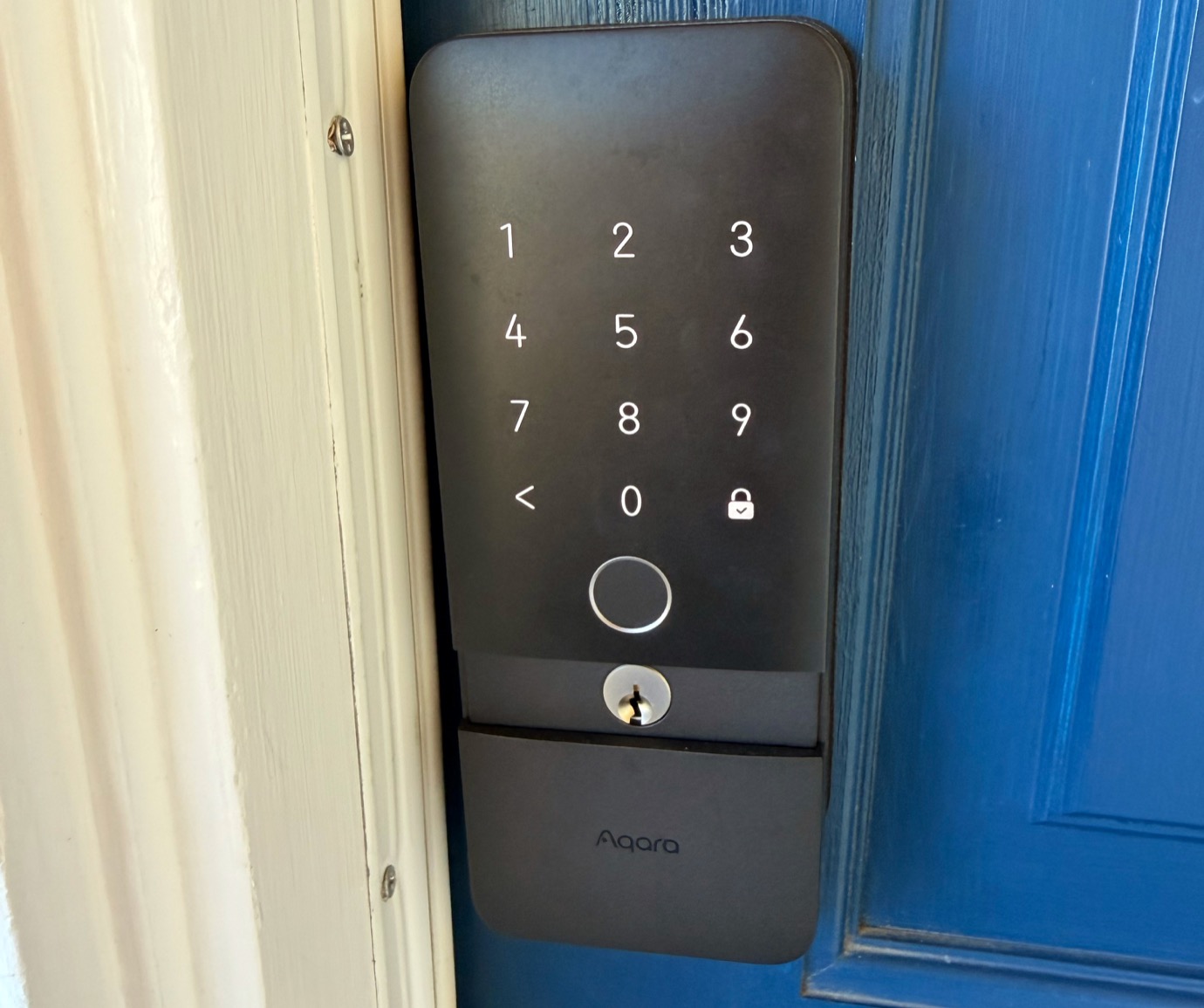
A smart door lock is an electronic device that replaces your old lock. You can control it using a smartphone, keypad, or other methods. These locks offer convenience, flexibility, and often better security. Some models let you share access codes, monitor who enters, and connect with other smart home devices.
Most smart locks are battery-powered and connect to Wi-Fi, Bluetooth, or Zigbee. Some are designed for new doors, while others fit over your existing deadbolt. Smart locks are popular for homes, offices, and rental properties because they make entry easier and tracking access simpler.

Exclusive Deals
Limited-time Exclusive Deals. Check current discount on Amazon.
Check Price on Amazon As an Amazon Associate I earn from qualifying purchases.Reasons To Install A Smart Door Lock Yourself
Many people choose to install smart locks themselves. Here’s why:
- Save money: Professional installation can cost $70 to $200, depending on your location and lock model.
- Learn new skills: Installing a lock helps you understand your home security better.
- Immediate use: You can use your new lock right away—no need to wait for a technician.
- Privacy: You avoid sharing entry codes or access with outside installers.
However, self-installation isn’t right for everyone. Some locks are easier to install than others. If you’re not comfortable with tools or technology, you might prefer professional help.
Are All Smart Door Locks Diy-friendly?
Not every smart lock can be installed easily. Here’s what affects the process:
- Type of lock: Some smart locks replace only the inside part of your deadbolt. Others require full removal of your old lock.
- Door compatibility: Thickness, material, and alignment of your door can make installation harder.
- Features: Locks with Wi-Fi, fingerprint readers, or built-in cameras may need extra wiring or setup.
- Skill level: Basic locks are easier for beginners. Complex locks may need expert knowledge.
Let’s compare some common smart locks to see which ones are more DIY-friendly:
Exclusive Deals
Limited-time Exclusive Deals. Check current discount on Amazon.
Check Price on Amazon As an Amazon Associate I earn from qualifying purchases.| Smart Lock Model | DIY Difficulty | Tools Needed | Estimated Install Time |
|---|---|---|---|
| August Smart Lock | Easy | Screwdriver | 15–30 min |
| Schlage Encode | Medium | Screwdriver, Drill (optional) | 30–60 min |
| Yale Assure SL | Medium | Screwdriver, Tape Measure | 30–45 min |
| Kwikset Halo | Medium-Hard | Screwdriver, Drill | 45–60 min |
Before You Begin: Check Your Door And Lock
Smart lock installation depends on your existing door and lock. Here’s what you should check:
- Door thickness: Most smart locks fit doors between 1 3/8″ and 2″.
- Backset: The distance from the edge of the door to the center of the lock hole. Standard is 2 3/8″ or 2 3/4″.
- Deadbolt type: Many smart locks need a single-cylinder deadbolt. Double-cylinder or mortise locks are harder to replace.
- Door alignment: If your door is warped or doesn’t close properly, the smart lock may not function well.
- Wi-Fi signal: For locks that connect to Wi-Fi, make sure your signal is strong near the door.
Measure your door and take pictures of your existing lock. Read the smart lock’s manual or check online for compatibility.
Tools And Materials You’ll Need
Most smart lock installations require only simple tools. Here’s a list:
Exclusive Deals
Limited-time Exclusive Deals. Check current discount on Amazon.
Check Price on Amazon As an Amazon Associate I earn from qualifying purchases.- Phillips screwdriver
- Flathead screwdriver
- Drill (sometimes needed for new holes)
- Tape measure
- Smart lock kit (all parts included)
- Smartphone (for app setup)
- New batteries (if not included)
- Wi-Fi network (if needed)
Some locks need special tools. Always check the instruction manual before you start.
Step-by-step Guide: Installing A Smart Door Lock Yourself
Here’s a general process for installing a smart lock. Your lock’s instructions may vary, but these steps cover most common models.
1. Remove Your Old Lock
- Use a screwdriver to remove the screws from the interior side of your old deadbolt.
- Pull out the deadbolt and remove all lock parts.
- Clean the area and check for leftover debris or damage.
2. Prepare The Door
- Measure the holes and ensure they match the smart lock’s requirements.
- If needed, use a drill to enlarge or adjust holes.
- Make sure the door is aligned and closes properly.
3. Install The New Deadbolt
- Insert the new deadbolt mechanism into the side of the door.
- Secure it with screws.
- Test movement—make sure the deadbolt slides smoothly.
4. Attach The Exterior Lock
- Align the smart lock’s exterior part with the hole.
- Feed any cables or connectors through the door if the lock has electronic parts.
- Attach the exterior part to the door.
5. Connect The Interior Lock
- Attach the interior part to the door.
- Connect cables as needed.
- Secure with screws.
- Insert batteries (usually AA or AAA).
6. Set Up The Lock
- Download the smart lock app on your smartphone.
- Follow the instructions to connect the lock to Wi-Fi or Bluetooth.
- Set up user codes, fingerprints, or access cards.
- Test the lock—lock and unlock it several times from both inside and outside.
7. Final Adjustments
- Check the alignment and make sure the lock operates smoothly.
- Adjust screws or reposition parts if needed.
- Make sure the door closes fully and the deadbolt engages.
Common Problems And Solutions
Even simple installations can have issues. Here are some common challenges:
- Misaligned door: If the deadbolt doesn’t fit, check the alignment. Tighten or loosen screws, or adjust the strike plate.
- Weak Wi-Fi: Move your router closer or use a Wi-Fi extender.
- Battery drain: Use high-quality batteries. Some locks drain faster in cold weather.
- App connection fails: Restart your phone and the lock, or check your network settings.
- Lock doesn’t fit: If your door is non-standard, you may need to buy an adapter kit or consult a locksmith.
Don’t rush. Most problems have simple solutions if you read the manual and check online forums.
Smart Lock Features: What Matters For Diy Installers
Smart locks come with many features. Some make installation easier, others more complicated. Here’s what to look for:
- Keypad entry: Simple to set up. No extra hardware needed.
- Bluetooth unlock: Requires smartphone pairing. Easy for most users.
- Wi-Fi: Needs strong signal and app setup. May require firmware updates.
- Fingerprint reader: More wiring and setup. Not all doors support this.
- Auto-lock: Some models automatically lock after a set time—no extra steps.
- Voice control: Works with Alexa, Google Home, etc. Needs smart home integration.
Compare features before buying. Choose what you really need, not just what sounds cool.
| Feature | Installation Difficulty | Extra Steps Needed |
|---|---|---|
| Keypad | Easy | Set codes |
| Bluetooth | Easy | Pair phone |
| Wi-Fi | Medium | Connect app, update firmware |
| Fingerprint | Hard | Enroll fingerprints, check compatibility |
| Voice control | Medium | Integrate with smart home |
Real-life Examples: Diy Success And Challenges
Let’s look at some stories from homeowners:
- Easy installation: Sarah bought an August Smart Lock. She removed her old deadbolt, snapped the new lock in place, and connected it to her phone in less than 30 minutes.
- Trouble with alignment: Mike tried to install a Schlage Encode. His door was warped, so the deadbolt didn’t slide smoothly. He had to sand the edge of his door and reposition the strike plate.
- Wi-Fi issues: Priya installed a Yale Assure SL but found her Wi-Fi signal too weak. She added a Wi-Fi extender and the lock started working.
- App confusion: John struggled with Kwikset Halo’s app setup. After reading the manual and searching online, he solved his problem by updating his phone’s operating system.
These examples show that success depends on your preparation and your door’s condition.
Safety Tips For Diy Installers
Home security is important. Follow these tips to stay safe:
- Read instructions carefully: Every lock is different.
- Use the right tools: Don’t force screws or parts.
- Test the lock before closing the door: Make sure you can open the door from both sides.
- Change default codes: Set your own codes and passwords.
- Keep backup keys: Some smart locks come with keys. Store them safely.
- Check batteries regularly: Low batteries can leave you locked out.
- Update firmware: Manufacturers release updates to fix bugs and improve security.
Many beginners forget to check battery life or change default codes. Always follow best practices.

When Should You Call A Professional?
Some situations are too complicated for a DIY install. Consider professional help if:
- Your door is very old or damaged.
- You’re replacing a mortise lock or double-cylinder deadbolt.
- The smart lock requires wiring or drilling new holes.
- You’re not comfortable with technology.
- You want the lock integrated with a larger smart home system.
A locksmith or installer can finish the job quickly and ensure everything works correctly.
How Long Does Diy Installation Take?
Most smart locks can be installed in 30 to 60 minutes if your door fits standard sizes and you have the right tools. Complex models or difficult doors may take longer.
According to a survey from Consumer Reports, 68% of homeowners who installed their own smart lock finished in less than one hour. Only 12% needed more than two hours, usually due to door alignment or Wi-Fi issues.
Cost Comparison: Diy Vs Professional Installation
DIY installation saves money. Here’s a simple comparison:
| Installation Method | Typical Cost | Extra Charges |
|---|---|---|
| DIY | $0–$20 (for tools) | None |
| Professional | $70–$200 | Travel, extra parts |
If you already own basic tools, DIY costs almost nothing. Professional installers may charge more for complex doors or smart home integration.
Mistakes Beginners Make (and How To Avoid Them)
Installing a smart lock sounds easy, but beginners often make these mistakes:
- Skipping compatibility check: Always check if your door and lock are compatible.
- Misplacing screws: Keep small parts organized to avoid losing them.
- Rushing setup: Take your time, especially with app configuration.
- Ignoring battery life: Use fresh batteries and check them often.
- Leaving default codes: Change all codes and passwords right away.
One non-obvious insight: Many smart locks require a firmware update after installation. If you skip this, your lock might not work properly or could be less secure.
Another common oversight: When installing locks with both exterior and interior parts, people sometimes forget to align them perfectly. This can cause the deadbolt to stick or fail. Always double-check alignment before tightening screws.
Smart Lock Security: What You Need To Know
Smart locks can be safer than traditional locks, but they also have new risks:
- Hacking: If your lock connects to Wi-Fi, use strong passwords and update firmware.
- Battery failure: Some locks alert you when batteries are low. Set reminders to check.
- Physical security: Choose locks with Grade 1 or Grade 2 security rating.
- Backup access: Keep a physical key or access card in case electronics fail.
According to the National Crime Prevention Council, homes with smart locks are less likely to be targeted for break-ins. Smart locks add security by tracking entry times and sending alerts.
Smart Lock Brands: Which Ones Are Best For Diy?
Some brands make installation easier. Here are popular choices for DIYers:
- August: Fits over existing deadbolts. Great for renters.
- Schlage: Offers keypad and Wi-Fi models. Clear instructions.
- Yale: Sleek design, easy setup.
- Kwikset: Wide range of models, some more complex.
- Ultraloq: Unique features like fingerprint and touch entry.
Read reviews and watch videos before buying. Look for locks with detailed manuals and strong customer support.

Smart Lock Integration: Connecting To Your Smart Home
If you have other smart devices, you may want your lock to connect with them. Many smart locks work with:
- Amazon Alexa
- Google Home
- Apple HomeKit
- SmartThings
Integration lets you control your lock with voice commands or automate routines. For example, you can set your door to lock automatically when you leave home.
However, integration can add complexity to installation. Make sure your devices are compatible and follow setup guides closely.
Upgrade Tips: Maximizing Your Smart Lock’s Value
Once your lock is installed, you can make it even more useful:
- Share codes with guests: Give temporary codes to friends or cleaners.
- Set auto-lock timers: Prevent forgetting to lock your door.
- Enable notifications: Get alerts when someone enters.
- Connect to cameras: Some locks show video of who enters.
- Create routines: Link your lock with lights or alarms for added security.
Many beginners don’t realize how much a smart lock can do once integrated with other devices.
Frequently Asked Questions
How Hard Is It To Install A Smart Door Lock?
For most people, installing a smart lock is moderately easy. If you’re comfortable using a screwdriver and reading instructions, you can finish in less than an hour. Some locks are easier than others, especially models designed for DIY.
Will A Smart Lock Fit My Old Door?
Most smart locks fit standard doors (1 3/8″ to 2″ thick) with a single-cylinder deadbolt. If your door is older, thicker, or uses a different lock type, check the lock’s manual for compatibility.
What Happens If The Batteries Die?
Most smart locks warn you when batteries are low. If batteries die completely, some locks have backup keys or access cards. It’s best to replace batteries regularly and keep a backup method handy.
Are Smart Locks Safe From Hackers?
Smart locks use encryption and security features, but like any device, they can be vulnerable. Use strong passwords, update firmware, and check for security updates. See more tips at Consumer Reports.
Can I Remove A Smart Lock And Go Back To A Regular Lock?
Yes, most smart locks can be removed without damage. You can reinstall your old lock or upgrade to a new one anytime. This is especially useful for renters.
Smart door locks offer convenience, security, and flexibility. With proper preparation and patience, most people can install a smart lock themselves. Check your door, choose a DIY-friendly lock, and follow instructions carefully. If you run into trouble, don’t hesitate to seek help from a professional or online guides.
By installing your own smart lock, you gain confidence and control over your home security—plus, you save money and learn valuable skills.


