
Ring excels for easy outdoor security; Google Nest wins for smarter home integration and AI.

Exclusive Deals
Limited-time Exclusive Deals. Check current discount on Amazon.
Check Price on Amazon As an Amazon Associate I earn from qualifying purchases.I’ve tested both Ring and Google Nest cameras, doorbells, and hubs in real homes and rental properties. In this guide I break down Ring vs Google Nest across video, smart home features, privacy, costs, and real-world use. Expect clear comparisons, hands-on tips, and decision steps so you can pick the right system for your needs.

How Ring vs Google Nest differ at a glance
Ring started as a simple, popular video doorbell brand. It built an ecosystem focused on cameras and easy setup. Google Nest evolved from a smart thermostat maker into a full smart-home and security platform. It emphasizes cloud AI, seamless Google Assistant integration, and device synergy.
Key high-level differences:
Exclusive Deals
Limited-time Exclusive Deals. Check current discount on Amazon.
Check Price on Amazon As an Amazon Associate I earn from qualifying purchases.- Ring focuses on DIY outdoor security, easy installs, and wide device choices.
- Google Nest focuses on smart home integration, intelligent alerts, and privacy controls.
- Ring uses a broad partner and marketplace approach. Nest prioritizes a cohesive Google ecosystem.
This section frames the core trade-offs you'll see through the rest of the article. If you want the best smart-home assistant experience, lean toward Google Nest. If you want wide hardware choice and outdoor security tools, Ring often fits better.

Side-by-side feature comparison
Below I break down the main feature areas where Ring vs Google Nest compete. This helps you match priorities like video quality, smart features, and cost.
Video and image quality
- Ring offers solid video across models, with many 1080p and some 2K devices.
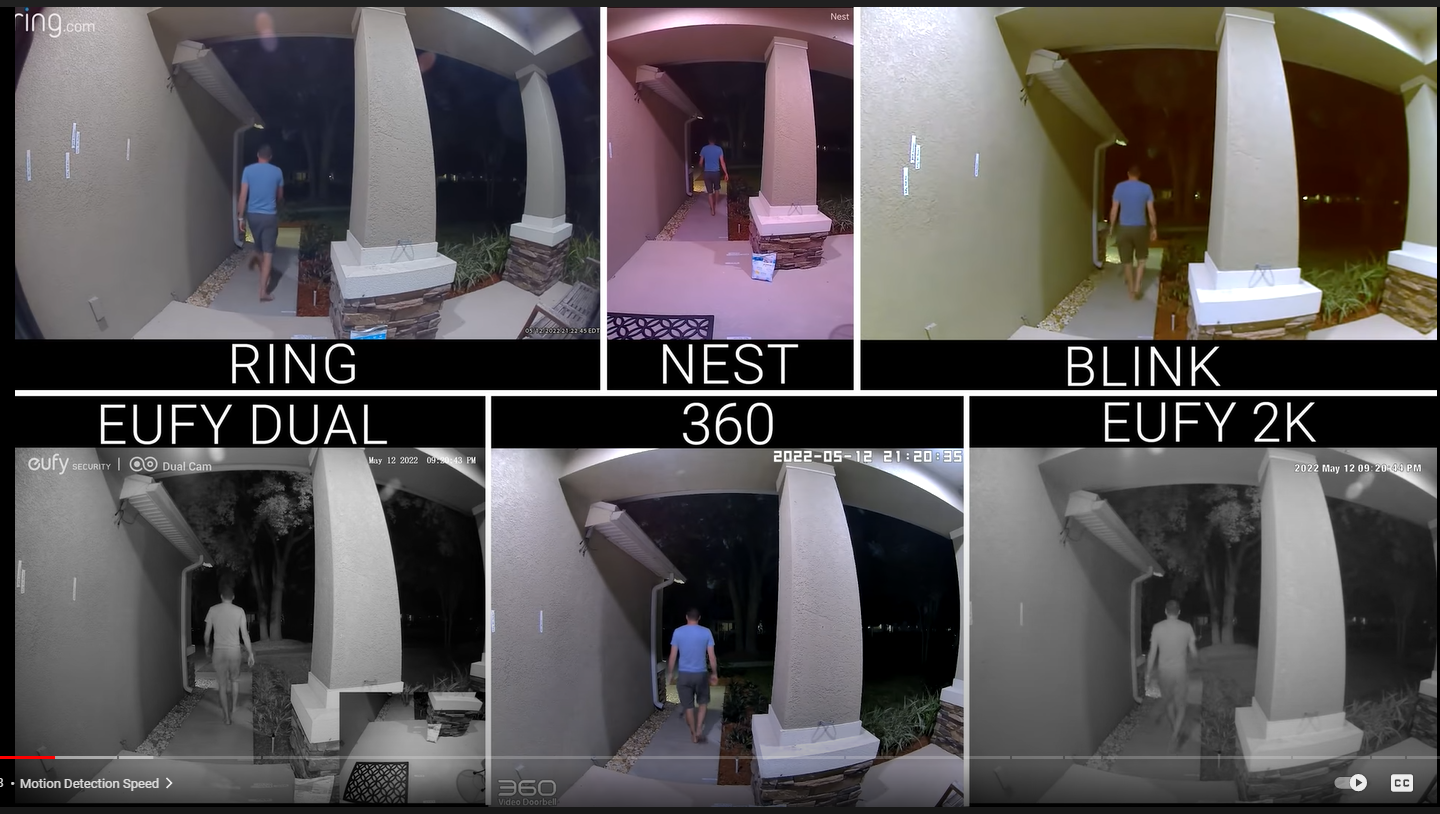
- Google Nest often uses higher-end sensors and AI-driven image processing, yielding clearer low-light footage.
- Real tip: For night clarity, Nest’s software tends to reduce noise better. Ring does fine if you pick the mid to high-end models.
Motion detection and alerts
- Ring uses PIR and pixel-change detection. Sensitivity and zones are adjustable.
- Google Nest relies on machine learning for person, package, and vehicle detection. Fewer false alerts in my tests.
- If you want smarter alerts out of the box, Google Nest wins. Ring gives more manual tuning.
Smart home integration
- Ring works with Amazon Alexa and offers some third-party integrations. It’s great for Echo users.
- Google Nest integrates deeply with Google Home and Assistant. Devices work together smoothly.
- Choose based on your voice platform: Alexa favors Ring, Assistant favors Nest.
Storage and subscriptions
- Ring offers local storage on some devices via Ring Edge (newer models) or cloud-only through Ring Protect.
- Google Nest uses Google’s cloud storage model with tiered subscriptions, but has limited local backup options.
- Both require subscriptions for extended history and advanced features. I found Ring’s pricing slightly more flexible.
Privacy and data controls
- Ring has faced scrutiny over law enforcement access and partnerships. They have tightened policies since.
- Google Nest has strong privacy settings inside Google accounts and clear activity controls.
- I recommend reading each company’s privacy controls before buying. Both offer ways to limit data sharing.
Power, design, and weatherproofing
- Ring offers battery, wired, and solar options across many designs. Good for outdoor installs.
- Nest devices are typically wired and polished for indoor and sheltered outdoor use.
- If you need a battery-powered doorbell, Ring has more options.
Installation and ease of use
- Ring is DIY-friendly. The app guides are straightforward.
- Google Nest setup is polished if you already use Google Home. The app flows well for grouped devices.
- My experience: both are easy. Nest felt faster when adding multiple Google devices.
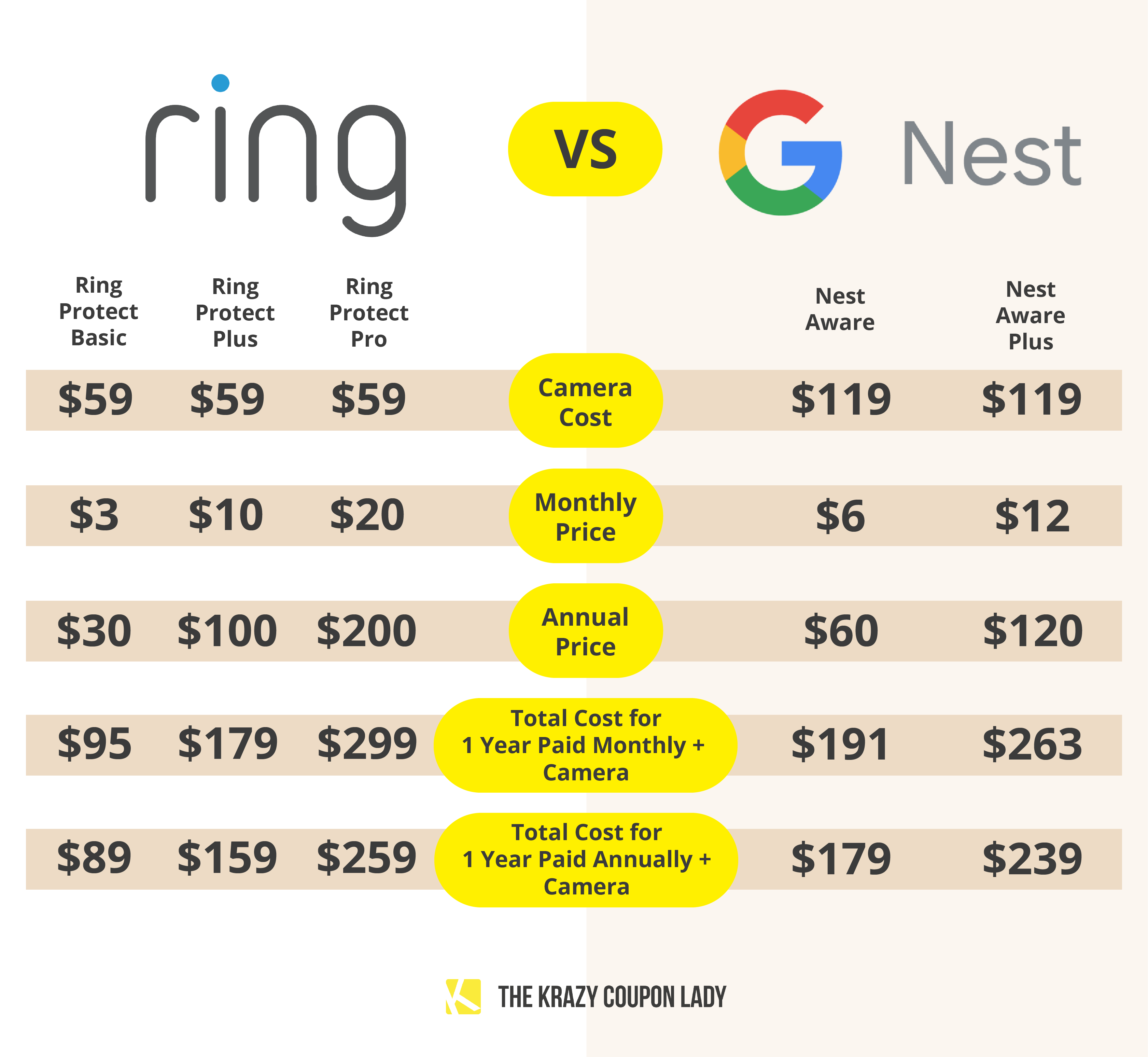
Pricing, plans, and true cost of ownership
Understanding recurring costs is critical for Ring vs Google Nest decisions.
Exclusive Deals
Limited-time Exclusive Deals. Check current discount on Amazon.
Check Price on Amazon As an Amazon Associate I earn from qualifying purchases.Subscription basics:
- Ring Protect plans enable video history, sharing, and advanced alerts. Plans are per-device or site-wide.
- Google Nest Aware covers one or multiple cameras in tiers and adds intelligent event history and familiar face detection.
- Expect to pay monthly or yearly for 30–60 days of history and smart clips.
Hidden costs to watch:
- Extra storage for long-term footage.
- Professional monitoring if you want 24/7 response.
- Replacement batteries for Ring battery models over time.
Practical advice:
- Test the free trial both companies offer. See which alerts you prefer.
- Add up the yearly subscription per camera before buying multiple units.

Privacy, security, and data handling
Both platforms stream and store video. That makes privacy a top concern.
How they handle data:
- Ring stores video in the cloud by default when subscribed. Users can delete clips and set privacy zones.
- Google Nest stores events in Google Cloud and links footage to your Google account. You can manage or delete history in your account.
Security measures:
- Two-factor authentication is available on both platforms.
- Both companies use encryption in transit and at rest, but exact implementations vary by device.
Limitations and risks:
- Cloud storage means potential exposure if accounts are compromised. Use strong passwords and 2FA.
- Be aware of device permissions. Integrations with other apps can widen access.
My recommendation: Use strong, unique passwords and enable 2FA. Review device sharing and linked accounts regularly.

Which system is best for different users
Match your use case to Ring vs Google Nest.
-
Best for renters and DIY installs
- Ring is great. Battery models and easy mounting make it ideal for renters and quick installs.
-
Best for Google Home lovers
- Google Nest wins if you use Assistant, Chromecast, or other Google services.
-
Best for large outdoor coverage
- Ring’s range of outdoor cameras and choices makes scaling simple and cost-effective.
-
Best for smarter alerts and fewer false positives
- Google Nest’s AI-based detections reduce noise, especially around busy streets.
-
Best for someone on a tight budget
- Compare entry-level Ring devices and their cheaper subscription options for lower cost.

Personal experience, tips, and mistakes to avoid
From years of testing and installs, here are honest tips.
What worked for me:
- Place cameras 7–10 feet high for the sweet spot of faces and packages.
- For Ring battery cameras, use a solar charger when possible to avoid frequent swaps.
- Use Google Home routines with Nest to automate lights when motion is detected.
Common mistakes I made early on:
- I ignored privacy zones and got alerts of neighbors walking by. Set zones after install.
- I mixed ecosystems and had duplicate notifications. Pick one primary app for alerts.
- I assumed higher megapixels meant better night video. The processing matters more.
Actionable tips:
- Run the free trial and walk around your property to tune motion zones.
- Label devices clearly in the app.
- Check firmware updates monthly.
PAA-style questions you might search for
Which camera is better for low light?
- Google Nest often offers clearer low-light images due to better processing. Choose higher-end models for best results.
Can I use Ring and Google Nest together?
- You can run both in the same home, but integrations between Ring and Google Assistant are limited. Use separate apps for full control.
Do both systems require subscriptions?
- Both offer basic live view without subscription. For event history and advanced alerts, a subscription is required.

Frequently Asked Questions of Ring vs Google Nest
Is Ring or Google Nest more secure from hackers?
Both companies offer strong security features like encryption and two-factor authentication. Security also depends on your account hygiene and device updates.
Can I keep video locally with Ring or Nest?
Ring has limited local storage options on some newer products; Google Nest mainly relies on cloud storage. Local options are more common with Ring's hardware variety.
Which system uses less data and bandwidth?
Data use depends on resolution and recording frequency. Lower resolution and fewer alerts save bandwidth; both platforms let you lower quality to reduce data use.
Which works better with voice assistants?
Ring pairs best with Amazon Alexa. Google Nest pairs best with Google Assistant. Choose the system that matches your preferred assistant.
Are there recurring fees after I buy the device?
Yes. Subscriptions unlock history, person detection, and other smart features. Basic live access usually remains free.
How reliable are motion alerts on both systems?
Nest’s AI tends to reduce false alerts for people and packages. Ring is reliable but may need more manual zone tweaks in busy areas.
Can I use third-party cameras with Ring or Nest?
Ring supports some partner devices but mainly promotes its own hardware. Google supports third-party devices that work with Google Home and standards like ONVIF in some cases.
Conclusion
Choosing between Ring vs Google Nest comes down to your priorities. Pick Ring for easy outdoor installs, flexible hardware choices, and Alexa users. Choose Google Nest for smarter alerts, deep Assistant integration, and polished image processing.
Take action now: list your must-have features, test the free trials, and match devices to your voice ecosystem. If you’d like, comment with your use case and I’ll recommend a specific setup based on your home and budget.


