
When you think about home security, the first devices that come to mind are often alarms and cameras. But there’s one smaller technology that quietly protects millions of homes and businesses: door and window sensors. These little gadgets might seem simple, but they play a huge role in keeping people safe. If you’ve ever wondered exactly how these sensors work, how they connect to alarm systems, or what makes them reliable, you’re about to find out. In this guide, you’ll discover the science, the practical details, and some surprising facts about door and window sensors that most people miss.
What Are Door And Window Sensors?
Door and window sensors are security devices designed to detect when a door or window is opened. They are a core part of intruder alarm systems and smart home setups. Most sensors are small, easy to install, and can be used on almost any type of door or window.
Sensors work by monitoring the status of an entry point—usually whether it is closed or open. When a sensor detects an unexpected opening, it sends a signal to the alarm system or smart hub. This can trigger an alert, a siren, or even a notification on your phone.

Exclusive Deals
Limited-time Exclusive Deals. Check current discount on Amazon.
Check Price on Amazon As an Amazon Associate I earn from qualifying purchases.Types Of Sensors
There are several types of door and window sensors, but the most common are:
- Magnetic contact sensors – These use magnets and switches to detect movement.
- Motion sensors – These detect movement near doors or windows.
- Glass-break sensors – These recognize the sound or vibration of breaking glass.
- Vibration sensors – These sense vibrations when someone tries to force a door or window.
Among these, magnetic contact sensors are the most popular for home security.
How Magnetic Contact Sensors Work
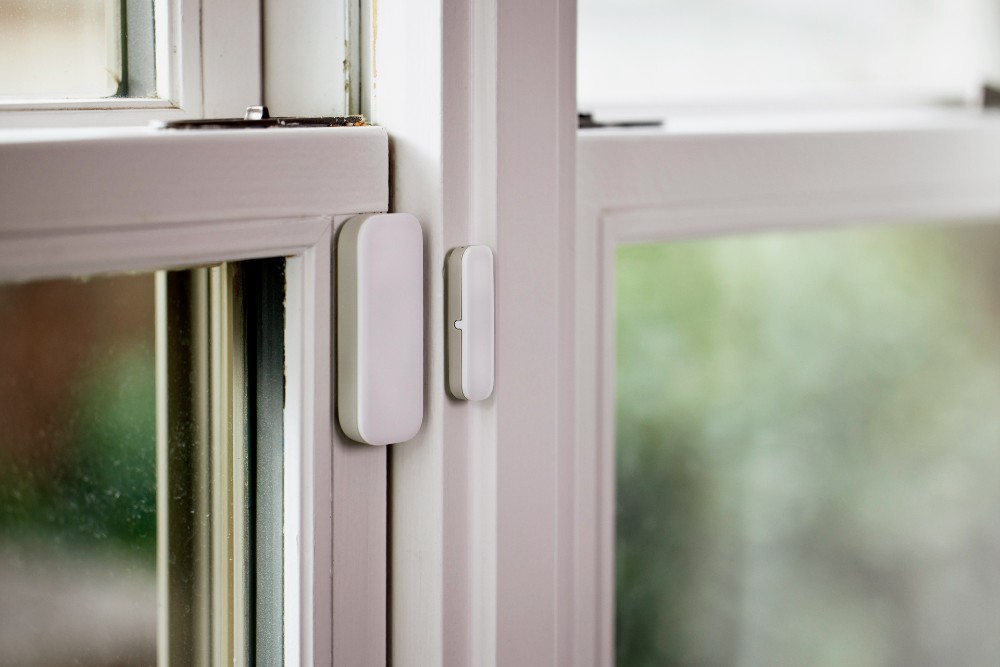
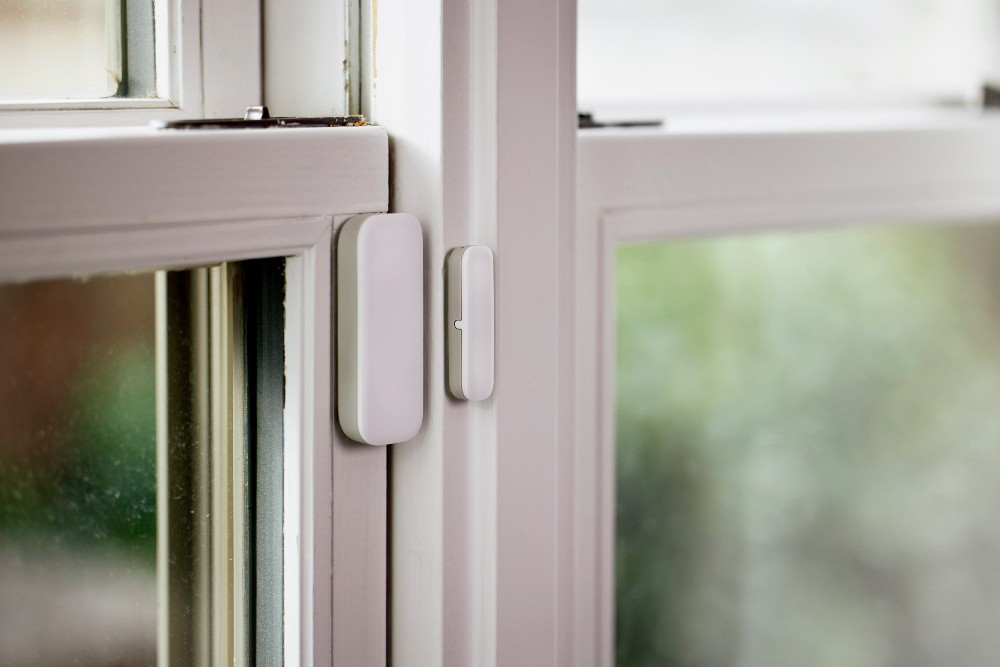
Most door and window sensors use a magnet and a reed switch. The sensor is split into two parts: one is attached to the door or window, and the other to the frame.
The Reed Switch Mechanism
A reed switch is a small glass tube containing two thin metal strips. When a magnet is close, the metal strips touch, closing the circuit. When the magnet moves away (for example, when the door or window opens), the strips separate, breaking the circuit. This change triggers the sensor.
Exclusive Deals
Limited-time Exclusive Deals. Check current discount on Amazon.
Check Price on Amazon As an Amazon Associate I earn from qualifying purchases.Magnetic contact sensors are highly reliable because they are simple and have very few moving parts.
Installation Example
Let’s say you install a sensor on your front door. The sensor and magnet are aligned so that when the door is closed, the magnet is next to the reed switch. If someone opens the door, the magnet moves away from the switch.
This causes the circuit to break, and the sensor sends a signal to your security system.
Exclusive Deals
Limited-time Exclusive Deals. Check current discount on Amazon.
Check Price on Amazon As an Amazon Associate I earn from qualifying purchases.Wired Vs Wireless Sensors
Door and window sensors come in wired and wireless versions. Each has its own advantages and drawbacks.
| Feature | Wired Sensors | Wireless Sensors |
|---|---|---|
| Installation | Requires wiring; harder to install | Easy to install; no wires |
| Maintenance | Rarely needs battery replacement | Needs battery replacement |
| Reliability | Stable connection; less interference | May suffer interference or signal loss |
| Cost | Lower upfront cost | Higher upfront cost |
| Flexibility | Hard to move after installation | Easy to relocate |
Wireless sensors are popular in modern homes because they are quick to install and easy to maintain. However, wired sensors are still preferred in commercial buildings for their reliability.
Sensor Communication And Alarm Systems
Door and window sensors need to communicate with a central system to trigger alerts. This communication can happen in several ways:
Wired Communication
Wired sensors send signals through electrical wires. When the circuit is broken, the system knows the door or window is open.
Wireless Communication
Wireless sensors use radio frequencies to send signals. Most use protocols like Zigbee, Z-Wave, or Wi-Fi. This makes them easy to connect to smart home hubs and mobile apps.
Integration With Smart Systems
Modern sensors can be connected to smart home systems like Amazon Alexa, Google Home, or custom smart hubs. This allows you to:
- Get alerts on your phone
- Automate lights or sirens when a sensor is triggered
- Check the status of doors and windows remotely
Battery Life And Power Consumption
One common concern with wireless sensors is battery life. Most wireless sensors use small batteries. Good quality sensors can last from 1 to 3 years before needing a battery change.
A typical sensor draws very little power. For example, a wireless sensor may use less than 10 microamps in standby mode and 100 microamps when active. Some sensors have low-battery alerts, so you never miss a replacement.
Practical Tip
For best results, check your sensors every 6 months. Replace batteries before they run out, especially if you live in an area with extreme temperatures, which can drain batteries faster.
Placement And Coverage
Where you place your sensors makes a big difference in security. Most experts recommend:
- Installing sensors on all main entry doors
- Placing sensors on ground-floor windows
- Adding sensors to windows that are hidden from view (like those behind bushes)
Sensors are most effective when installed close to the edge of the door or window. This ensures the magnet and switch stay aligned.
Coverage Example
If your home has 2 doors and 8 windows, you would need at least 10 sensors for full coverage. Some smart systems allow you to monitor each sensor separately, so you know exactly which door or window was opened.

False Alarms And Reliability
False alarms are a major worry for many users. According to the National Burglar and Fire Alarm Association, over 90% of false alarms are caused by user error or poor sensor placement.
Common Causes Of False Alarms
- Misaligned sensor and magnet – If the parts are not close enough, the sensor may trigger accidentally.
- Low battery – A dying battery can cause unreliable signals.
- Environmental factors – Wind, vibration, or animals can sometimes trigger sensors.
- Poor installation – Using glue instead of screws can cause sensors to move.
Reducing False Alarms
To avoid false alarms, follow these tips:
- Install sensors according to manufacturer guidelines
- Test each sensor after installation
- Use sensors with tamper detection features
Advanced Sensor Features
Today’s door and window sensors are smarter than ever. Here are some advanced features you might find:
- Tamper detection – Alerts you if someone tries to remove or disable the sensor.
- Temperature monitoring – Some sensors check for extreme temperatures.
- Encrypted communication – Protects your data from hackers.
- Smart notifications – Sends customized alerts to your phone.
Example: Smart Sensor Use
Imagine you are away on vacation. Your smart sensor can notify you if a window is opened, and even turn on lights or sound an alarm. Some systems allow you to check sensor status in real-time from anywhere.
Comparing Sensor Types
Different sensors suit different needs. Here’s a comparison of the most common types:
| Sensor Type | Best Use | Strengths | Limitations |
|---|---|---|---|
| Magnetic Contact | Doors/windows | Simple, reliable | Only detects opening/closing |
| Motion Sensor | Rooms/hallways | Wide coverage | May trigger from pets |
| Glass-break Sensor | Windows | Detects breaking glass | May trigger from loud noises |
| Vibration Sensor | Doors/windows | Detects forced entry | May trigger from storms |
Magnetic contact sensors are usually best for entry points, while motion and glass-break sensors add extra protection.
Real-world Data And Effectiveness
Door and window sensors are proven to prevent break-ins. According to the FBI’s Crime Statistics, homes without security systems are 300% more likely to be burglarized. In a study by SafeHome.org, 85% of convicted burglars said they would avoid homes with visible sensors or alarms.
Example Scenario
A family installs sensors on every door and window. During a break-in attempt, the sensor triggers the alarm before the intruder enters. Police arrive within minutes, and the break-in is prevented.
Non-obvious Insight
Many people forget that sensors also protect against accidents. For example, parents can get alerts if children open windows, or if elderly relatives wander outside unexpectedly.
Sensor Compatibility And Smart Home Integration
Most modern sensors are compatible with popular smart home platforms. Before buying, check if the sensor supports your system (like Zigbee, Z-Wave, or Wi-Fi).
Smart Home Example
You can create routines such as:
- Turning on lights when a door opens at night
- Sending an alert when a window is opened while you’re away
- Locking smart locks automatically when sensors detect a door closing
Some sensors even work with voice assistants like Alexa and Google Assistant.
Buying Guide: What Matters Most
If you’re choosing door and window sensors, focus on these key factors:
- Reliability – Look for sensors with good reviews and strong battery life.
- Compatibility – Make sure the sensor works with your alarm or smart home hub.
- Ease of installation – Wireless sensors are usually easier for DIY installation.
- Features – Decide if you need extras like tamper detection or smart notifications.
- Price – Quality sensors range from $15 to $60 each.
Common Buyer Mistakes
- Buying cheap sensors – Low-cost sensors often fail or give false alarms.
- Ignoring compatibility – Not all sensors work with every system.
- Skipping battery checks – Forgetting to replace batteries can leave you vulnerable.
Installation: Step-by-step Guide
Installing door and window sensors is simple, but accuracy matters. Here’s how to do it:
- Clean the surface – Use alcohol wipes to clean where you’ll attach the sensor.
- Mark placement – Use a pencil to mark where the sensor and magnet will go.
- Attach sensor – Use screws or adhesive tape. Screws are more reliable.
- Align magnet – Make sure the magnet is close to the sensor when closed.
- Test sensor – Open and close the door or window to check if the sensor works.
- Connect to system – Follow instructions to connect to your alarm or smart hub.
Practical Example
If you install a sensor on your back door, place the sensor on the frame and the magnet on the door. When the door is closed, they should be less than 1/2 inch apart.
Maintenance And Troubleshooting
Sensors require little maintenance, but regular checks help avoid issues.
- Check battery levels every 6 months
- Clean sensors to remove dust or debris
- Test sensors monthly to make sure they’re working
- Realign sensors if they get bumped or moved
Troubleshooting Tips
If a sensor stops working:
- Replace the battery
- Check alignment between sensor and magnet
- Reset the sensor or reconnect to your system
Security And Privacy Concerns
Some users worry about privacy and security with wireless sensors. Modern sensors use encryption to protect your data. Still, it’s important to use strong passwords and keep your smart home hub updated.
A 2022 study found that less than 1% of security sensor signals were intercepted by hackers. Still, choose sensors from trusted brands and update firmware regularly.
For more information about wireless security, see Wireless Security – Wikipedia.
Comparing Popular Brands
Here’s a look at three well-known sensor brands:
| Brand | Average Price | Battery Life | Smart Home Support | Reliability |
|---|---|---|---|---|
| SimpliSafe | $20 | 3 years | Yes | High |
| Ring | $30 | 2 years | Yes | High |
| ADT | $40 | 2 years | Yes | Very High |
SimpliSafe and Ring are popular for DIY users, while ADT is trusted for professional installations.
Frequently Asked Questions
How Do Door And Window Sensors Detect An Opening?
Sensors use a magnet and reed switch. When the door or window opens, the magnet moves away from the switch, breaking the circuit and triggering an alert.
Can I Install Sensors Myself?
Yes. Most wireless sensors are easy to install with adhesive tape or screws. Just follow the instructions and test each sensor after installation.
How Often Do I Need To Change Batteries?
Wireless sensors typically need a battery change every 1 to 3 years. Some sensors have low-battery alerts to remind you.
Are Sensors Affected By Weather?
Extreme temperatures can affect battery life and performance. Choose sensors rated for your climate, and check them regularly if you live in areas with heavy rain or snow.
Can Sensors Be Hacked?
Modern sensors use encrypted communication. While hacking is rare, always use strong passwords and update your smart hub to protect your devices.
Door and window sensors are an essential part of any security system. They are simple, effective, and proven to reduce the risk of burglary. Whether you are protecting your home, office, or even your loved ones, these sensors offer peace of mind at a reasonable cost.
With smart features and easy integration, they are more useful than ever. By choosing the right sensors and maintaining them well, you can make your space safer—and stay informed every time someone opens a door or window.


